Why use proxies for Twitter / X
Twitter changed its name to X, but users' problems stayed the same. Every day thousands of accounts get blocked, data won't parse, and entire countries can't even access the platform. A proxy server for Twitter solves these issues, though many still don't understand how it works.
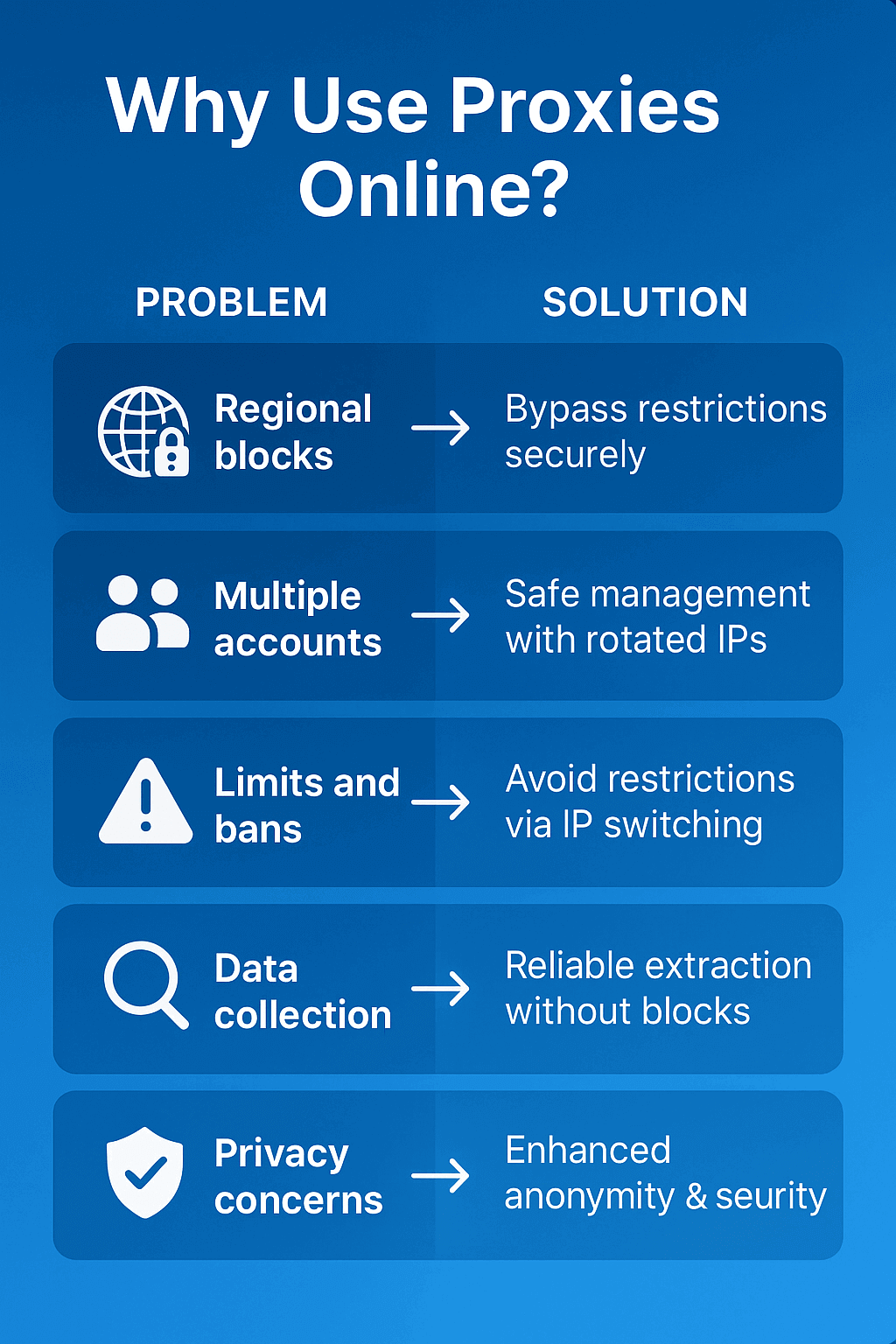
Bypassing Regional Blocks. Turkey has blocked Twitter 7 times in the last 10 years already. Last time was in February 2023 after the earthquake. In China, the platform's been unavailable since 2009, that's 1.4 billion people sitting without Twitter. Russia also periodically throttles traffic. What to do? Connect through proxies from Germany or USA — and Twitter works like clockwork.
Safe Multi-Account Management. Your average SMM manager has 30-40 working accounts. A big-time affiliate has 200-300. Twitter sees all logins, remembers every IP. Logged into 5 accounts from one address? All 5 will fly into a ban within a week. Twitter proxies separate profiles — each sits on its own IP, the system thinks these are different people from different cities.
Bypassing Limits and Shadow Bans. Twitter cuts activity: 2400 tweets per day, 400 follows, 1000 likes. Overdid it? Get a shadow ban — only you can see your posts. Stats drop to zero. Rotating proxies change IP every 100 actions, Twitter thinks these are different users.
Data Parsing for Analytics. Need to collect 50 thousand tweets with hashtag #marketing? From one IP you'll collect 500 max, then a block will hit. Proxies for Twitter give you 1000 different addresses, 500 tweets from each — there's your 500 thousand records without a single ban.

Contents
Datacenter
Cost pennies — $0.5-2 per piece monthly. Speed is cosmic — up to 10 Gbit/sec. Located in server racks at Amazon, Google Cloud, DigitalOcean. One problem: Twitter immediately sees it's not a human, but a server. Will do for parsing, for accounts — suicide. 8 out of 10 accounts will catch a ban in the first week.
Residential
These are regular people's IPs. Someone's sitting at home in Berlin, watching Netflix, and you can rent their IP for $3-8 per gigabyte. Twitter sees a regular German with home internet from Deutsche Telekom. Zero suspicions. When working with Twitter/X accounts, residential proxies work best. In services like GonzoProxy you can get an IP pool with the country you need to promote accounts locally and not get suspicious logins.
Mobile
Most expensive — $30-80 per month unlimited. Work through SIM cards from Vodafone, T-Mobile, Verizon. Twitter loves mobile traffic — 82% of users are on phones. If you need to register 50 accounts and pass verification — only mobile. Ban chance approaches zero.
With and without authorization
Without authorization — tied to your white IP. Fast, simple, but if your IP changes — proxy falls off. With login and password — universal. You can work from home, office, cafe, airplane. Security is way higher.
Proxy selection checklist:
✓ Geography = your audience. Selling courses to Americans? Get USA proxies. Working with CIS? You need Twitter Russia proxies from Moscow, St. Petersburg, Yekaterinburg.
✓ 1 account = 1 proxy. No exceptions. Two accounts on one IP = both banned in 3-7 days. Proven by thousands of burned accounts.
✓ Rotation for the task. Parsing data? Change IP every 30-50 requests. Running an account? Keep one IP minimum 12-24 hours, better several days.
✓ API is mandatory for automation. Without API you'll be changing proxies manually. With API your bot switches addresses on schedule.
✓ Only HTTPS and SOCKS5. Twitter won't digest HTTP proxies — all their traffic is encrypted. SOCKS5 always works.
✓ Check fraud score. Before buying, run IP through ip-score.com or scamalytics.com. Fraud score above 75? Don't take it, you'll catch a ban.
On PC (Windows / Mac)
Windows 10/11: Windows: Settings → Network & Internet → Proxy → Manual proxy setup → Enter IP and port → Save. Problem: all Windows traffic will go through proxy. Solution: use Proxifier or ProxyCap — set up proxy only for OBS.
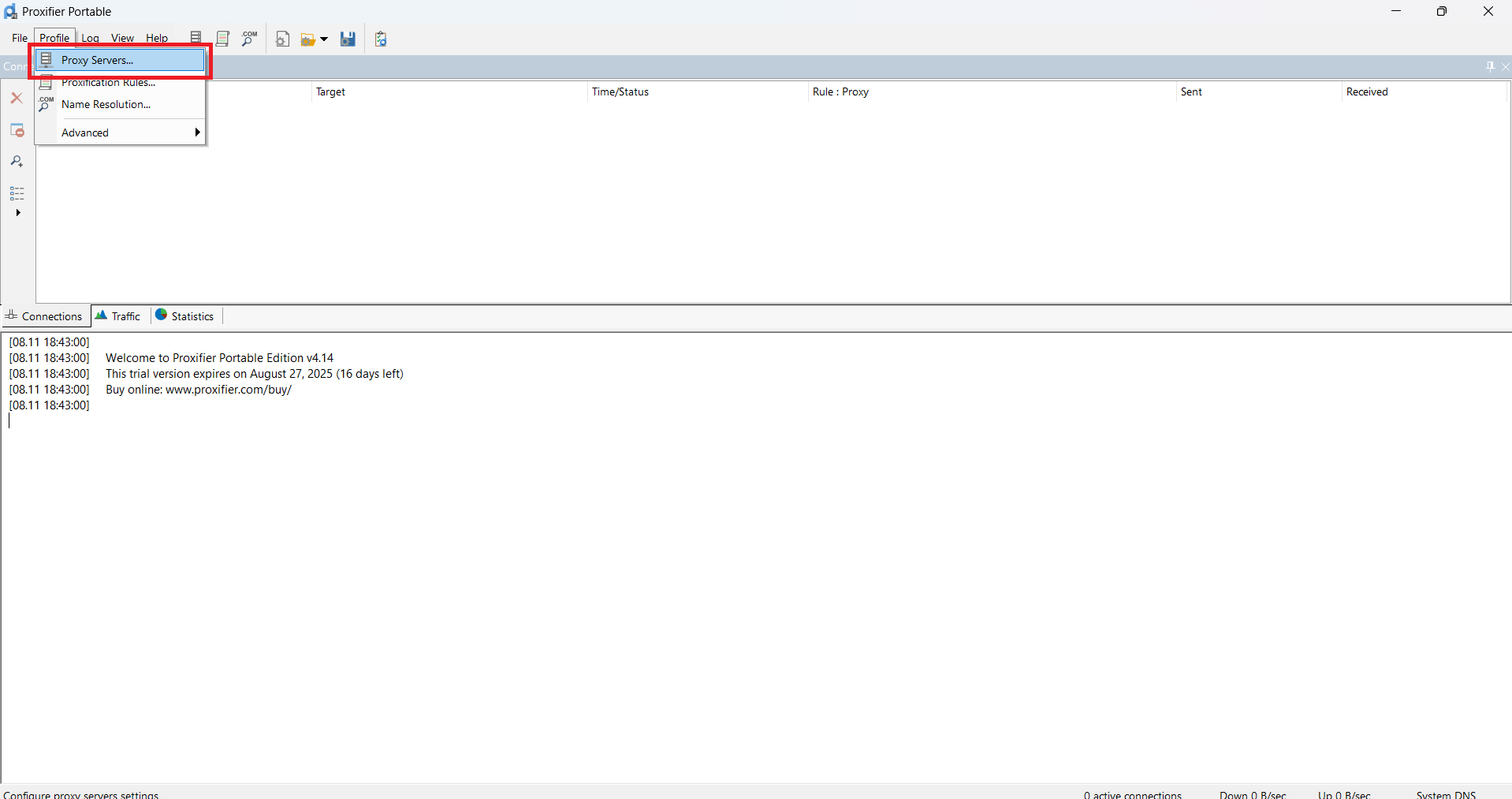
Let's look at how to set up Proxifier:
- In Proxifier click on Proxy Servers
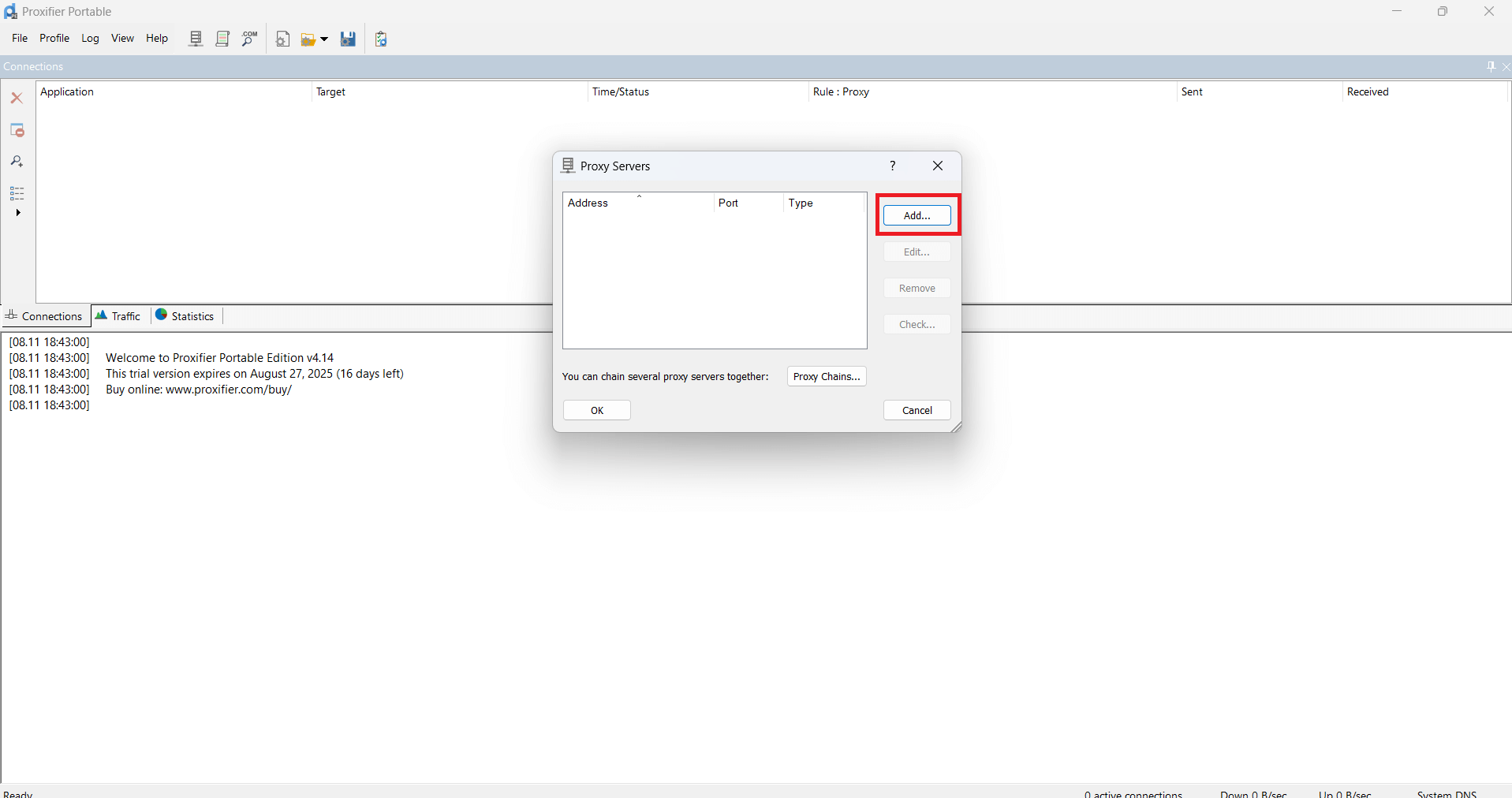
- Then click Add
- In the window that appears, insert proxy data
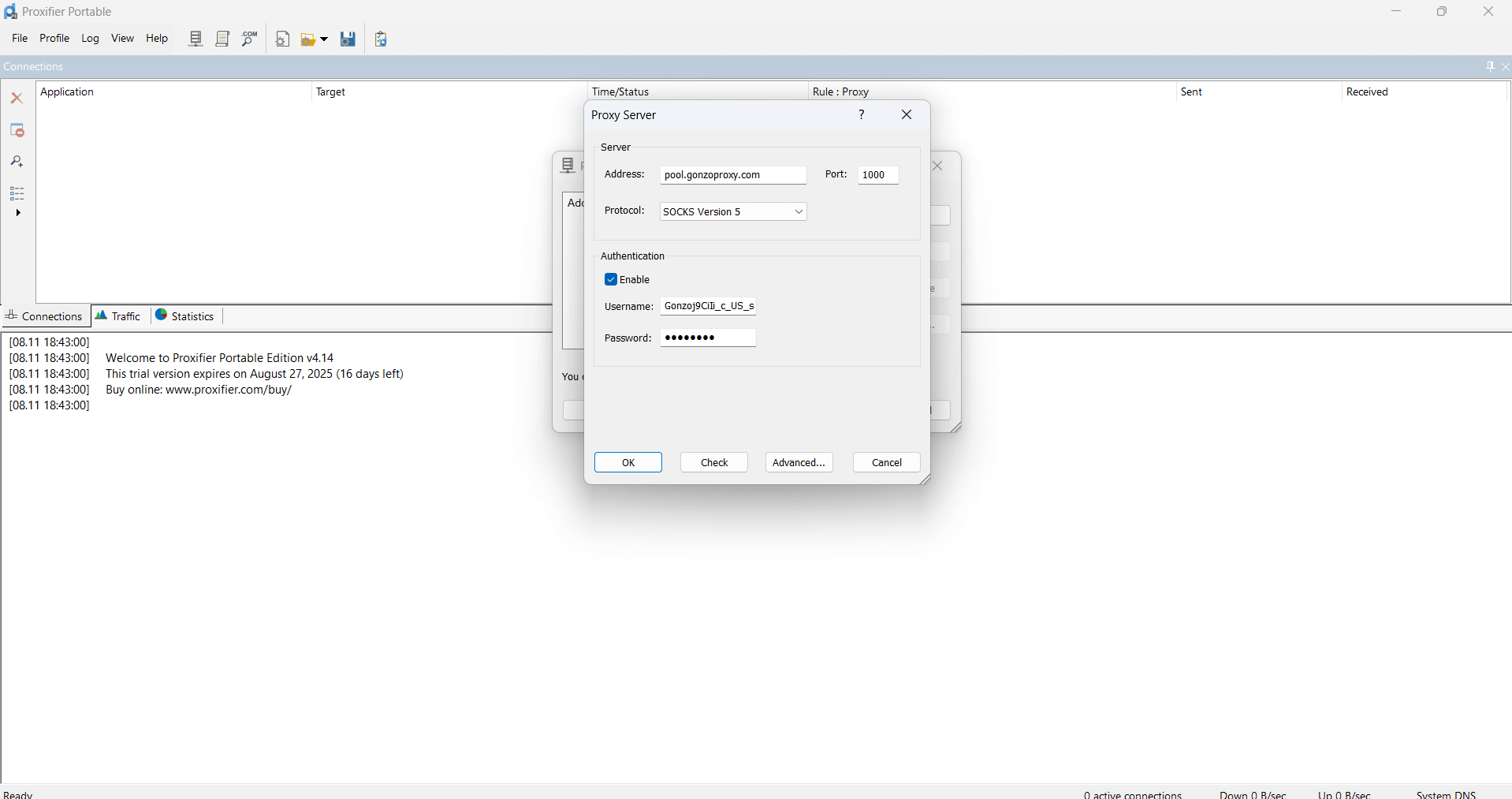
- Click OK - OK
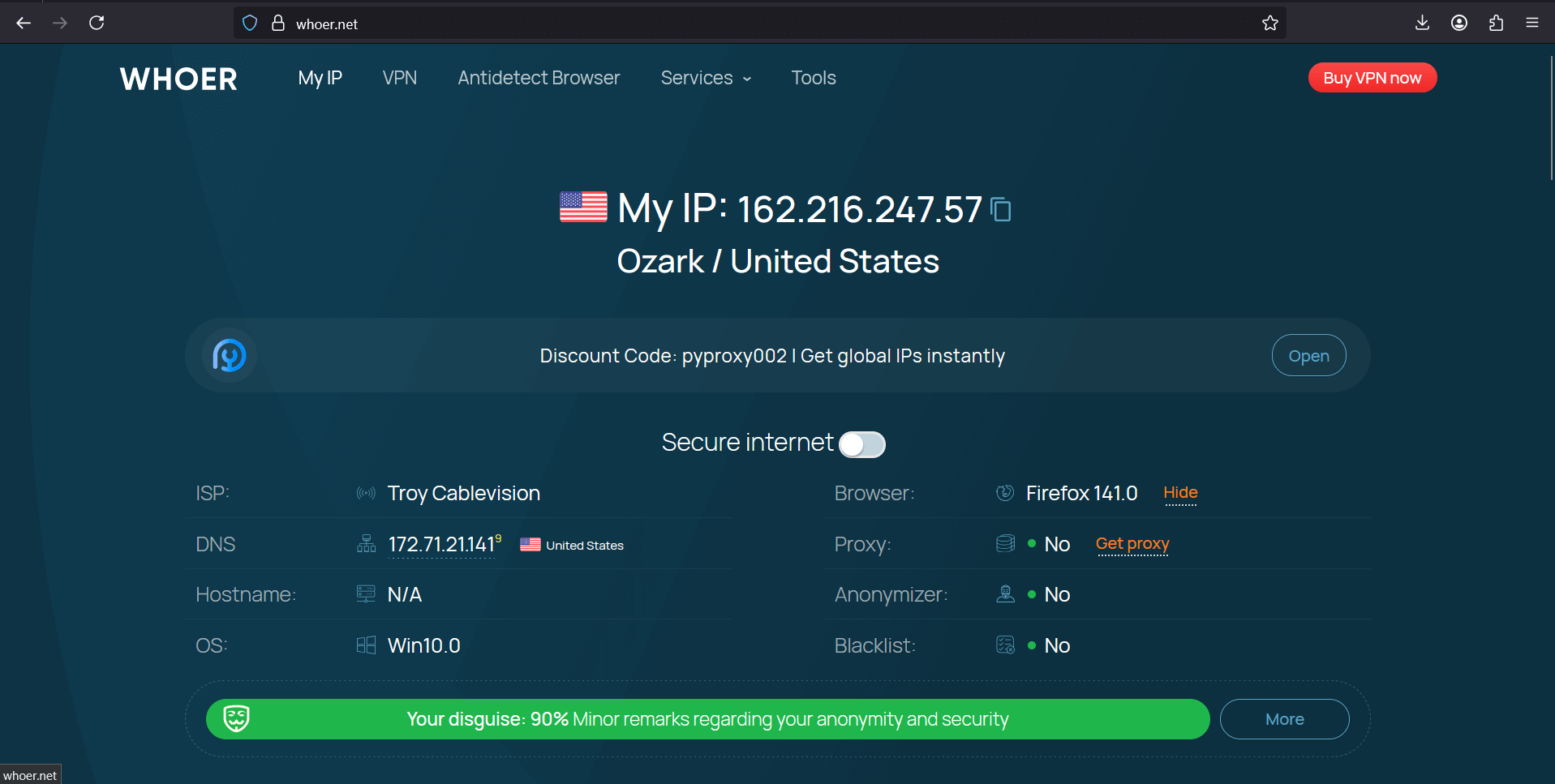
- Go to whoer.net. Everything works!
macOS setup through System Preferences:
- Apple in corner → System Preferences
- Click "Network" → choose Wi-Fi or Ethernet
- "Advanced" button → "Proxies" tab
- Check "Web Proxy (HTTP)" and "Secure Web Proxy (HTTPS)"
- Enter data, click OK → Apply
On Mobile Devices (iOS / Android)
iPhone/iPad in 30 seconds:
- Settings → Wi-Fi → circle (i) next to your network
- Scroll down, see "HTTP Proxy"
- Switch to "Manual"
- Server: IP address, Port: port number, Authentication: enable if there's login
Android even simpler:
- Settings → Wi-Fi → hold your network
- "Manage network settings" or "Modify"
- Advanced options → Proxy → Manual
- Host: IP address, Port: number, save
In SMM and Automation Services
ZennoPoster eats proxies in batches through ProxyChecker. Upload list in format ip:port:login:pass, it'll check live ones itself.
ProxyChecker — built-in utility for checking proxies. Upload list, choose site for testing (better the one you'll work with), start check. Get data: speed, country, loss percentage. Dead proxies filtered automatically.
- Launch ZennoPoster and click "ProxyChecker" button located on top panel.
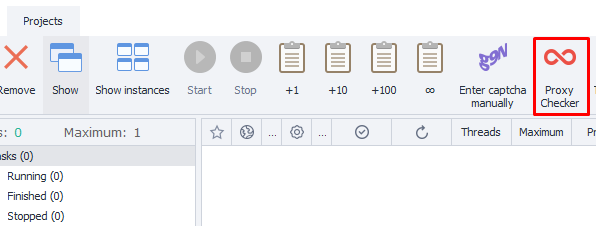
2. Go to "Sources" tab and click "Add proxy".
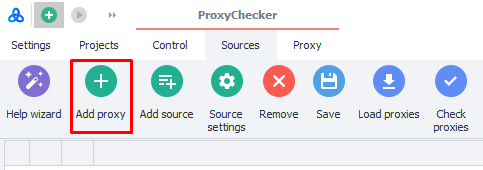
3. In popup window fill data with format "username:password@IP-address:port"
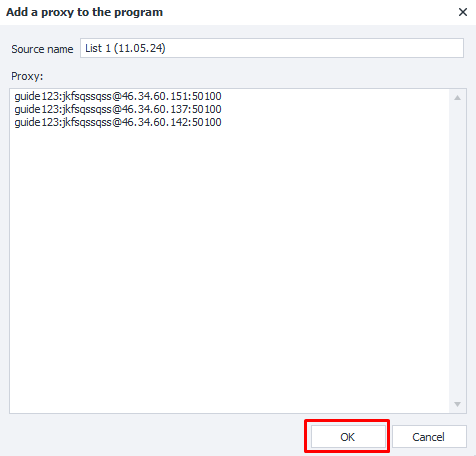
4. After adding proxies click "Start check" button.ProxyChecker will test all added proxies and provide detailed information about each: location country, connection speed, anonymity, type and other parameters.
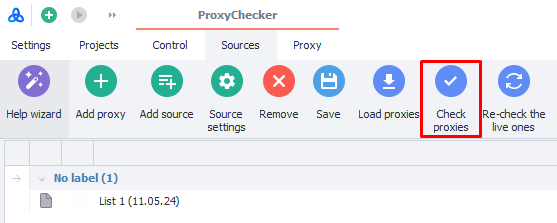
Use filters at top of window to sort proxies by needed parameters: for example, select only high-speed or only from specific country.
To not waste time on manual IP functionality checks, you can connect a service with ready residential proxies. For example, GonzoProxy provides only pre-checked IPs with high uptime.
Rotation is an art. Newbie changes IP every 5 minutes and wonders about the ban. Pro keeps one IP for days for an account, changes every 50 requests for parsing. Golden middle for accounts: change once per 24-48 hours.
Document all connections. Excel table will save your accounts. Columns: account, proxy, usage start date, action count. See two accounts accidentally sat on one IP? Fix in a second, not after ban.
Cheap proxies will kill your business. $0.5 per proxy? Most likely it's garbage used by 100 people before you. Normal residential cost $3-15 per gigabyte. Mobile — $30-80 per month. Expensive? New account after ban will cost more.
Twitter's no fool, it watches patterns. 50 tweets per minute? Ban. 300 follows per hour? Ban. Work like a human: 20-30 actions per hour for new account, 50-70 for warmed up. Random pauses 15-90 seconds between actions.
Encrypt data or lose everything. KeePass, Bitwarden, 1Password — anything but notepad. One hack — and all your 200 accounts go to hackers along with proxies. Make backups every 3 days, store in cloud with 2FA.
"Unusual activity, confirm it's you". Yesterday sat in New York, today logged in from Tokyo? Twitter's shocked. Solution is simple: use proxies from same city where you registered account. Maximum — neighboring city within 200 km radius.
Captcha on every sneeze. Your IP is on gray list. Where does Twitter get these lists? Buys from Cloudflare, MaxMind, IP2Proxy. Check IP on whatismyipaddress.com/blacklist-check. If even one service shows block — change proxy.
Shadow ban came from nowhere. Tweets don't show in search? Nobody sees replies? That's shadow ban. In 70% of cases dirty IP is to blame. Switch to mobile proxies, reduce activity to 10-15 tweets per day, post only text without links for a week.
"Too many attempts, try later". Rate limit — you exhausted request limit. From one IP you can make 300 requests per 15 minutes to API. Solution: pool of 20-30 proxies with automatic rotation every 10-15 requests.
FAQ


Twitter fights hard against bots and boosting, but right proxies bypass any protection. For accounts take residential with permanent geolocation — accounts will live for years. Do parsing through datacenter with rotation — cheap and fast. Critical operations only through mobile — expensive, but no bans.
Independent setup will eat tons of time. Easier to take ready solution like GonzoProxy — IPs already checked, rotation configured, tech support will help with setup. Time savings will pay back price difference in first month.
Main rule: Twitter watches every action. Work smoothly, document all connections, keep reserve proxies. Then your accounts will survive any algorithm updates and ban waves.