What are Facebook proxies and why do you need them
Running ads on Facebook, managing client pages, or juggling multiple accounts? Then sooner or later, you’ll hit account bans. Facebook hands them out left and right, especially if it notices anything suspicious. And it’s not always about breaking the rules — the platform’s algorithms are just paranoid about any unusual activity.

Contents
Why Facebook blocks accounts
Facebook’s security system is like a lie detector on steroids. It tracks literally everything: where you log in from, how often you click, how much time you spend on a page, even the way your mouse moves.
Here’s what makes Facebook suspicious:
Multiple logins from the same IP — logging into three accounts in a row? Get ready for an ID check or a selfie with a code
Jumping between countries — morning in Moscow, evening in New York? Facebook doesn’t like those tricks
Mechanical actions — 50 likes in a minute? Welcome to the ban list
Dirty IP history — if someone used your IP for spam or rule-breaking before, your new accounts are in trouble too
Facebook’s algorithms are so sensitive they can flag a regular manager just for working fast. And if you’re running an account farm or driving traffic in a gray niche — you definitely need protection.
How proxies help you avoid bans A Facebook proxy server works like a mask for your IP address. Instead of connecting directly, you go through a proxy server. Facebook sees the proxy’s IP, while your real one stays hidden.
What this means in practice:
- Each account gets its own IP — Facebook thinks they’re different people from different places
- Working with German clients? Grab a German IP and look like a local
- Your main IP stays clean — if one account gets banned, the others stay safe
- Easy scaling — you can run a hundred accounts, as long as each has its own IP
Proxies vs VPN: what’s the difference Lots of people think VPNs are the ultimate solution, but for Facebook, it’s like shooting sparrows with a cannon. Here’s why:
Residential proxies Residential proxies are IP addresses of real people. The ISP gave some guy in Berlin an IP, and you can use it through a special service.
What makes them special:
- Facebook sees a regular home user, no red flags
- You can pick a city or even a neighborhood
- Business Manager works smoothly, no checks
- With smart use, bans are rare
Where they shine:
- Long-term account management — months without issues
- Running ads in different GEOs — you look like a local advertiser
- Working with payments — Facebook is calmer with transactions
Where they can fail:
- More expensive than datacenter IPs — quality costs money
- Speed can fluctuate — depends on the real owner’s internet
- Can drop suddenly — the owner turned off their router
Mobile proxies Best choice for multi-accounting. Mobile proxies use IPs from mobile carriers. Facebook loves mobile traffic since most users are on phones.
Mobile carriers use NAT technology — meaning thousands of people share one IP. Facebook physically can’t ban such IPs without affecting regular users.
Why they’re great for multi-accounting:
- Almost zero ban risk — Facebook doesn’t touch mobile IPs
- Automatic IP rotation — just restart the modem
- Maximum trust from algorithms — looks like a normal person on a phone
- Safe for risky actions — password changes, adding admins, linking cards
Datacenter proxies Datacenter proxies are the cheapest, but also the most suspicious. Facebook instantly knows an IP belongs to a server, not a person.
Rotating proxies
These change IPs automatically — either by timer or per request. Perfect for specific tasks.
Where useful:
- Scraping Facebook pages — every request with a new IP
- Testing lots of creatives — run variations fast without risk
- Competitor stats scraping — collect data unnoticed
- A/B testing at scale — validate hypotheses quickly
For ad accounts, residential or mobile proxies are the best. With GonzoProxy, you can try both and pick the one that fits your needs — whether you’re targeting Europe or the US, even down to a specific ISP.
Selection criteria When picking a Facebook proxy, check:
- Response speed: Ping under 100 ms. If pages load in 10 seconds, Facebook notices. No normal user tolerates that speed, and algorithms know it.
- IP reputation: Always check with IPQualityScore or Scamalytics. If fraud score is above 75, skip it. Facebook checks IP reputation and may limit your account before you even break rules.
- Pool size: A good provider should have thousands of IPs. If it’s only a hundred, chances are you’ll get a used and burned one.
Why proxy GEO must match the account Here’s a real-world case: you manage a German company’s account. The profile is in German, has a Berlin address, and a Deutsche Bank card attached. Then you log in with a Moscow IP. What does Facebook think? That the account’s hacked.
How to do it right:
- German account = German proxy, no exceptions
- Stick to big cities — Berlin, Hamburg, Munich
- Use local ISPs — like Deutsche Telekom or Vodafone Germany
- Don’t jump between cities — if you started in Berlin, stay in Berlin
Checklist: how to test proxy quality
- Measure ping — run ping in command line with the proxy address
- Check for leaks — dnsleaktest.com should not reveal your real location
- Look at IP history — check AbuseIPDB for complaints
- Get trial access — reliable providers let you test before buying
- Confirm geo-location — whatismyipaddress.com should show the proxy’s country
- Test speed — run Speedtest with the proxy enabled, results should be stable
Adding a proxy in your browser For 1–2 accounts, you can set up proxies directly in your browser:
- Open network settings
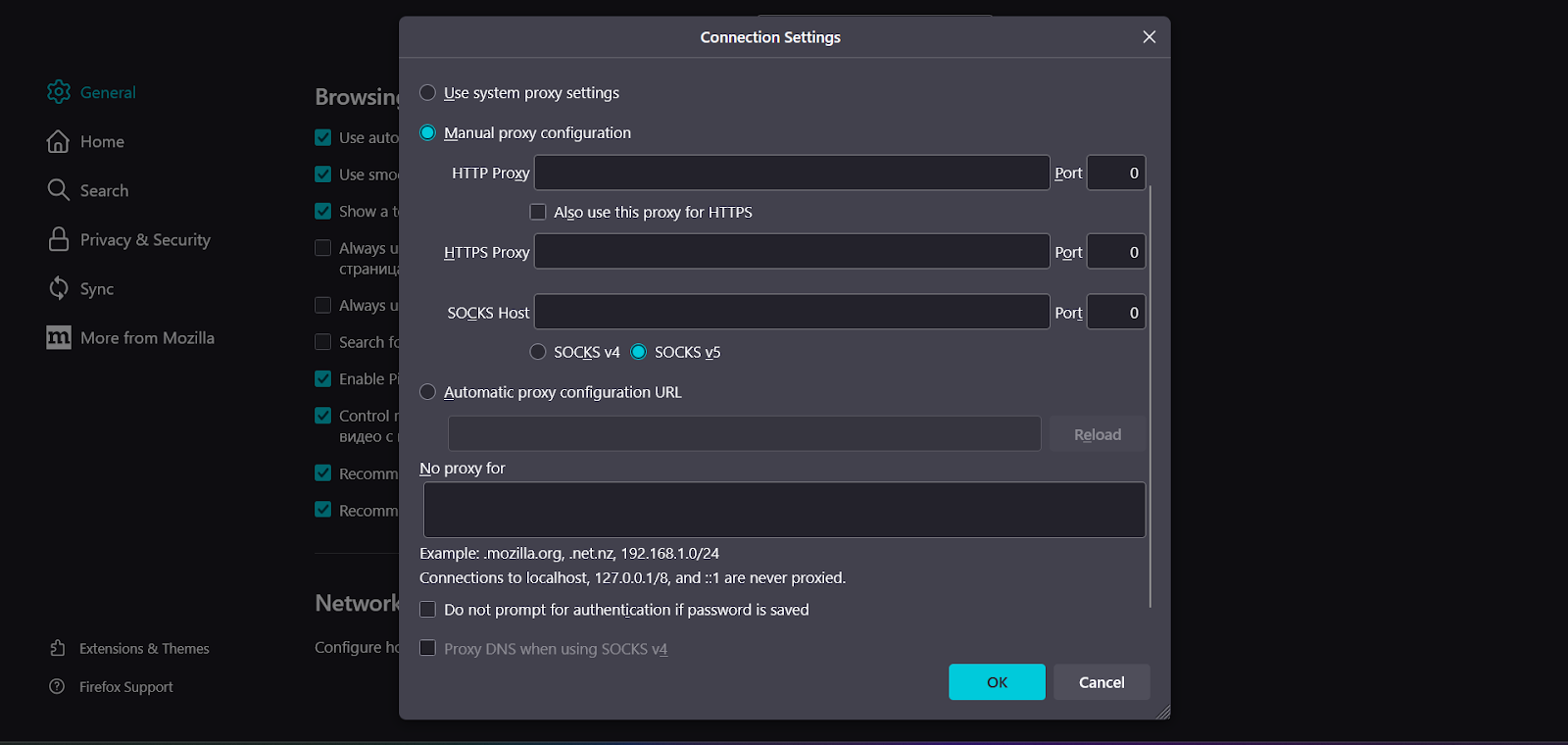
2. Enter your proxy details
Example: Gonzoj9CiIi_c_US_sd_79_city_Ozark_s_87231IXF_ttl_72h:RNW78Fm5@pool.gonzoproxy.com:1000
- IP: pool.gonzoproxy.com
- Port: 1000
- Login: Gonzoj9CiIi_c_US_sd_79_city_Ozark_s_87231IXF_ttl_72h
- Password: RNW78Fm5
- Save — now your browser works through the proxy
Setting up proxies in an antidetect browser For serious account work, you need an antidetect browser. Take Dolphin Anty as an example.
Setup:
1. Create or edit a profile
2. In “Proxy” choose “Custom” or “Manual”
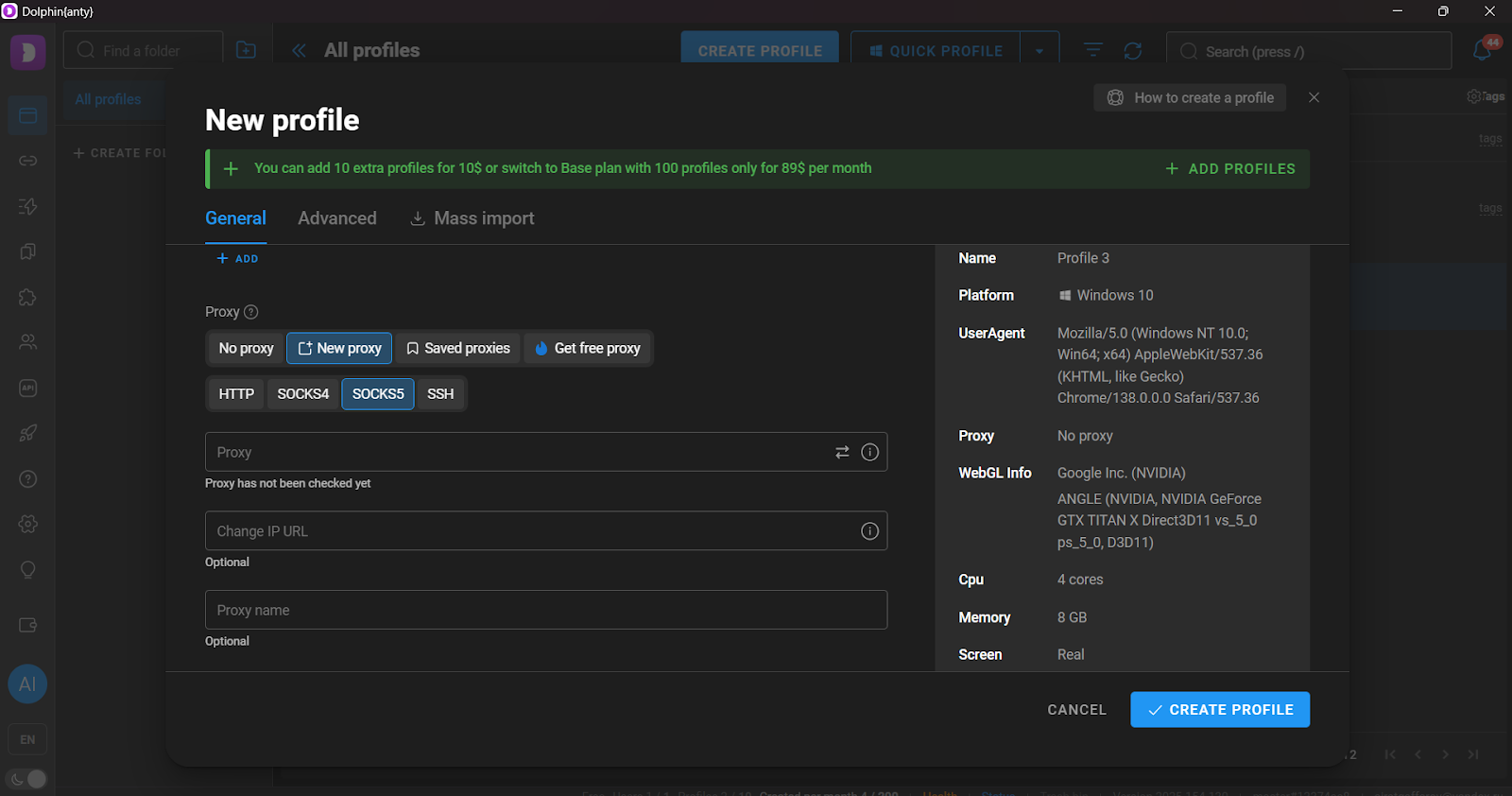
3. Enter type HTTP/SOCKS5 and your proxy credentials
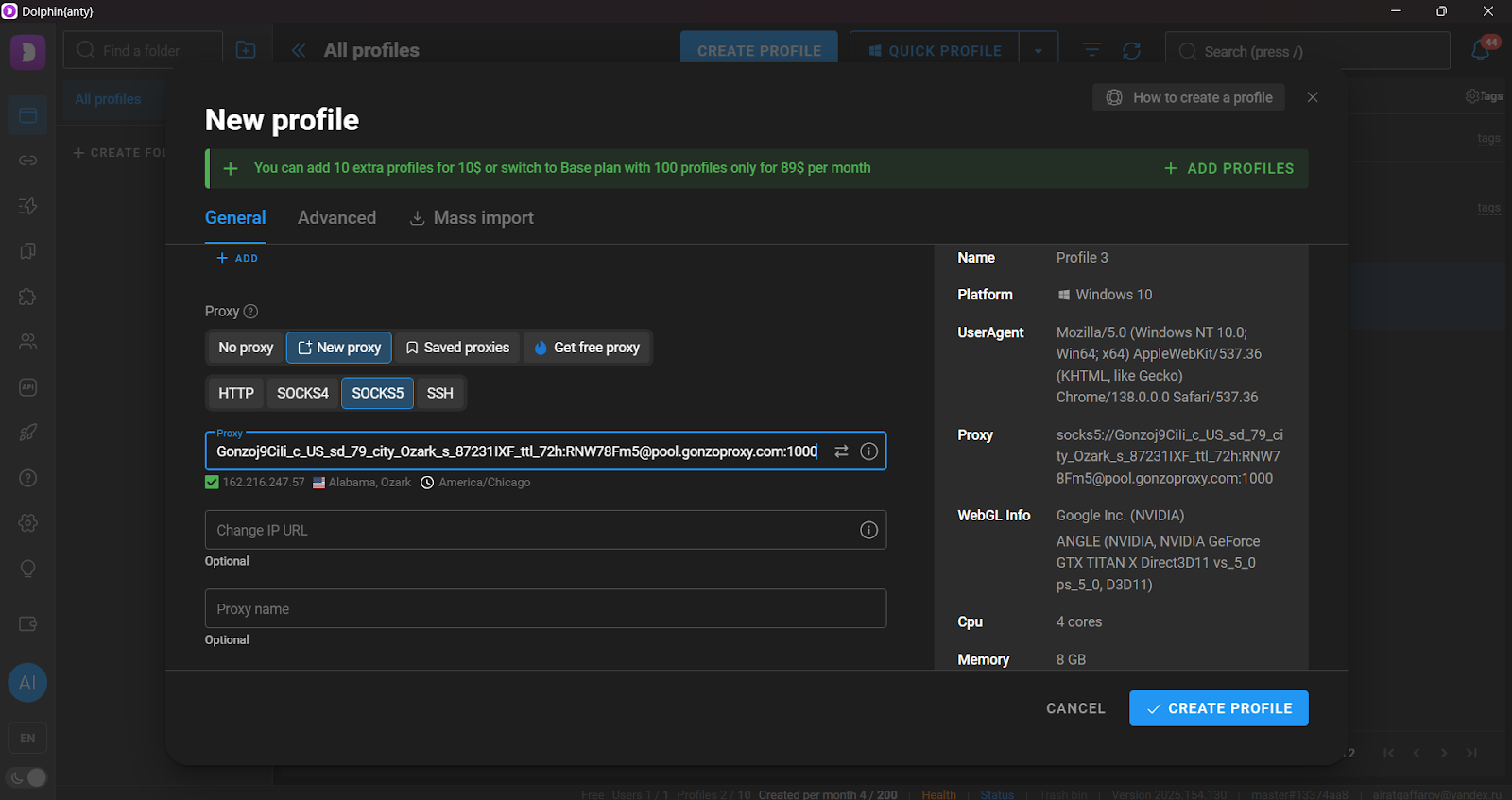
4. Test connection, save profile
Golden rule: one profile = one proxy = one Facebook account. Don’t cut costs here — you’ll lose way more later.
Setting up mobile proxies for multi-accounting Mobile proxies have their own nuances:
- Management access — providers give you a control panel
- Rotation — set IP change every 10–15 minutes between accounts
- Login schedule — don’t access all accounts at once, Facebook notices
- Authorization — IP-based login is safer than user/pass
- Monitoring — enable alerts for IP changes, so you don’t get logged out mid-session
Mass account management Take an SMM agency managing 50+ client accounts. Without proxies, Facebook blocks you after the third login from one IP.
Their setup:
- Each manager gets 10–15 residential proxies
- Rule: one client = one proxy = one antidetect profile
- IPs match client’s country (US business = US proxy)
- Cookies and browser data saved per session
- Managers rotate clients weekly for natural behavior
Cutting ad costs Facebook shows different ad rates for different regions. With country-specific proxies, you can:
- See real bids for locals, not inflated “foreigner” prices
- Test creatives as locals see them
- Avoid auto price hikes from “weird” locations
Working with Facebook Business Manager
Business Manager is the most sensitive tool. Any IP change triggers checks.
Best practices:
- Use sticky sessions — one IP for at least 24–72 hours
- Pick proxies with low fraud scores (under 25)
- Don’t switch city or ISP unless necessary
In ad account cases, IP reputation is critical. GonzoProxy lets you pick not just countries but specific ISPs — drastically reducing checks when adding payment methods or raising limits.
Main issues
Shared IPs with abusers: Cheap shared proxies = 50 random users. If one breaks rules, everyone gets banned.
Slow connections: Cheap proxies may have 500–1000 ms ping. Try browsing Facebook at that speed — impossible. Algorithms notice too.
Real IP leaks: WebRTC, DNS, Flash — misconfigured setups can expose you.
How to minimize risks
- Warm up new accounts for 2–3 weeks — don’t rush into ads
- Change proxies only if absolutely needed — Facebook remembers IPs
- Enable 2FA everywhere — extra security
- Save cookies and browser fingerprints — your digital identity
- Act like a human — take breaks, vary login times
- Respect Facebook limits — no adding 100 friends a day
- Keep spare proxies — main ones may drop at the worst time
FAQ


Running Facebook without proxies in 2025 is like driving without a license. You can do it, but not for long — and it’ll end badly. The right Facebook proxies turn a risky hustle into a stable business process.
Remember the essentials:
- Serious work = residential or mobile proxies
- Every account needs its own IP — no exceptions
- Proxy GEO must match account data — Facebook isn’t stupid
- Antidetect browser is a must for multi-accounts
- Test proxies before use — or regret it later
Don’t skimp on Facebook proxies. Quality IPs save your nerves, time, and most importantly — accounts with history and ad limits. Choose trusted providers, follow safety rules, and Facebook will go from headache to predictable sales channel.