What are Instagram proxies and why do you need them
Picture this: you’re managing a dozen Instagram accounts, you log in in the morning — and three of them are blocked. Panic? Don’t. You just forgot about Instagram proxies. These are basically intermediate servers between your device and Instagram. In simple terms, you’re sitting at home in Moscow, but Instagram thinks you’re logging in from anywhere — LA, Berlin, you name it.
The trick is, proxies hide your real IP address. Each account gets its own unique address. Boom — Instagram no longer sees one guy juggling a bunch of profiles. For Instagram, it looks like different people from different places.
Why Instagram blocks accounts
Instagram has a tough security system. Every second, its algorithms process billions of actions and look for suspicious activity. Logged into five accounts in a row from the same computer? Hello, verification. Dropped a hundred likes in ten minutes? Get ready for a selfie request. What definitely triggers a block:
- More than five logins from the same IP in a single day
- A hundred actions in an hour (likes, follows, comments)
- Automation tools without proxy protection
- Logging in from Russia to a US account (or the other way around)
- Mass follow/unfollow patterns like a bot
How proxies help bypass restrictions
An Instagram proxy server is your disguise online. Instagram sees not your home IP, but the proxy address from the right country. Running an account for a New York store? Grab a US proxy for Instagram. The algorithms won’t suspect a thing.
Real example: a Moscow-based SMM agency manages about 50 European accounts. Without proxies, it’s suicide — Instagram immediately spots the geographic mismatch. With the right proxies, each profile looks like a local from the target city. No questions asked.
Proxies vs VPN: what’s the difference when working with Instagram
A VPN changes the IP for the entire device and encrypts all traffic. Proxies work more precisely — only for a specific program or browser. If you’re working with Insta, proxies are way more convenient. You can assign each account its own IP and manage dozens of profiles at once. No endless switching between servers.
What the numbers say
Automated traffic is now the majority of the web: Imperva's 2026 Bad Bot Report puts bots at 53% of all web requests in 2025, against 47% from humans — the first year machines outnumbered people by this margin. Imperva Bad Bot Report 2026.

Contents
Residential proxies
These are IPs from regular people — their home computers and smartphones. Instagram sees you as just another user from that city. Basically, you’re “renting” someone else’s internet connection for a while. Maximum trust from Instagram.
What you get:
- Less than 10% block risk
- Huge choice of countries and cities
- Instagram thinks you’re a normal user
But there are catches:
- Speed depends on the person’s internet quality
- More expensive than datacenter proxies
Mobile proxies for Instagram
IP addresses from mobile carriers — this is Instagram’s sweet spot. The platform was designed for mobile from the start, so mobile traffic raises almost zero red flags. The cool part: hundreds of regular users share the same mobile IP. Instagram physically can’t ban that address, otherwise innocent people would get locked out too.
Best for:
- Mass registration of new accounts
- Bots and automation tools
- High-value profiles you can’t afford to lose
Datacenter proxies
Regular server IPs from data centers. Cheapest option, but Instagram spots them instantly. Only good for basic stuff: viewing private profiles, quick scraping. For serious account management? Straight path to a ban.
Rotating proxies
These change IPs automatically — every 5 minutes or on each request. Perfect for scraping and data collection. But for account management? Forget it — Instagram instantly notices the jumping IPs and bans the profile.
For stable Instagram work, people usually go with mobile or residential proxies. On GonzoProxy you can test both options and pick what fits your needs best — from promo campaigns to mass account management.
What to look for when buying
Speed is everything. Stories, IGTV, Reels — they eat bandwidth like crazy. You need at least 10 Mbps. Always check ping to Instagram (should be under 100 ms). If the connection keeps dropping — Instagram will notice. Unique IPs are absolutely critical. If 50 people are using the same address — expect a ban. Ask the provider how often the pool is updated and how many users share one IP.
Why matching proxy geo to your target audience matters Simple logic: Moscow restaurant = Russian IPs, Milan boutique = Italian proxies. Instagram cross-checks your posts’ language, content, and login location. If things don’t add up — it’s a red flag.
Quality proxy checklist
What to check before buying:
- Check IP reputation with special services
- See if there’s a trial period or money-back guarantee
- Test customer support speed (send them a message)
- Look up reviews specifically about Instagram use
- Can you pick city and ISP?
- Is it compatible with your tools and browsers?
How to connect a proxy in a browser Setup in Chrome takes just a couple minutes:
- Get proxies from GonzoProxy
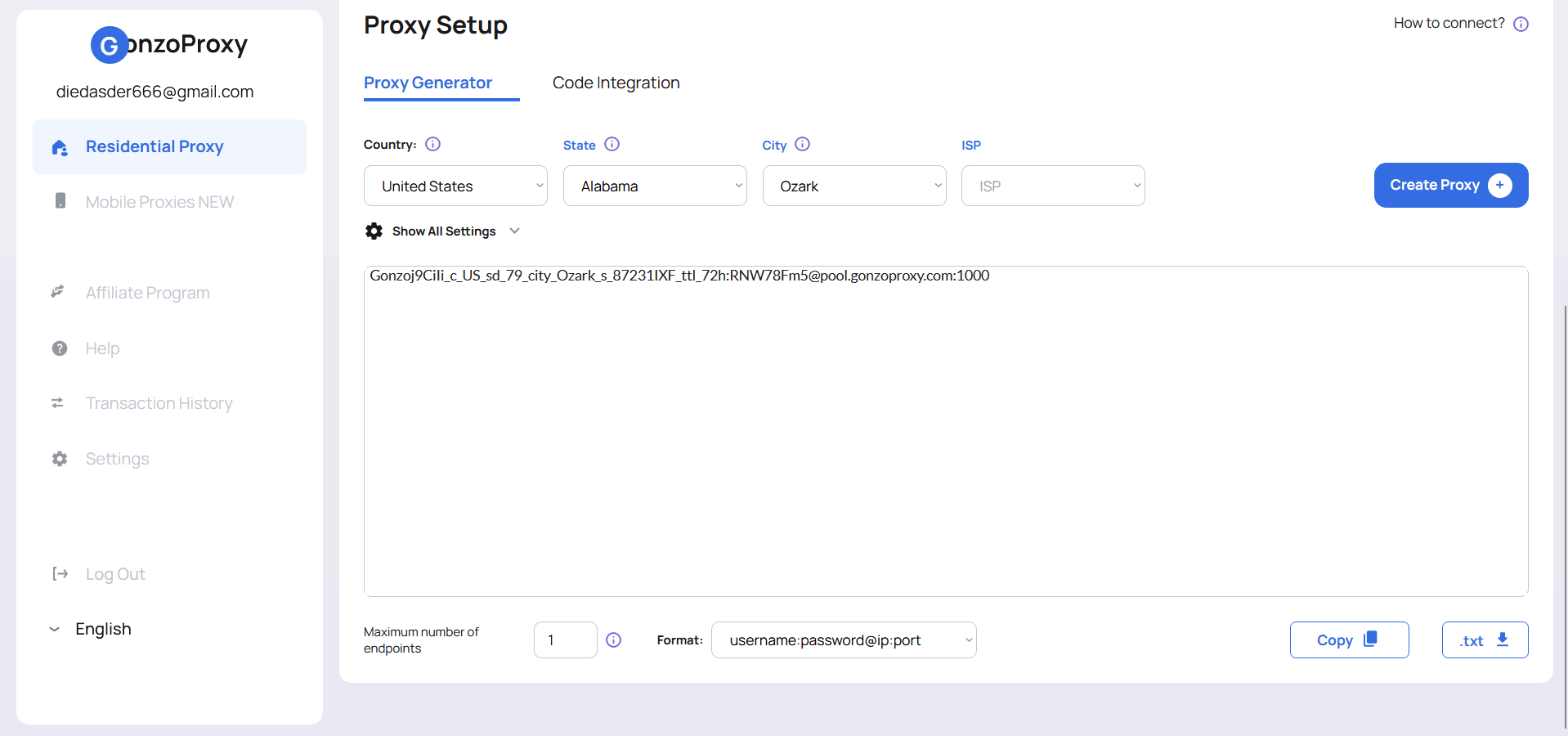
- Open browser network settings
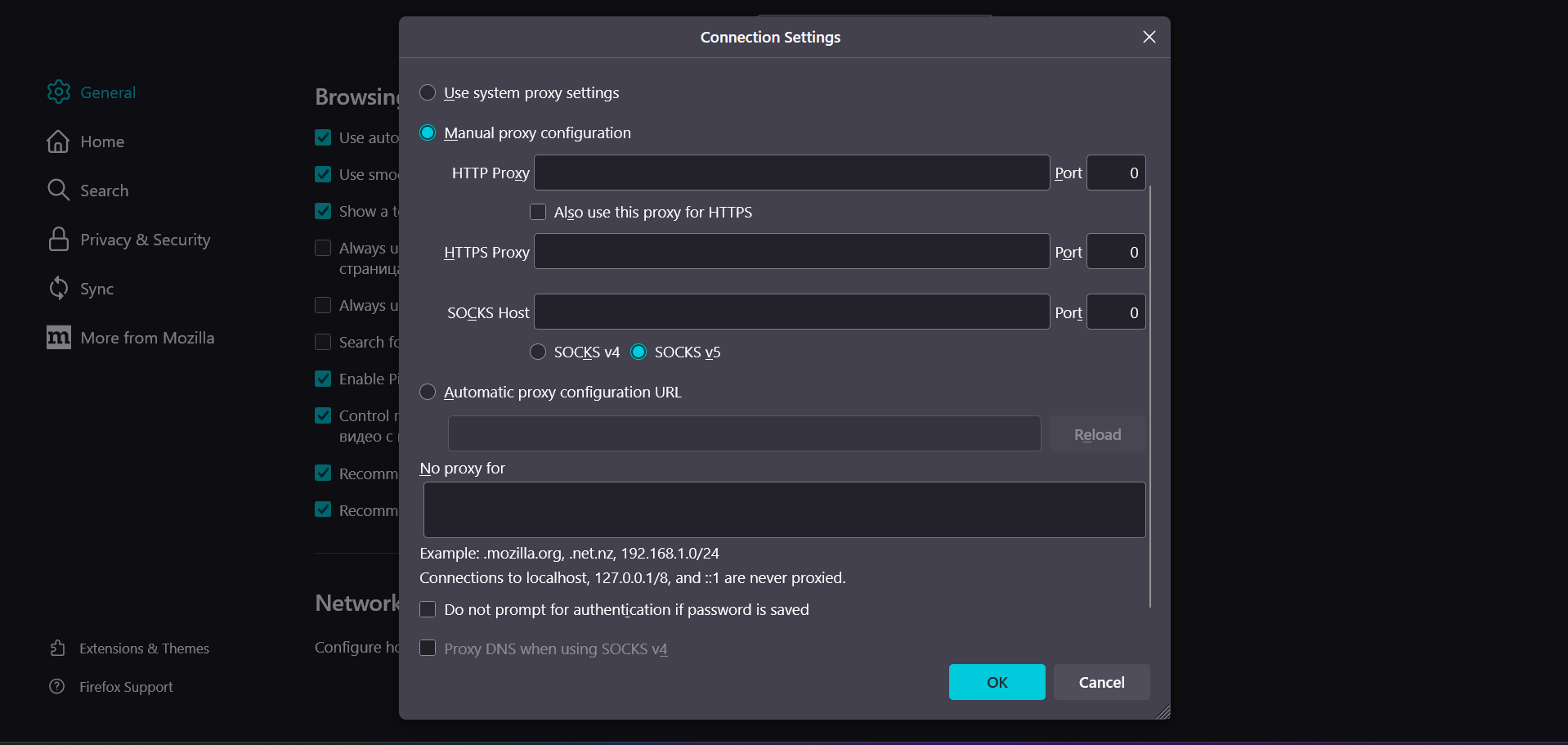
- Enter the proxy details you got: Gonzoj9CiIi_c_US_sd_79_city_Ozark_s_87231IXF_ttl_72h:RNW78Fm5@pool.gonzoproxy.com:1000 Where: IP - pool.gonzoproxy.com Port - 1000 Login - Gonzoj9CiIi_c_US_sd_79_city_Ozark_s_87231IXF_ttl_72h Password - RNW78Fm5
- Click OK, done. Your browser now runs through that IP.
Setting up proxies in anti-detect browsers
Anti-detects are a must-have for multi-accounting. They give each profile a unique browser fingerprint. Setup is similar everywhere:
1. Create a new profile or edit an existing one
2. In the “Proxy” section, select “Custom” or “Manual setup”
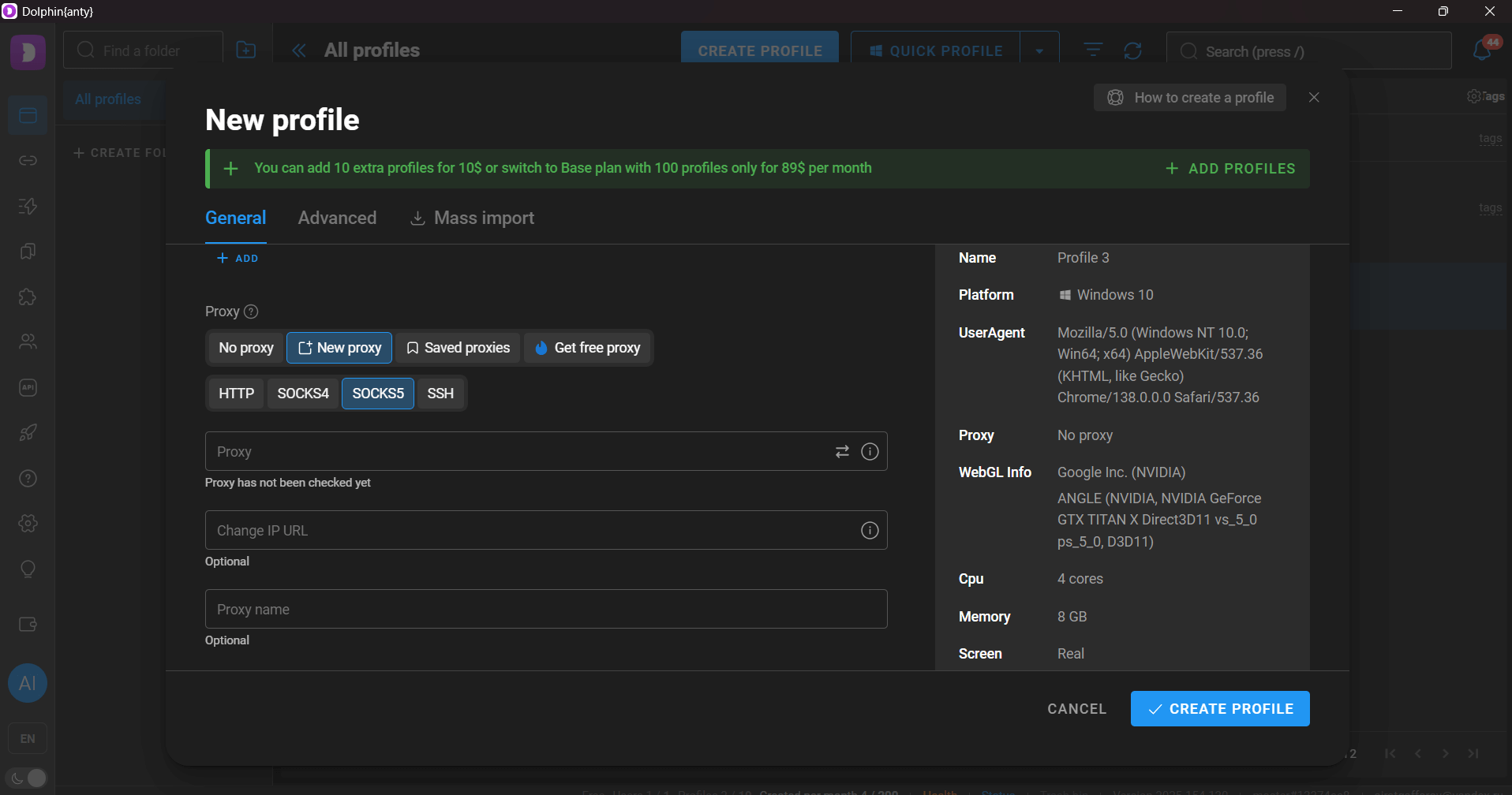
3. Choose HTTP/SOCKS5, enter your proxy details
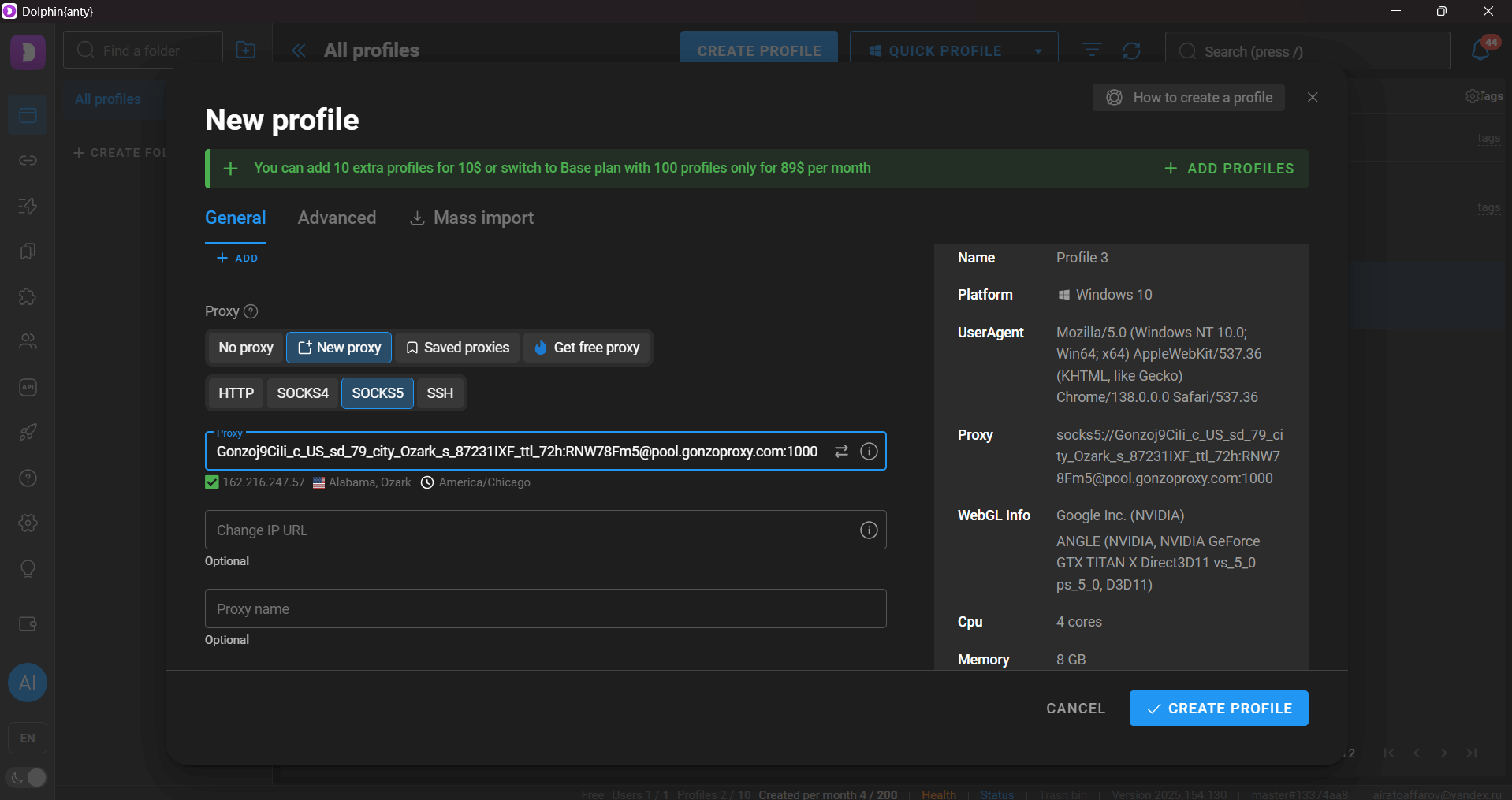
4. Test connection and save the profile
Using mobile proxies on a phone On iPhone: Settings → Wi-Fi → Your network → HTTP Proxy → Manual → Enter proxy details On Android: Settings → Wi-Fi → Long press network → Modify → Advanced → Manual proxy → Enter details After setup, check Instagram in your phone’s browser. If it works, you’re good to log in through the app.
Mass account management A St. Petersburg SMM agency runs 120 profiles. Without proxies, bans hit after the fifth account from one IP. Solution: each profile got its own residential IP from the target city. Result — zero bans in six months.
Advertising campaigns Affiliate marketers running e-commerce ads. Problem: Facebook/Instagram bans ad accounts for any reason. After adding high-quality proxies, ban rates dropped from 40% to 5%. The secret — proxy geo matched billing info.
Automation (bots, scraping, tools) A fashion brand tracks competitors: which posts blow up, best posting times, working hashtags. Without rotating proxies, Instagram blocks the scraper after a hundred requests. With proper setup, they can collect data 24/7. When managing dozens of accounts, it’s not just about unique IPs — you also need to spread out the workload. On GonzoProxy you can set up rotation by time or requests, which lowers ban risk and optimizes costs.
Main issues
“Dirty” IPs — the biggest headache. If spammers used that address before you, Instagram remembers. Shared pools with tons of people on the same IP = guaranteed ban. Unstable connections are also a red flag. Constant disconnects, country jumps, sudden speed spikes — Instagram notices it all.
How to minimize risks
Golden safety rules:
- One account = one unique IP (no exceptions)
- Scale activity gradually (max 20 actions/hour the first week)
- Activity time should match proxy’s time zone
- Regularly check IP reputation
- Stick to trusted providers only
FAQ


Proxies aren’t just a fancy add-on for Instagram — they’re the foundation for stable work. If you’re running serious projects, you can’t go without them: they prevent bans, let you scale up, and make automation possible.
Choose between mobile and residential depending on your tasks and budget. Cheap IPs will cost you accounts and nerves. Invest in quality services, follow safety rules — and Instagram will become a reliable tool for your goals.