Website blocks, geo-restrictions, and the need to hide your IP address come up all the time. Some people just want to access a blocked site, while others are running multiple accounts and don't want to catch a ban. That's exactly why anonymizers were invented - tools that hide your real location and user data online. Let's break down what this thing actually is, how it compares to proxies and VPNs, how to properly format proxy credentials, and what pitfalls you can run into with free options.

Contents
- What is an anonymizer in simple terms
- How anonymizers differ from proxies and VPNs
- How an anonymizer works
- Types of anonymizers and anonymity levels
- How to format proxies for working with anonymizers
- How to use an anonymizer to access blocked sites
- Advantages and risks of using anonymizers
- How to choose an anonymizer or proxy for your tasks
An anonymizer works as a middleman between you and the website. The site sees the intermediary server's address instead of your real IP. You basically get to hide behind this server.
The analogy is simple. You're sending a letter, but instead of writing your own address, you put down your friend's address. The recipient sees your friend's address, not yours. That's exactly how an anonymizer works online.
Anonymizer alternatives:
- Proxy servers redirect traffic through an intermediate server
- VPN encrypts the connection and changes your IP
- Tor browser routes traffic through a chain of nodes
- Smart DNS changes settings to bypass blocks
Why you need this:
- Bypass website blocks
- Protect data on public Wi-Fi
- Work with multiple accounts without getting banned
- Parse websites without ending up on blocklists
- Check how ads display in other countries
All three tools hide your IP, but they work differently.
Anonymizer is usually a website or browser extension. You go to the anonymizer site, type in the URL you need, and it opens through their server. Only protects the browser, not your entire device.
Proxy is a more advanced solution. You configure it in your system or app, and all traffic goes through the selected server. There are different types like HTTP, HTTPS, SOCKS5. Residential proxies use IPs from real home devices, so to websites they look like regular people, not bots.
VPN creates an encrypted tunnel for all your internet traffic. The most secure option because it encrypts data before it hits the network. Works at the system level.
Comparison table
GonzoProxy recommendation
For working with Facebook, Google, TikTok ad accounts or in arbitrage, consider residential proxies. Anonymizers and cheap datacenters get flagged instantly. Residential IPs look like home users, have low fraud scores, and provide strong ban protection. Learn more about residential proxies and how they work.
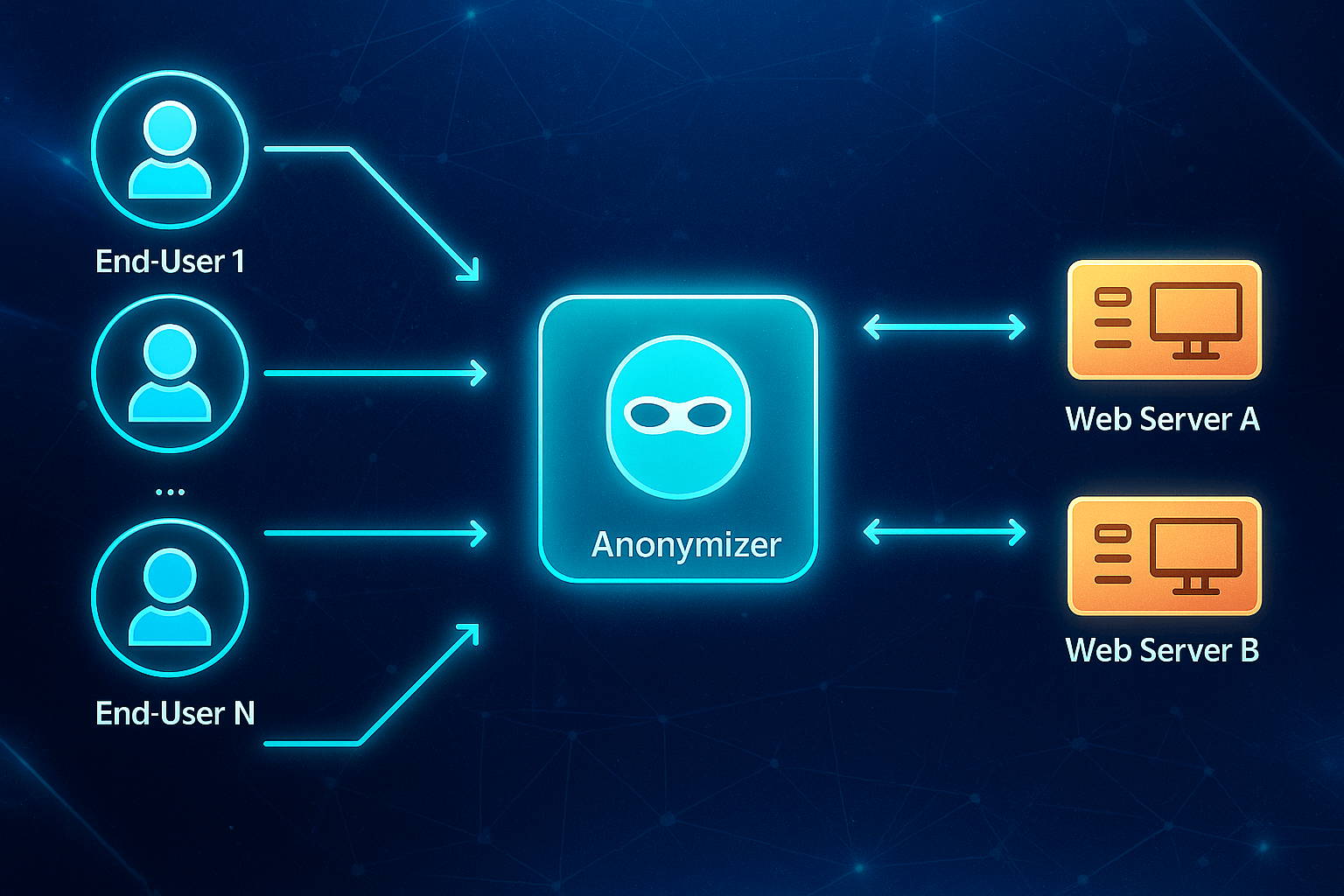
Five-step process:
- You enter the website address in the anonymizer
- The request goes to the anonymizer's server, not the site
- The server replaces your IP with its own
- The site delivers content to the server (only sees its IP)
- The server passes that page to you
What happens technically
An anonymizer works like a proxy with a web interface. It accepts HTTP requests, changes headers like User-Agent, Referer, X-Forwarded-For, makes the request to the site on your behalf, and returns the result. Advanced anonymizers also filter JavaScript, block trackers, and close WebRTC leaks.
The catch is that most free anonymizers DON'T encrypt traffic. Your ISP or Wi-Fi admin can see what you're doing. If you're transmitting passwords or card data, that's dangerous.
Web anonymizers
You go to the site, type in a URL, and it works. No installation needed.
Pros: no installation required, free, work everywhere Cons: slow, break website layouts, inject ads, low security, IPs often banned Good for: one-time access to a blocked site
Browser extensions
Install in Chrome, Firefox, Yandex and they work right in the browser.
Pros: flip a switch and it works, doesn't affect other apps Cons: only protect the browser, many collect data, free ones are slow Good for: daily access to blocked social media
PC and Android apps
Full-fledged applications for computer or phone. Protect the entire device.
Pros: protect all apps, stability, more settings Cons: need installation, paid, can slow down internet Good for: constant work, protecting all applications
Proxy anonymizers
You get proxy credentials in the format IP, port, login and password, enter them in settings.
Pros: high speed, choice of country and city, suitable for business, residential ones look like real people Cons: manual setup required, paid from $2 per gigabyte Good for: arbitrage, multi-accounting, parsing, ad accounts
Comparison table
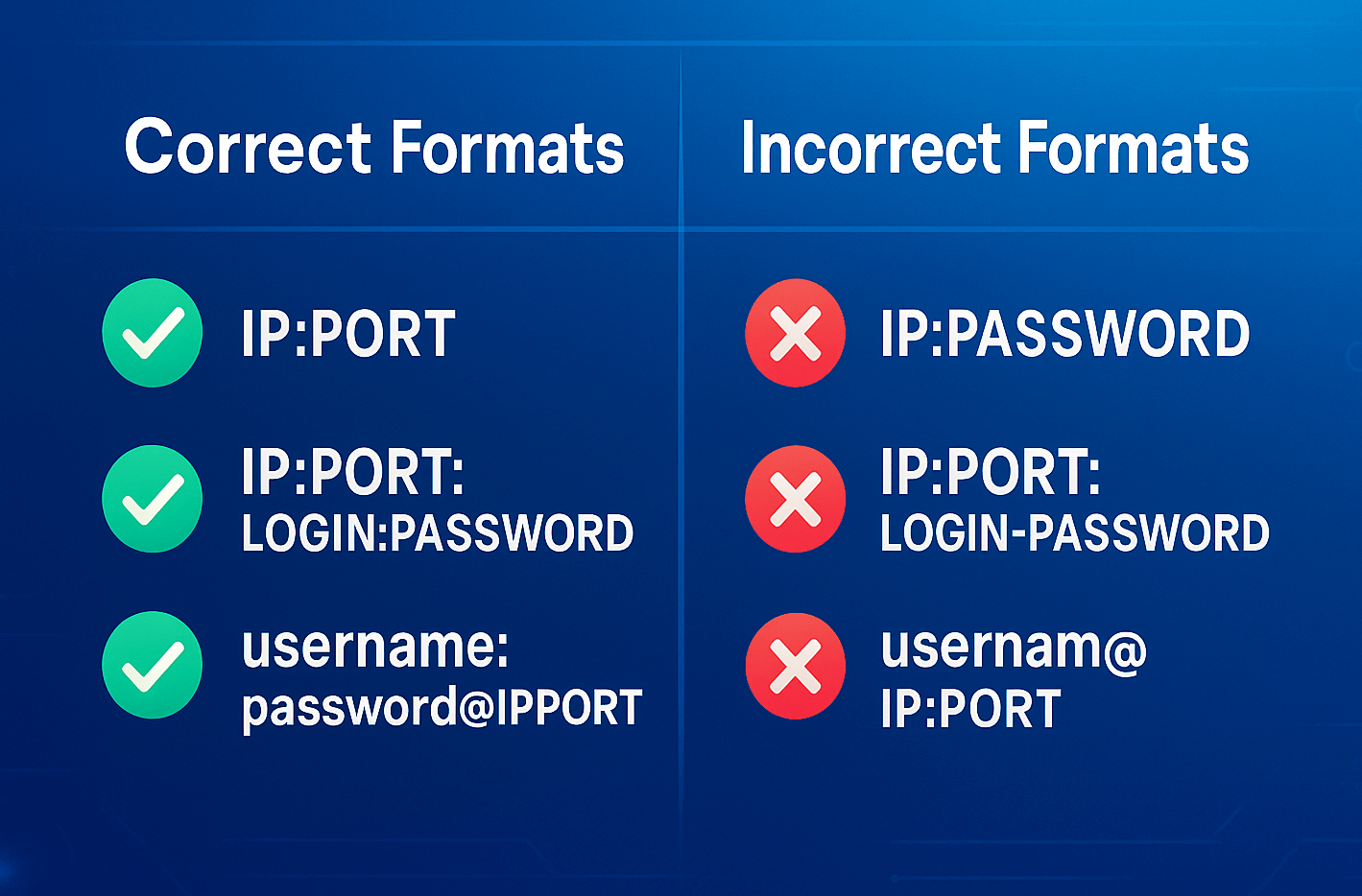
If you've decided to use proxies, the first hurdle is getting the format right. Mess it up and the connection won't establish - you'll get a "Proxy Connection Failed" error.
Three main formats
First format - basic The simplest, for proxies without authentication.
192.168.1.100:8080
Where 192.168.1.100 is the proxy server's IP address, and 8080 is the connection port.
Second format - with authentication For proxies with login and password.
192.168.1.100:8080:username:mypass123
Used in parsers, bots, antidetect browsers.
Third format - for browsers Format for Chrome, Firefox, curl, Python.
username:mypass123@192.168.1.100:8080
Or full URL format:
http://username:mypass123@192.168.1.100:8080
Usage examples
In Chrome browser
Go to settings, then system, open proxy settings, go to connections, then network setup and enter IP with port.
In terminal via curl
curl -x http://username:mypass123@192.168.1.100:8080 https://example.comIn Python via requests library
import requests

proxies = {
  'http': 'http://username:mypass123@192.168.1.100:8080',
  'https': 'http://username:mypass123@192.168.1.100:8080'
}

response = requests.get('https://example.com', proxies=proxies)
GonzoProxy delivers proxies in the right format immediately, suitable for APIs, browsers, apps and scripts. Just copy the ready string and paste it into settings with no risk of formatting errors.
Three ways to bypass blocks
First way - through a web anonymizer. Google "web anonymizer online," pick any service, paste the blocked site's URL, hit the go button. If it doesn't work, try another one.
Second way - through a browser extension. Open the extension store like Chrome Web Store, search for VPN or proxy extension, install and turn it on with a button, select a country, refresh the page.
Third way - through manual proxy. Get proxy credentials like IP, port, login and password, open network settings, enter the data, try accessing the site.
Why the site still blocks you
Many popular sites keep blacklists of known proxies and anonymizers. If the IP is on the list, you'll get an "Access Denied" message. Free anonymizers especially suffer because thousands of people use their IPs.
Sites also analyze browser headers, device fingerprints, WebRTC leaks. If something doesn't match up, you get banned.
Alternative - residential proxies with IP rotation: Residential proxies use addresses from real home connections. To sites, this looks like a regular user - they rarely block these. With automatic rotation, the system changes IPs itself. If one gets banned, it picks another from the same region. Learn more about IP rotation and how it works
The good stuff
Bypassing blocks and censorship gives you content access. Basic privacy protection hides your IP from sites. Geolocation testing helps with marketing. Availability is nice - many are free. Quick start without setup saves time.
The dangers
Low security because they don't encrypt traffic. Owners can log everything - sites, passwords, data. They inject ads and malicious code. Unstable operation with constant dropouts. Anonymizer IPs are often on blacklists.
For serious tasks, free anonymizers won't cut it. If you're working with ads, parsing data, or managing accounts, you need residential proxies. They don't log data, provide stable connections and clean IPs. Some services even offer a model where traffic doesn't expire - you buy gigabytes and use them whenever you want, no deadline pressure.
Different tools for different goals
- One-time site access: web anonymizers like Hide.me or ProxySite work fine
- Daily block bypassing: browser extensions like friGate or ZenMate are better
- Public Wi-Fi protection: requires VPN with encryption like NordVPN or ExpressVPN
- FB, Google, TikTok ad accounts: only work with residential proxies
- Dozens of social media accounts: need residential proxies, one proxy per account rule
- Data parsing: requires proxies with automatic IP rotation
- Buying limited-edition items: needs fast residential proxies from the right country
- Crypto and airdrop farming: works with residential proxies without KYC
What to look for when choosing
- IP type: should be datacenter or residential, for business only residential
- Connection speed: affects work comfort
- Number of countries and cities: determines flexibility
- Payment method: subscription or pay-per-traffic
- API availability: needed for automation
- Support: should work 24/7
- Reputation: check reviews and years in business
What pros choose
Surveys among arbitrageurs and marketers show an interesting picture. Over 70% of specialists rely on residential proxies when it comes to serious projects. They only use free anonymizers for quick checks and experiments.
What matters to professionals when choosing a tool?
First, purchased traffic should be stored indefinitely - pay for gigabytes and spend them as needed, no deadline pressure.
Second, need the ability to instantly generate new connections for each task, without limits or queues.
Third, tech support should respond via messengers in a couple minutes, not shuffle questions through a ticket system for days.
And finally, the company behind the service should be actually registered and operate transparently, so they don't disappear one day with your money.
Checklist before choosing
✅ Define the task - one-time or ongoing
✅ Assess required security level
✅ Understand what IP type is needed
✅ Check availability of needed countries
✅ Compare prices and pricing models
✅ Read real reviews
✅ Find out about API availability
✅ Make sure support exists
✅ Clarify traffic expiration terms
✅ Test with small volume
FAQ


Anonymizers are needed for quick block bypassing and basic privacy protection. They're suitable for those who need one-time access to blocked sites, to hide their IP during regular browsing, or bypass regional restrictions without installing programs.
Who anonymizers are good for:
- Regular users for one-time access to blocked resources
- Those who want basic anonymity while surfing
- People without technical skills who need a quick solution
Why proxies are better:
For professional work with ad accounts, multi-accounting, data parsing or arbitrage, residential proxies are far more effective. IP addresses from real home devices look like regular users, have low fraud scores, and provide 90% protection from bans on Facebook, Google, TikTok.
If you need quality residential proxies for work, try GonzoProxy with promo code WELCOME15 for 15% off your first purchase.