Site blockages, constant surveillance of every click, sudden advertising account bans, sound familiar? Half of internet users regularly face this. Some just want to finish watching a series that's blocked in their region. Others protect their data from intrusive advertising. And still others build entire businesses managing hundreds of accounts simultaneously.
Proxy servers solve all these tasks. The problem is that most people don't understand how proxies really work and why they're even needed. We'll explain everything from scratch now, without fancy terms and unnecessary fluff, straight to the point.

Contents
A proxy acts as an intermediary in the connection between your computer and the target site. The work scheme is simple. The request doesn't go directly to the site, but makes a detour through the proxy server. It forwards this request on its own behalf. The site only sees the proxy and has no idea who the real sender is.
Imagine a courier. You want to send a package but don't want to expose your address. You give the box to a courier service, they deliver on their behalf. The recipient sees the company stamp, not your data. With proxies it's the same story, just in the digital world.
Technically it looks like this. Your device sends a request to an intermediate server. It processes the request, replaces your IP with its own and contacts the necessary site. The response goes back through the proxy to you. The whole thing takes less than a second.
A proxy server doesn't just drive data back and forth. It can dig into your request and tweak something. Say, remove certain headers, cache a page on its side to give it back faster next time, or block a site altogether. Everything depends on the settings and proxy type.
In recent years, the proxy market has changed dramatically. It used to be a niche for geeks and those hiding from authorities. Now proxies are used by large agencies, marketers, analysts. Companies buy hundreds of gigabytes of traffic every month and manage thousands of accounts through proxies. The industry has grown many times over.
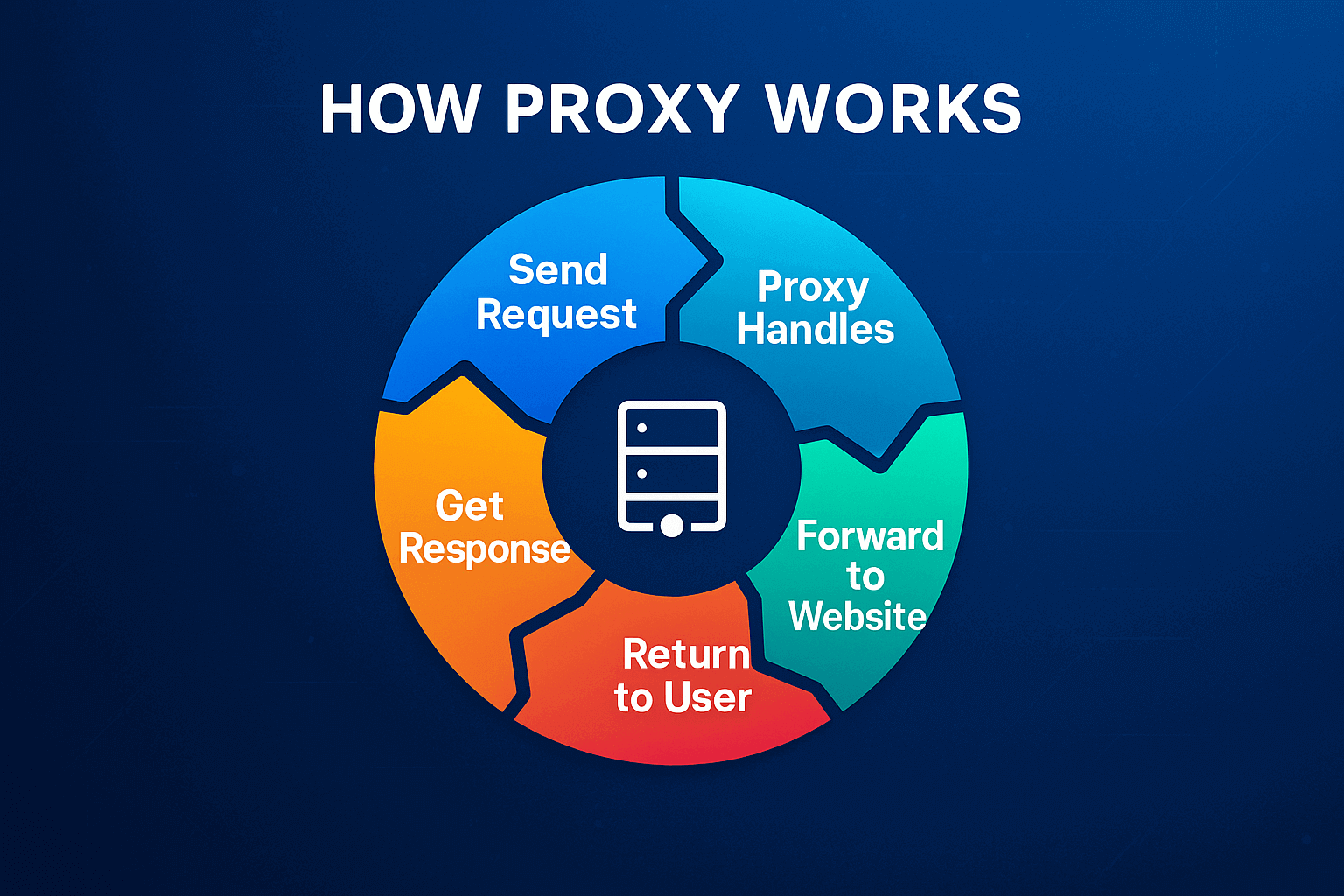
Let's break down the entire path of a request through a proxy step by step. Suppose you need to visit an online store website. Without a proxy, the browser directly connects to the store server, sends your real IP, data about the system, time zone. The store records all this. With a proxy everything is different.
Step one. You enter the site address in the browser. The request doesn't fly to the site itself, but goes to the proxy server. The thing is that in the system or browser parameters there's a rule written, all traffic goes only through a specific address.
Step two. The proxy receives your request and starts processing it. Looks at what you want to get, analyzes the headers. The main action, data substitution. The proxy removes information about your real IP and substitutes its own.
Step three. Now the proxy contacts the store on its own behalf. The site sees the IP address of the proxy server, its geolocation, its provider. The site knows nothing about your existence.
Step four. The store processes the request as usual and sends the response back. HTML page code, pictures, scripts, everything flies to the proxy address.
Step five. The proxy receives data from the site and forwards it to you. The page opens in the browser. When working through a quality proxy, the delay is almost imperceptible.
An important point about security. The proxy itself doesn't encrypt your traffic. If the connection goes over HTTP (without S), data is transmitted in open text. The proxy owner can theoretically see everything. Therefore, for confidential information, always use HTTPS, then the data is encrypted between you and the final site.
There are more complex schemes with proxy chains. The request passes through two or three servers sequentially, each adding a layer of anonymity. Maximum protection, but speed drops noticeably.
Proxies solve dozens of different tasks. From the simple desire to hide an IP to building complex automated systems for business.
- Hide your location. Every time you visit a site you leave a digital trace. The IP address shows the country, city, provider. Marketing companies collect this data for years and build user profiles. Advertising networks show ads based on browsing history. Proxies break this connection, sites only see the proxy server's IP.
- Bypass geographic blockages. Netflix shows one catalog to Americans, another to Europeans. Stores set prices differently depending on where you're coming from. Some news sites completely cut off entire countries. A proxy from the needed country solves the problem, for the site you become a local user.
- Protect advertising accounts from bans. Here serious commercial interest begins. Arbitrage specialists manage dozens and hundreds of advertising accounts. Facebook and Google strictly track suspicious activity. If the system sees authorization in 50 accounts from one IP, it blocks everything without questions. Quality residential proxies give each account a unique IP from a real home user.
The numbers speak for themselves. Agencies on regular VPNs or cheap server proxies lose 60-70% of accounts in the first two months. Those who work through professional residential proxies keep 85-90% of accounts for six months and more. The difference in money is huge.
- Collect data from sites en masse. Parsing, automatic collection of information from web pages. Monitoring competitor prices, analyzing vacancies, collecting contacts, aggregating reviews. When a bot makes thousands of requests per hour, the site quickly detects automation and blocks the IP. Proxies distribute the load, each request from a new address, imitating visits from different people.
- Manage groups of accounts. SMM agencies run profiles for many clients. One specialist manages 20-30 accounts every day. Instagram, TikTok, Twitter fight account farms and at the slightest suspicion of connection block in groups. The solution is simple, a dedicated proxy for each account. Each profile logs in from its own IP from its own city.
- Check advertising in different regions. For a marketer it's critically important to see advertising through the eyes of the target audience. How does the banner display in London? Is the ad showing in Texas? Without a proxy it's impossible to check, you're physically in a different place. With a proxy from the needed region you open the site and see the same thing the audience sees.
- Analyze competitor pricing strategies. Many stores apply dynamic pricing. They show different prices to users from different countries or cities. Track the behavior of a specific visitor and raise the price on repeat visits. Proxies allow you to enter as a "clean" buyer and see the real price.
Control access in a company. Corporate application. In many companies there's a common proxy server through which all employee internet traffic passes. What's the benefit from this? First, you can see who goes where during working hours. Second, it's easy to cut off access to YouTube and social networks. Third, catch viruses at the entrance. And fourth, save the internet channel, if someone already downloaded this file, the proxy will give a copy from its storage instead of re-downloading.
There are a huge number of proxy types. They differ in a mass of parameters. Some are built on one principle, others work completely differently. Somewhere they'll hide you so that no traces can be found, and somewhere they'll only cover the IP and that's all. Addresses are also taken from different sources, either from ordinary people with home internet, or from servers in data centers. Plus protocols differ, HTTP, SOCKS and a bunch of other options. If you don't figure out these details right away, then you'll buy something wrong and will wonder why nothing works as needed.
Forward Proxy
Forward Proxy, the classic version that everyone means by the word "proxy". It works on the client side. It stands between your device and the internet, forwards requests to external servers.
It's used everywhere IP needs to be hidden from external sites. Bypassing blockages, protecting accounts, parsing, multi-accounting, forward proxy is always used. The main working tool for arbitrage specialists, marketers, analysts.
Reverse Proxy
Reverse Proxy stands on the other side of the barricades, in front of the web server, not in front of the user. When people visit a site, their requests are first caught by the reverse proxy and distributed among internal servers. The regular visitor doesn't even suspect its existence.
What's this needed for? The balancer spreads requests across different servers so that one doesn't fall from the load. The cache holds pictures and files that rarely change, thanks to this pages load faster. The protective layer repels DDoS attacks when attackers try to overwhelm the site with requests. And the hidden architecture doesn't let hackers understand how many servers there are and how they're connected. All major services like Netflix definitely use reverse proxies.
For regular users and digital specialists, reverse proxies don't represent practical interest. This is a DevOps engineer's tool.
Read more about reverse proxy in our article.
Transparent Proxy
Transparent Proxy doesn't hide the fact of its existence. The target site understands that an intermediary is being used, and can even get data about the real IP through special headers.
It's massively used by providers, libraries, schools, offices for caching and filtering. It works automatically at the network level, the user doesn't configure anything.
The main minus, uselessness for anonymity. Sites easily determine transparent proxies and often restrict access. For professional work with platforms it's categorically unsuitable.
Read more about transparent proxy in our article.
Anonymous Proxy
Anonymous Proxy hides the real IP from the site but reports that the request is going through a proxy. The site sees the proxy IP, but understands it's working with an intermediary thanks to headers.
It provides a basic level of privacy. Suitable for simple surfing or bypassing light blockages. But many platforms are wary of obvious proxies and apply enhanced checks.
Elite Proxy
Elite Proxy, the maximum level of anonymity. It completely masks the use of an intermediary. The site sees a regular connection from a real user without signs of a proxy.
Doesn't add revealing headers like "Via" or "X-Forwarded-For". To an outside observer it looks like a regular person at home with a direct internet connection. Exactly this level is needed for serious work.
Quality residential proxies by default work as elite. IPs from real home devices initially look natural.
HTTP and HTTPS Proxies
HTTP proxy works with web protocol. It understands the structure of web requests, can analyze and change them. Suitable for browsers, working with APIs, scraping sites.
HTTP. The basic version transmits data without encryption. All content is available for viewing by the server owner. Logins, passwords, personal correspondence, everything in open text.
HTTPS. Adds support for secure connections. An encrypted tunnel is established between you and the target site. The proxy sees only the domain name but can't decrypt the information.
HTTPS has become the standard. When authorizing in accounts, transmitting confidential data, working with payments, HTTPS is mandatory.
SOCKS Proxy
SOCKS works at a lower level. Unlike HTTP, which is tailored for web, SOCKS just drives any traffic as is. Therefore it works with browsers, and torrents, and games. SOCKS5 can check login with password, works via TCP and UDP. UDP is needed for everything that goes in real time, calls, video chats, online games, streams. HTTP proxies can't handle such tasks.
Popular among torrent users thanks to high speed. Developers use it for testing applications with different protocols. Crypto traders apply it for access to foreign exchanges.
Residential Proxy
Residential Proxy uses the IP of a real home device of an ordinary person. Computer, smartphone, tablet. The IP belongs to a domestic provider, Vodafone, AT&T, Rostelecom, MTS, and not to a data center.
Such an address has a natural history. From it they logged into social networks, watched videos, read news, made purchases. The IP has the reputation of a regular user. Platforms check fraud score, an indicator of fraud probability. Quality residential IPs keep fraud score below 0.1%, server ones often exceed 0.5-0.8%.
The collection technology is based on the P2P model. Real people install an application on their devices and receive remuneration for providing part of the channel. When you connect through such a proxy, platforms see a regular home connection.
The statistics are impressive. Facebook accounts through residential proxies with low fraud score pass moderation in 87% of cases. Through server proxies or VPN, only 15-20%. For professionals the choice is obvious.
Residential proxies have become the standard for managing advertising accounts, multi-accounting, automation in e-commerce, professional scraping. The price is higher than server ones, but the effectiveness pays off the difference.
Data Center Proxy
Data Center Proxy, IP addresses of servers from data centers. Hosting companies and cloud providers own these addresses. No connection to home users.
The pluses are obvious, speed and price. Servers are connected to powerful communication channels with huge bandwidth. Stability is guaranteed by round-the-clock operation. The cost is several times lower than residential.
The critical minus, easy detectability. Web services know the IP ranges of Amazon AWS, Google Cloud, DigitalOcean. Antifraud systems of Facebook, Google, TikTok, Amazon aggressively block traffic from data center IPs.
Suitable for limited application. Parsing sites without hard protection, monitoring SEO positions, checking availability, technical tasks. For working with accounts they're unsuitable due to instant bans.
Public and Private Proxies
Public Proxies
Free servers in open access. Lists are published on specialized sites. Sounds tempting, in practice, a nightmare.
Speed is catastrophically low, hundreds of people use one server simultaneously. Stability is absent, they fall off every few hours. Security is zero, the owner sees all unencrypted traffic. Many public proxies are created specifically for stealing passwords and card data.
IPs instantly get into all blacklists. Facebook, Google, most large sites block these addresses even before authorization.
A 2024 study checked 200 random public proxies. The results are sad. 73% conducted full logging, 31% embedded malicious code, 89% IPs in blacklists, average operation duration 8 hours.
Private Proxies
Dedicated IPs for sole use. No one else has access. The advantages are cardinal, full bandwidth only for you, clean history, stable operation, security.
GonzoProxy applies an innovative model, payment for traffic, not for the number of proxies. You can create a thousand unique private proxies for free and pay only for consumed gigabytes. Ideal for large-scale projects.
The right choice determines project success. A mistake will lead to bans, loss of money and time.
Clear goal. What specifically are proxies needed for? The answer dictates all parameters.
- Arbitrage and advertising require residential proxies with fraud score below 0.1% and provider selection. Web scraping allows residential with rotation or data center depending on site protection. Account management needs residential private according to the rule "1 proxy = 1 account". Simple bypass of blockages is solved by data center.
- Anonymity level. Basic privacy is provided by regular proxies. Commercial tasks require elite residential without intermediary markers.
- Protocol. Browser work is covered by HTTP/HTTPS. Torrents, games, specific software need SOCKS5. Applications requiring mobile traffic work with mobile proxies.
- Geography. Availability of needed regions is critical. The ability to choose city and provider is fundamental.
- Speed. Uptime shows the percentage of uninterrupted operation. Slow proxies kill productivity.
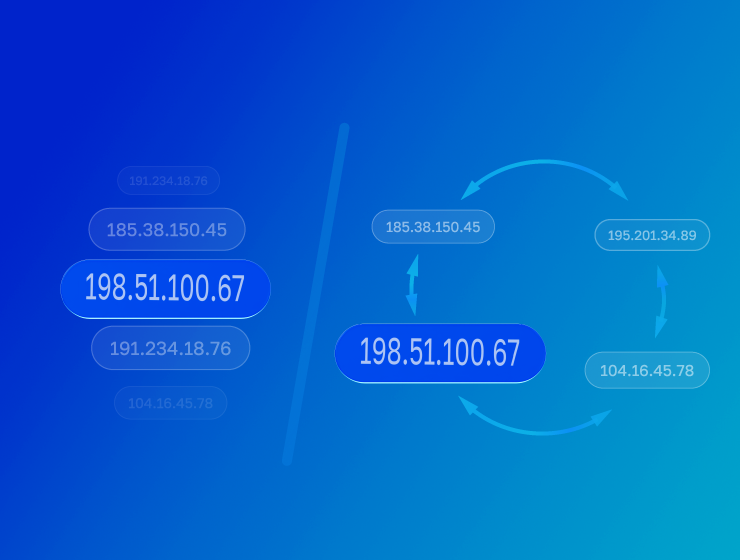
- IP rotation. Sticky sessions lock IP for up to 72 hours, ideal for accounts. Timer rotation changes address every N minutes, suitable for parsing. Change on every request gives a new IP every second, for mass collection.
- Pricing. Three options. Payment for traffic (pay for gigabytes), subscription (fixed payment, traffic burns), payment per piece. The traffic payment model is more profitable.
- API. Automation is impossible without API.
- Compatibility. Checking work with antidetect browsers, automation, parsers.
- Support. When something breaks at three in the morning, reaction speed is critical.
- Reputation. Independent reviews on specialized platforms.
Legal transparency. Work only with officially registered companies.
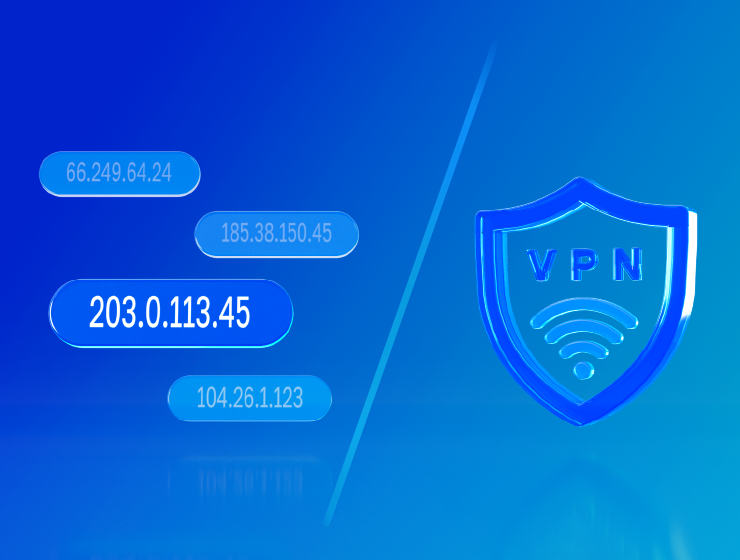
Proxies and VPNs are often confused, although these are fundamentally different technologies.
VPN encrypts all device traffic at the system level. All applications automatically use VPN. Proxy works at the level of individual programs, you can configure only the browser.
VPN guarantees complete encryption. Proxy by default doesn't encrypt (except HTTPS). VPN is slower due to encryption. Proxy is faster.
VPN gives 1-2 IPs per account. Proxies allow operating hundreds of addresses. VPN costs $5-15 per month. Proxies from $2 per gigabyte.
The key difference for business. VPN protects one user, proxies imitate many different ones. An attempt to manage 50 Facebook accounts through one VPN will end in a ban within days. Proxies give each account a unique IP.
Choosing proxies is justified for multi-accounting, parsing, arbitrage, automation, working through API. VPN is suitable for basic protection in public Wi-Fi, bypassing government censorship, access to streaming.
Incorrect application or choice of a dubious provider creates problems.
- Information interception. All traffic passes through someone else's server. A dishonest owner can intercept passwords, card data in the absence of encryption. Protection. HTTPS proxies, legal providers, refusal of free proxies.
- Data logging. Some providers collect logs and sell information to third parties. Protection. Study of privacy policy, choice of services with minimal logging.
- Low speed. Low-quality proxies slow down and fall off at critical moments. Instability looks suspicious to antifraud systems. Protection. Checking uptime, testing, choosing providers with auto-replacement of problem IPs.
- Dirty IPs. If the proxy was used before you for spam, the IP is already in blacklists. Protection. Only private proxies, residential with filtering, fraud score check.
- Legal consequences. Proxies are legal, but some actions through them violate laws. Protection. Use only for legal purposes, study of platform rules.
- Illusion of security. Proxies hide IP but don't protect from all identification methods. There are browser fingerprints, cookies, behavioral analysis. Protection. Antidetect browsers together with proxies, regular cookie cleaning, scheme "1 proxy = 1 account = 1 profile".
- Danger of free proxies. Public proxies are often created for data theft. Protection. Complete refusal of free proxies.
When developing GonzoProxy, all these risks were taken into account from the very beginning. Proprietary P2P infrastructure from verified devices, minimal logging, ISO/IEC 27001 certification, automatic filtering of problem IPs and round-the-clock tech support. The work is built so that users don't face typical problems of cheap providers.
The process takes a few minutes and doesn't require deep technical knowledge.
Windows
Go to Settings, look for "Network and Internet" there, then "Proxy Server".
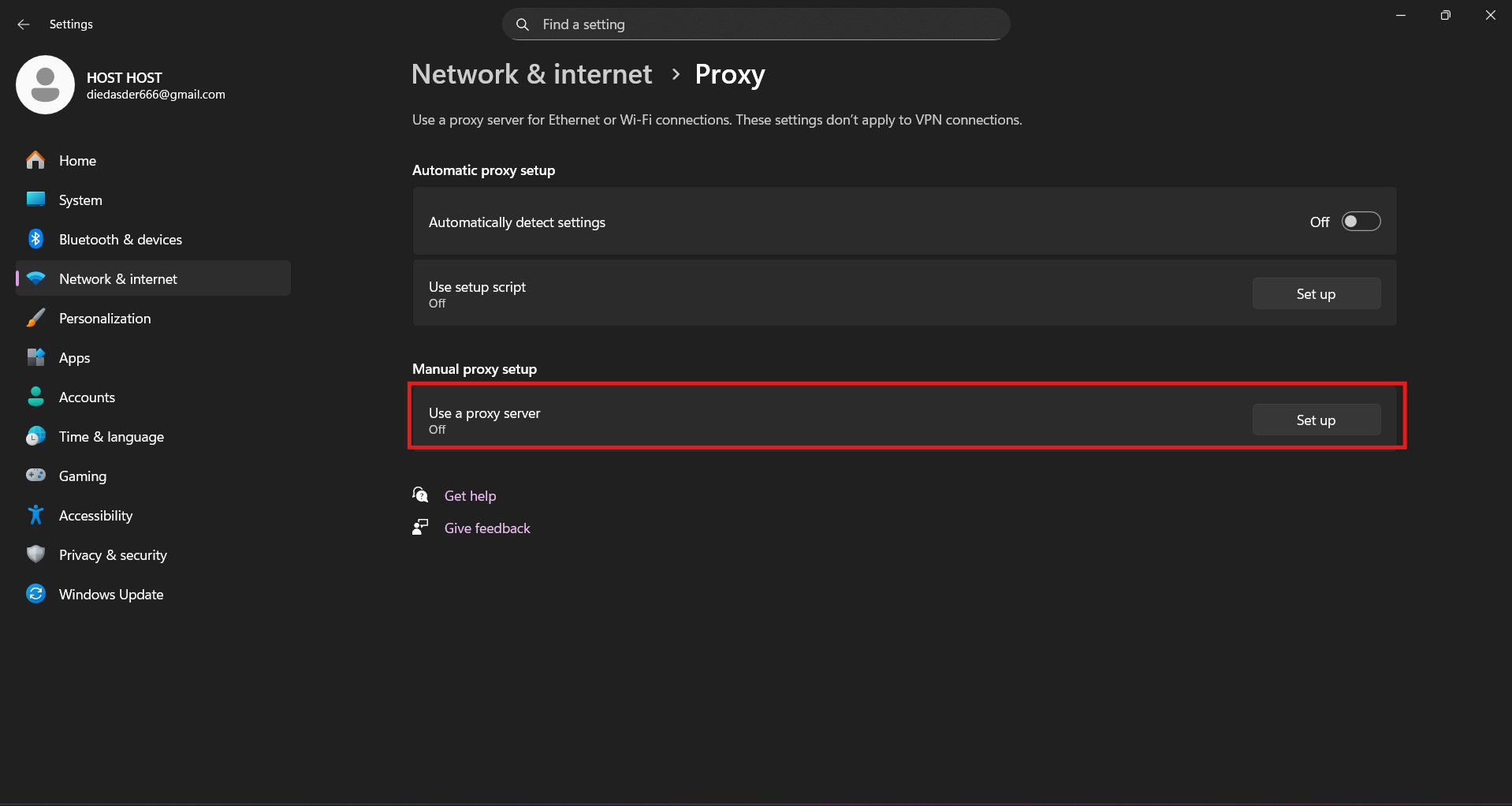
Insert address with port. Save.
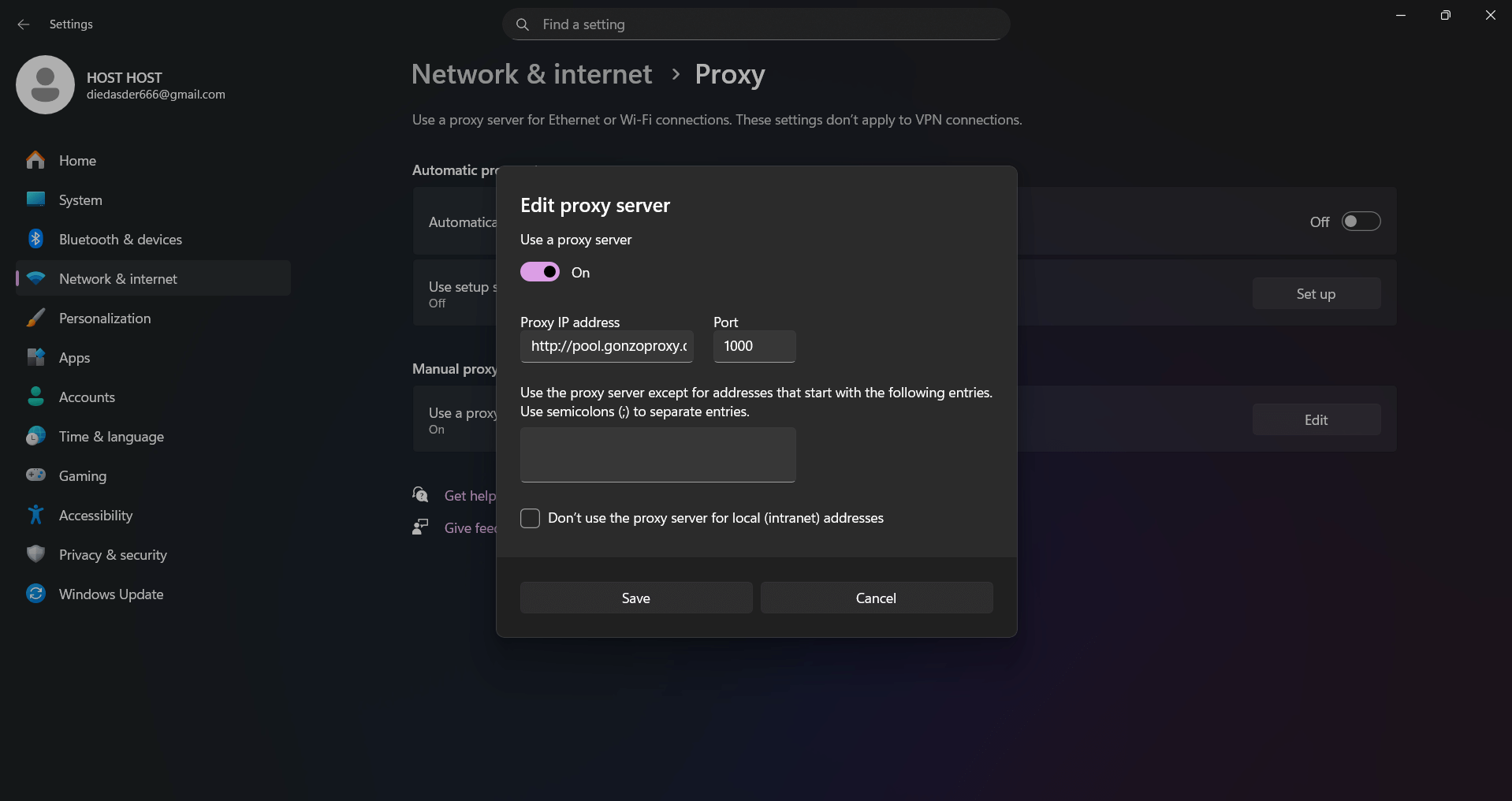
Open any browser. You'll be asked to enter login and password.
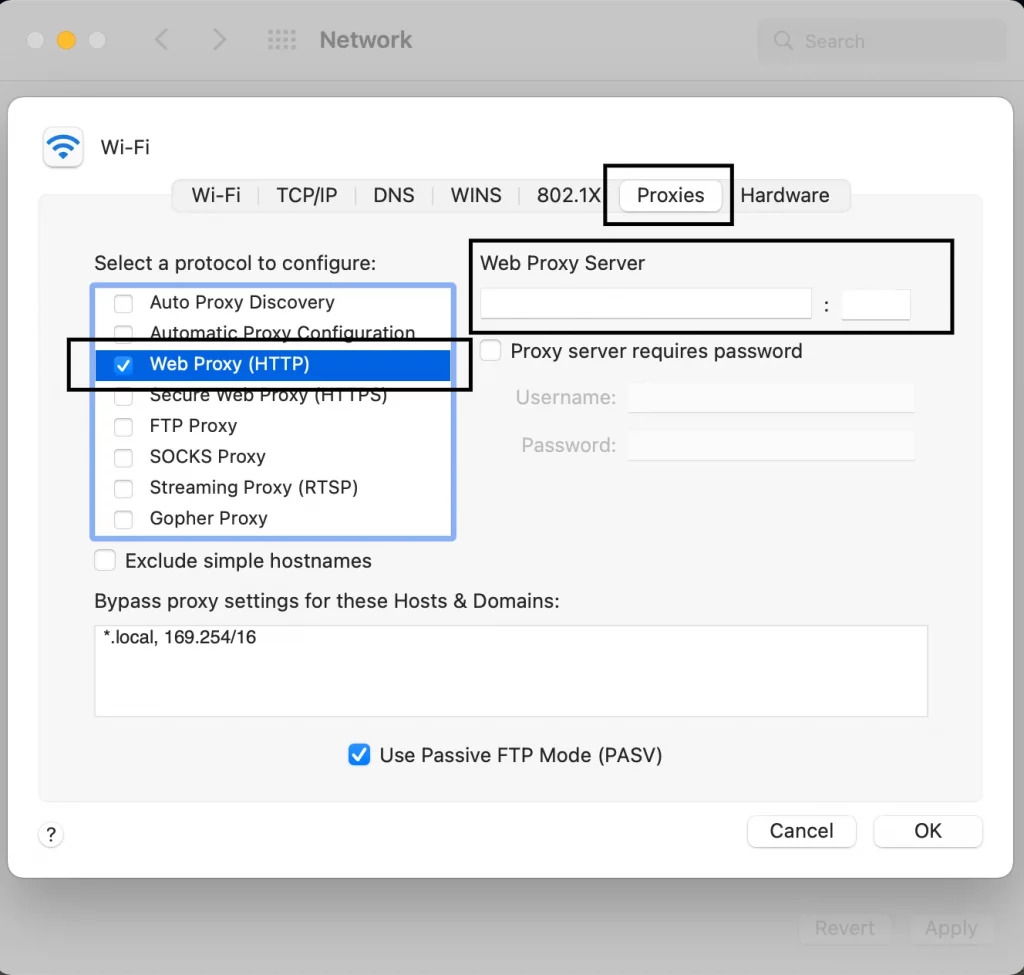
macOS
System setting. Apple menu, System Preferences, Network.
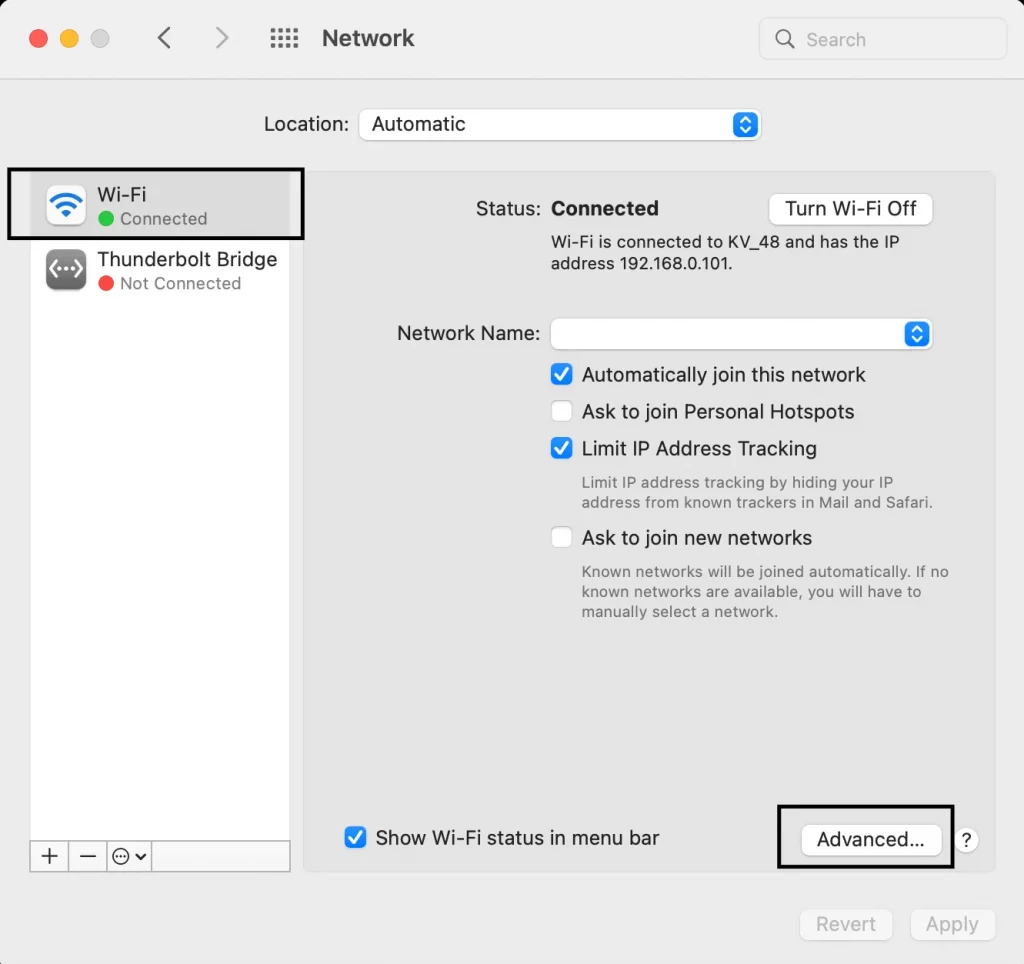
Select active connection, click Advanced. Proxies tab. Mark the needed type (Web Proxy for HTTP, Secure Web Proxy for HTTPS, SOCKS). Enter address and port.
If authentication is needed, enter login and password. Apply changes. Check in browser.
For Android we also have a step-by-step setup guide
After setup, check IP change through whatismyip.com, 2ip.ru or whoer.net. Make sure the country corresponds to proxy geolocation. Check for absence of errors when opening sites.
For working with dozens of proxies, use antidetect browsers where each profile automatically connects to its own proxy.
FAQ