Remember the times when you could just turn on any VPN and peacefully sit on TikTok? Forget it. Now the platform blocks VPN services faster than you can say "viral video". Black screen, endless loading, connection errors. Sound familiar? And if you're making money on TikTok, these problems hit right in the pocket.
A year ago I would've laughed if someone told me I'd have to study proxy servers like a professional admin. But reality forced me to. Clients demand results, ad campaigns need to work, and TikTok has turned into a fortress you can't take by storm. SMM specialists, arbitrageurs, shop owners are all looking for a reliable way to get on the platform. The reason is simple, there's cheap traffic and excellent conversion.

Contents
Regional restrictions and laws
TikTok exists in parallel universes. Americans see one platform, Europeans see something completely different, Asians see a third. Not only the content differs, but also the functionality. The American version has TikTok Shop, direct sales through streams, monetization through Creator Fund. In Europe, they cut half the functions due to privacy laws.
Getting into American TikTok from Russia or CIS becomes a quest for the chosen ones. That's where the affluent audience is, huge advertising budgets, real money. But the security system works like a Swiss watch. It's not enough to just change the IP. You need to become American in every sense: IP, time zone, system language, behavior patterns.
India banned TikTok back in 2020. Completely. You know what local entrepreneurs do? They find workarounds and sell Indian goods to Americans through the platform. Now that's real persistence and business savvy!
Why VPN is often unstable
TikTok maintains a database of IP addresses of all known VPN providers. NordVPN, ExpressVPN, Surfshark were the first on the blacklists. The database updates practically daily. A server that worked in the morning is blocked by evening.
Connection speed through VPN drops catastrophically. A one-minute video loads for five minutes. Comments don't send. Streams turn into a set of static pictures. And the most unpleasant thing, VPN can disconnect right during the upload of important content.
A major digital agency recently conducted testing. Out of 15 top VPN services, only 2 worked with TikTok more or less stably. The rest either blocked instantly or lagged so much that working was impossible. Meanwhile, a subscription to a quality VPN costs like Netflix, but with zero benefit.
TikTok's antifraud and VPN detection
TikTok's antifraud system analyzes dozens of parameters simultaneously. The IP address is important, but it's just the beginning of the check.
Real example from practice. An arbitrageur turned on VPN, chose a server in Miami. American IP, everything should work. But TikTok analyzes differently – IP from Miami, Moscow time zone, Russian system language, internet speed 5 Mbps with average speed in Miami 50+. Even the outlet voltage gives it away: 220V instead of American 110V!
The algorithm adds up the facts and concludes: this isn't an American, it's someone with VPN. The account falls under suspicion. Videos don't get promoted, recommendations are ignored, ads are blocked. There's no official ban, but nobody sees the content. Classic shadow ban.
Working principle: IP masking vs encrypting all traffic
VPN creates a secure tunnel for all internet traffic. Every byte of information is encrypted and sent through a remote server. Safe? Yes. Effective for TikTok? No.
Proxy works selectively. Only the IP for a specific application or site changes. TikTok sees an American IP, while Instagram works from your regular address. The system doesn't notice total masking and doesn't turn on paranoia mode.
A programmer explained the difference to me with a simple example. VPN is like arriving at a store in a tank. Nobody will know who's inside, but everyone understands something's not right here. Proxy is more like visiting a store wearing a cap and sunglasses. A bit unusual, but within normal limits.
Connection speed and stability
The numbers speak for themselves. Uploading a video through VPN takes 5-7 minutes. Through proxy, the same files upload in 30-40 seconds. Colossal difference.
VPN passes all traffic through its servers, encrypts and decrypts every data packet. Imagine sending a letter from Moscow to St. Petersburg through Vladivostok. Proxy just changes the return address on the envelope, and the letter goes directly.
An SMM specialist from our community managed 30 accounts on TikTok. On VPN, she spent 3-4 hours just on publishing content. After switching to proxy, she manages in an hour. In business, time equals money, especially when clients are waiting for results.
Anonymity level and risks
Paradox: VPN's complete encryption makes you suspicious for TikTok. The platform sees that absolutely all device traffic goes through one encrypted channel. This is a clear sign of using bypass tools.
Proxy masks only the needed application. WhatsApp shows your real geolocation, browser works from regular IP, and only TikTok thinks you're in another country. Looks natural, as if you're traveling and using local internet for one application.
Scalability: one account or hundreds?
For a personal account, the difference between VPN and proxy isn't critical. But managing even ten accounts through VPN turns into a nightmare. Constant switching, conflicts, mass blocks.
A newbie from our team connected 15 accounts to one VPN. Result is predictable: TikTok banned all 15 in one day. Moreover, the block was so harsh that new accounts from the same devices also got instantly banned.
Proxies allow assigning each account a unique IP. You can manage a hundred profiles simultaneously, and each will look like an independent user from their region.
Access to TikTok from blocked regions
VPN works when TikTok is completely blocked in a country and you need to get in there somehow. Simple situation – the platform doesn't load at all, shows connection error, and you just want to check what trends are there. For such basic access, VPN will do.
In India, for example, TikTok was shut down back in summer 2020. Completely. At government level. You know what Indians do? They turn on any VPN and go watch American or European trends. Sure, videos load like it's 2005 internet, pixel by pixel. But at least something works.
The Middle East has a different story. There TikTok works on and off. Depends on political situation and religious holidays. Sometimes they block for a couple days, sometimes for months. Locals have long gotten used to keeping VPN handy. Connection quality is terrible, but there's no alternative anyway.
Personal goals: watching content, publishing videos
When TikTok is needed purely for yourself, without earning and promotion, VPN handles it fine. You're not going to manage a farm of 50 accounts or run ads for thousands of dollars. Just want to get stuck in the feed at night or send a cat video to friends.
For such tasks, you don't need complex settings and expensive proxies. Turned on VPN, chose a country, entered TikTok. Yes, you'll have to wait for the video to load. Yes, quality might drop. But for personal use it's not critical.
Many use VPN just to see what content is popular in other countries. It's interesting to find out what they watch in Japan or Brazil. For such surfing, VPN is perfect.
Simple setup
VPN's main advantage is simplicity. Downloaded the app, created an account, pressed the big "Connect" button. That's it. No IP addresses, ports, protocols. Even grandma will figure it out.
Modern VPN services make the interface as friendly as possible. Beautiful world maps where you can click any country. Automatic selection of the fastest server. Kill switch function that will disconnect internet if VPN drops.
For people who panic at any technical settings, VPN becomes salvation. No need to get into Wi-Fi settings, enter strange numbers, understand proxy types. Installed, launched, using.
Managing multiple accounts
For working with multiple accounts, proxy is the only reasonable choice. Attempts to use VPN for multi-accounting end with mass bans and time loss.
An arbitrageur from our chat was pouring traffic to gambling through TikTok. 50 accounts, different countries, different creatives. On VPN, constant blocks destroyed profit. After switching to proxy, income tripled in a month. Accounts stopped getting banned in batches, campaigns became stable.
Fast access without speed drops
Active TikTok users publish several videos daily. With VPN, each upload becomes a test. Upload, waiting, error, retry.
Proxies maintain normal speed. Videos upload almost instantly, stories and live streams work without delays. The difference is especially noticeable when using quality residential proxies instead of cheap server ones.
Local targeting for access to American TikTok
American TikTok attracts with monetization opportunities. Creator Fund, virtual gifts, e-commerce integration. But the system checks many parameters, not just IP.
Professional proxy services understand these nuances. GonzoProxy, for example, allows choosing a specific state, city and even local provider. If you claim you're in Texas, the IP should belong to Texas provider AT&T or Spectrum, not an abstract data center.
Compatibility with antidetect browsers and software
Professionals use specialized tools. Antidetect browsers for managing multiple profiles, bots for auto-posting, analytics systems.
All these programs are created to work with proxies. Just enter proxy data into settings, and the system works. VPN constantly conflicts with professional software, creates problems with ports and double encryption.
On iPhone and iPad
- Setup on Apple devices takes a couple minutes. Open Settings, find Wi-Fi section.
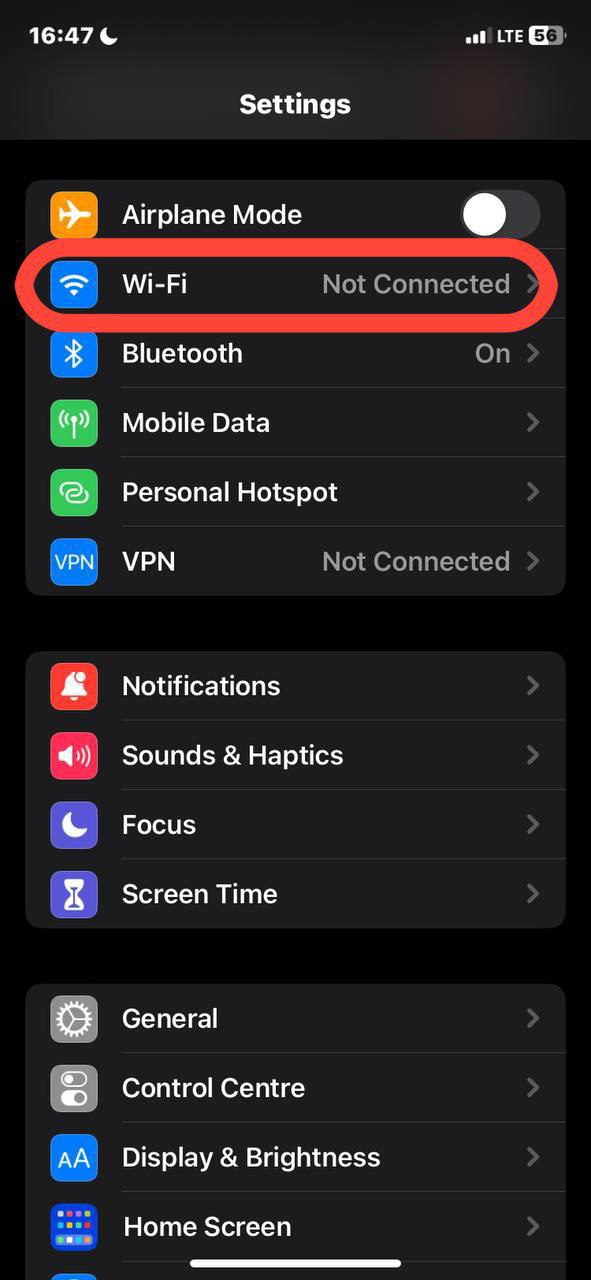
- See your network? Click on the information icon next to the name.
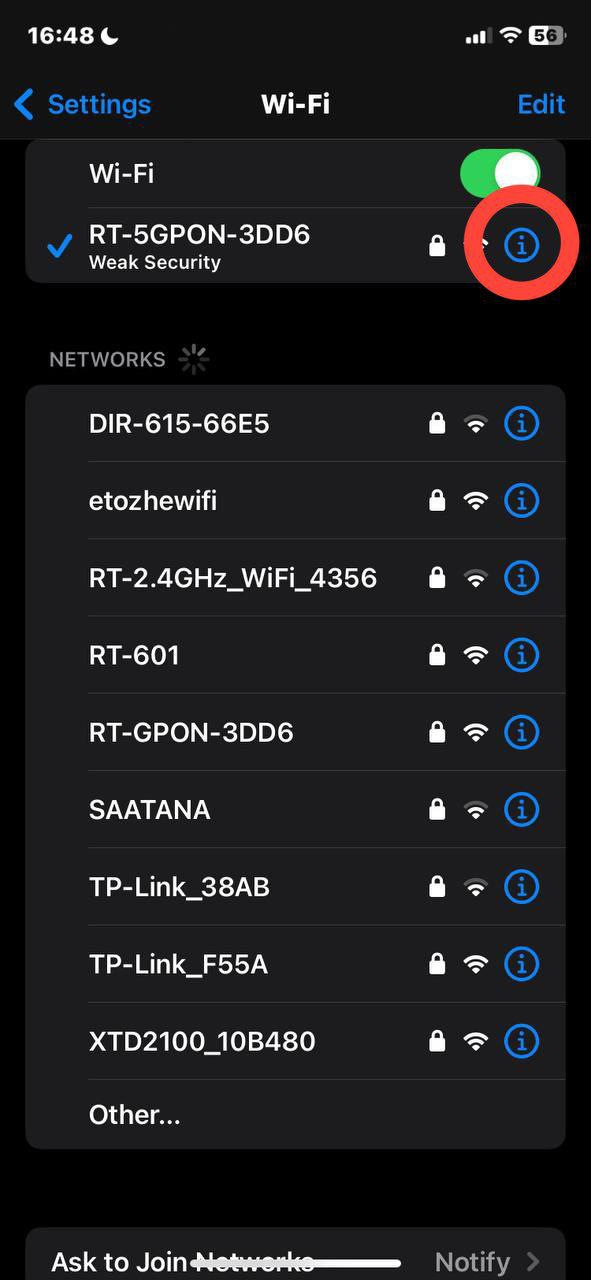
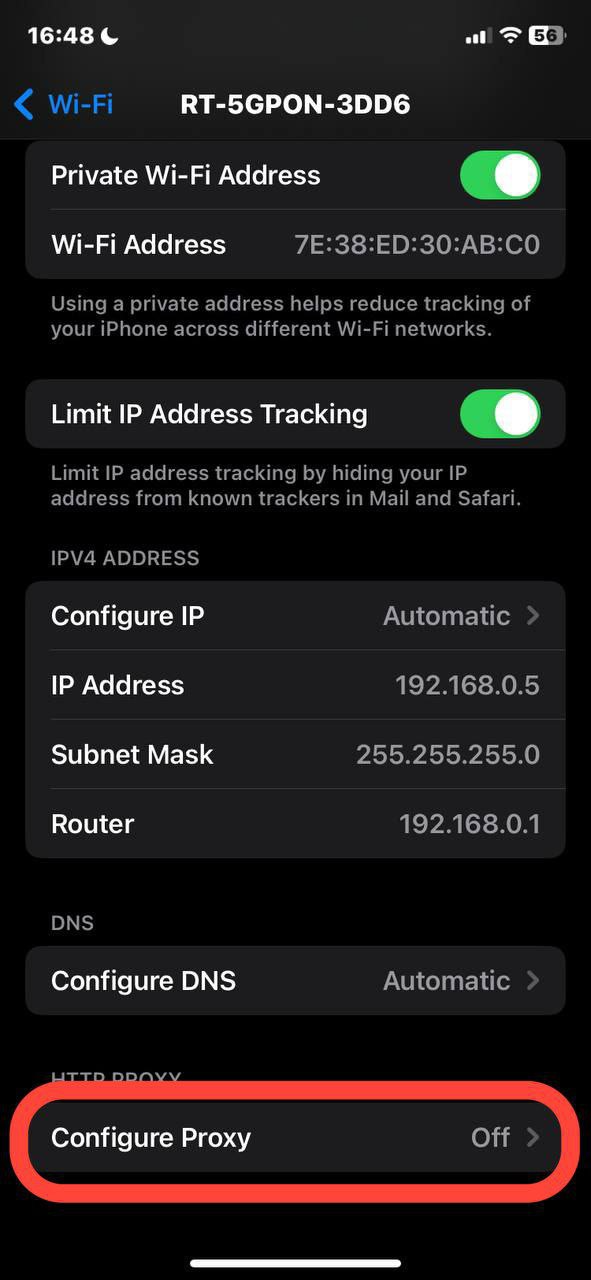
- Scroll down to "Configure Proxy". Change "Off" to "Manual".
- Enter data received from provider: server address (looks like a set of numbers 192.168.1.1), port. For paid proxies add login and password.
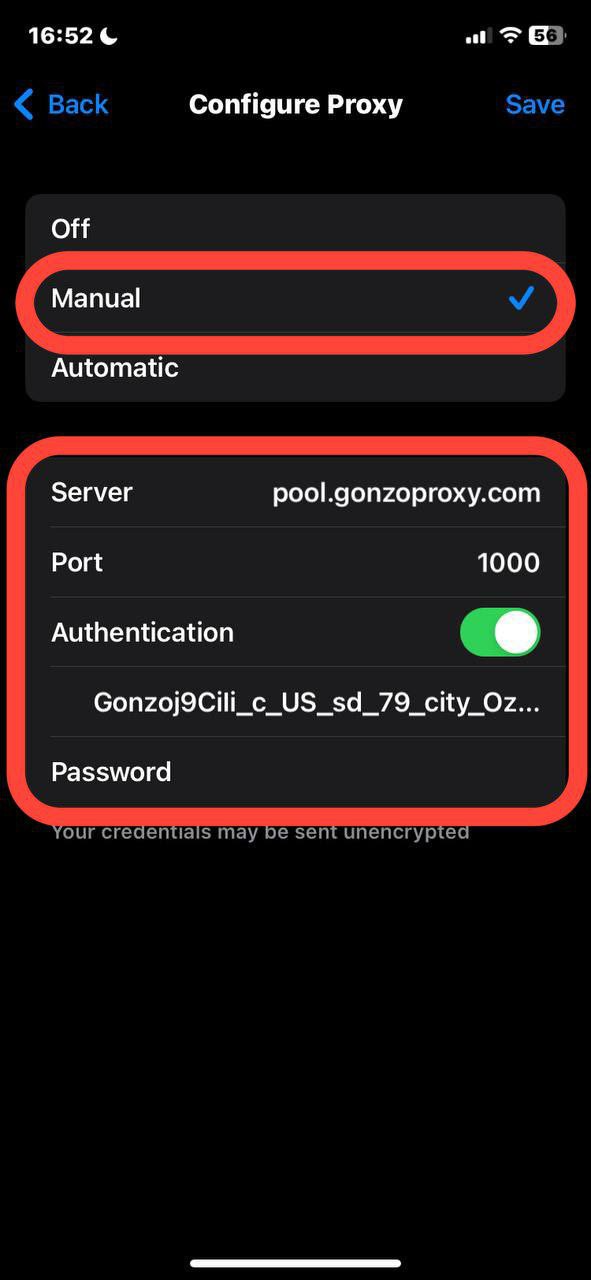
- Save settings, restart TikTok. Done, you're in another country.
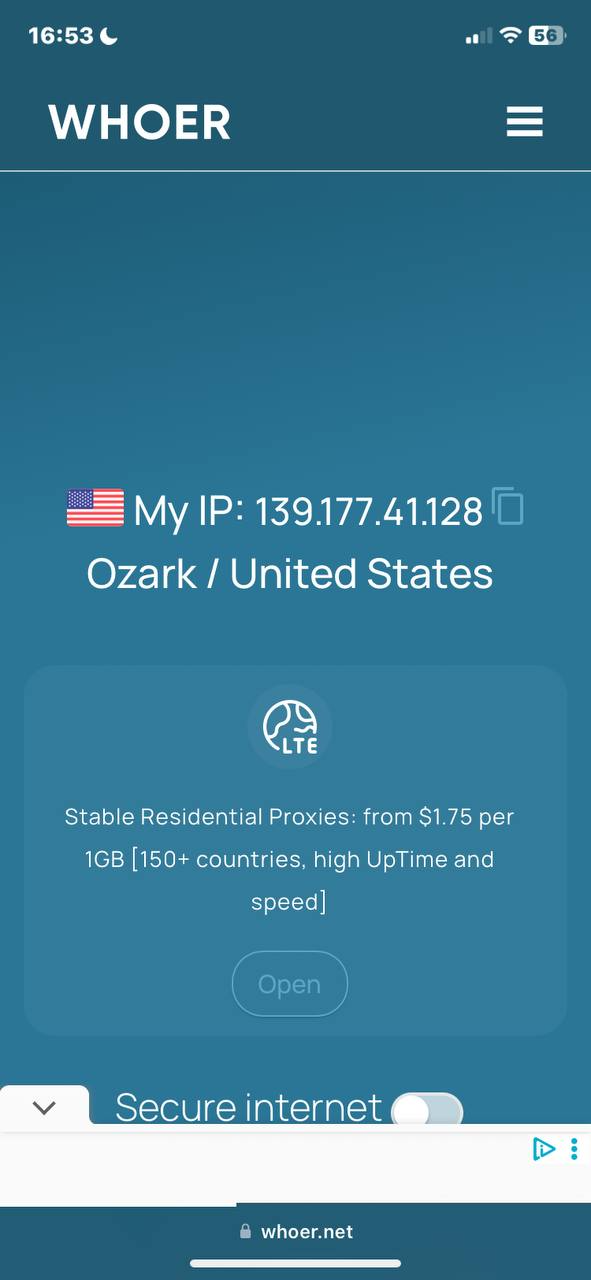
On Android
On smartphones proxy is configured in a minute right in the system:
1. Open phone settings, find Wi-Fi section.
2. Tap on the arrow in your network name.
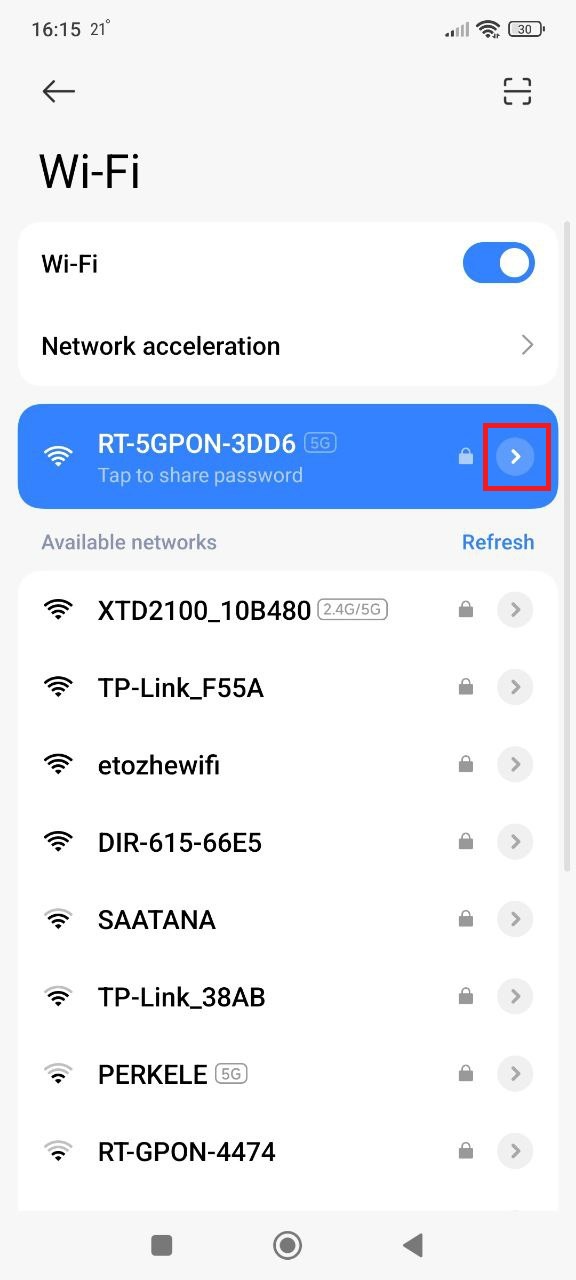
3. Look for proxy and specify manual configuration.
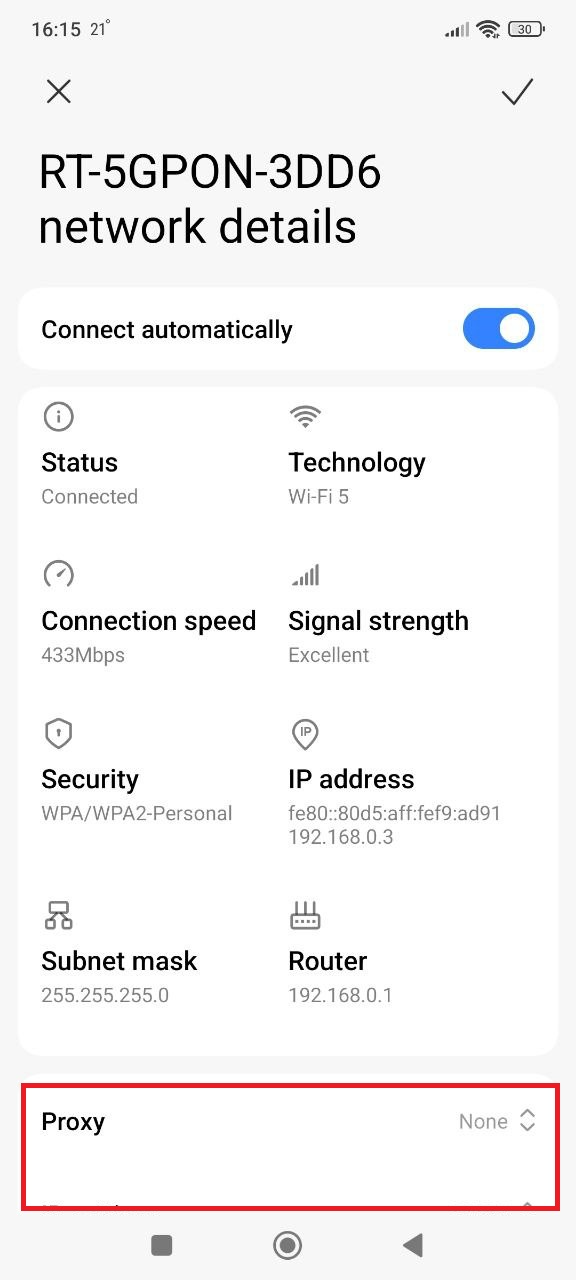
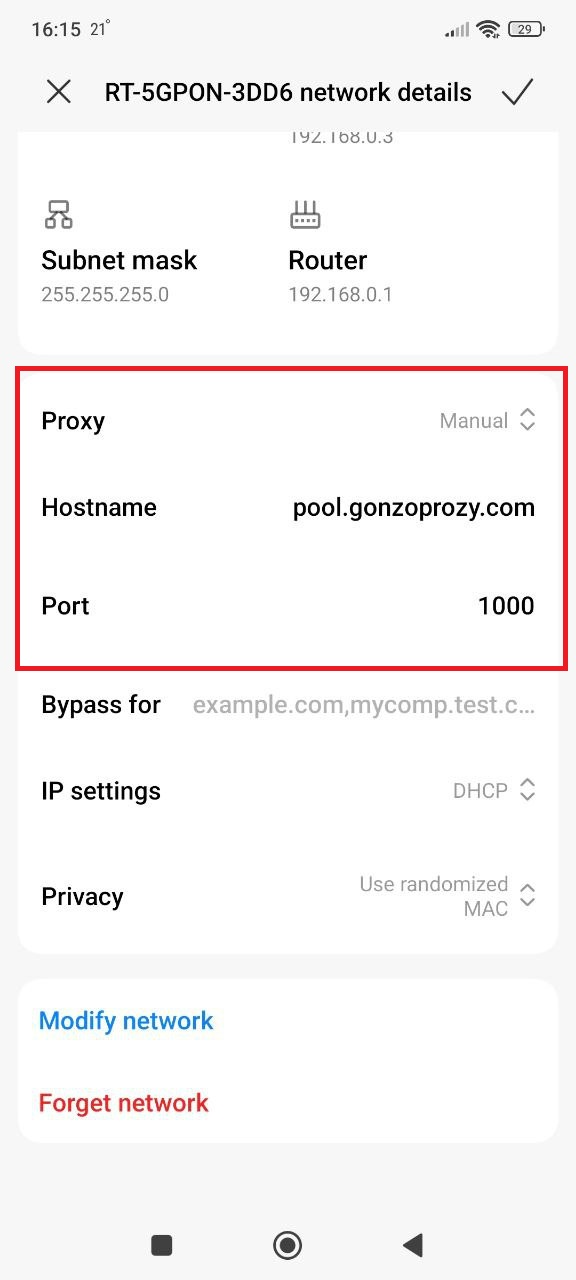
4. Enter proxy data:
For example:
Server/Host: pool.gonzoproxy.com
Port: 1000
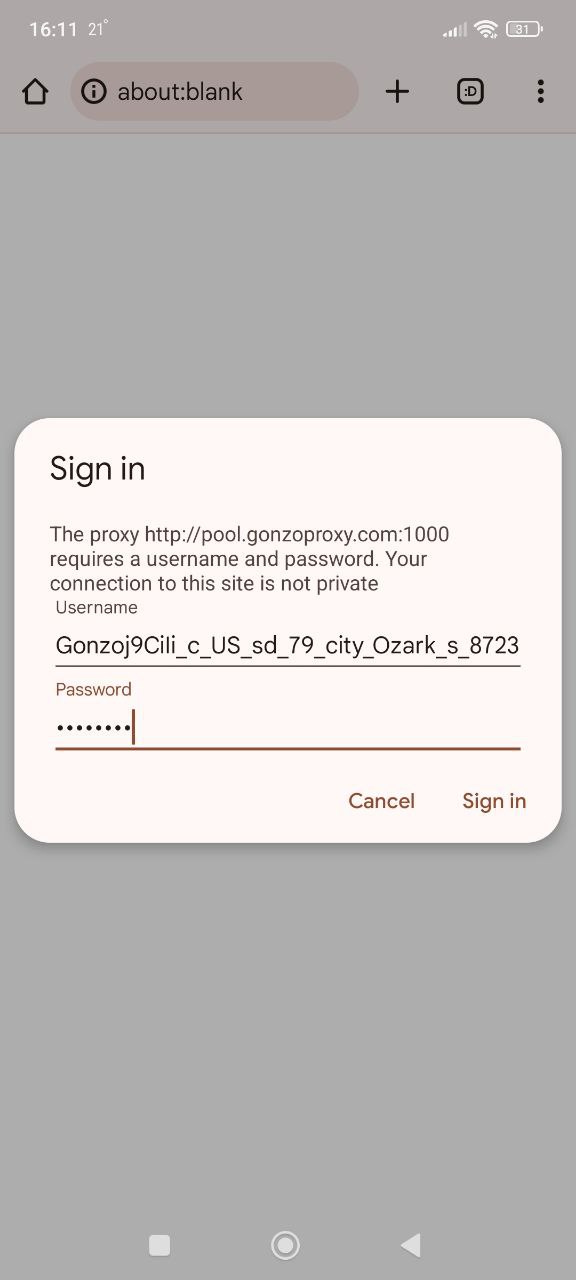
- Launch browser, it will ask for login and password, enter:
Login: Gonzoj9CiIi_c_US_sd_79_city_Ozark_s_87231IXF_ttl_72h
Password: RNW78Fm5
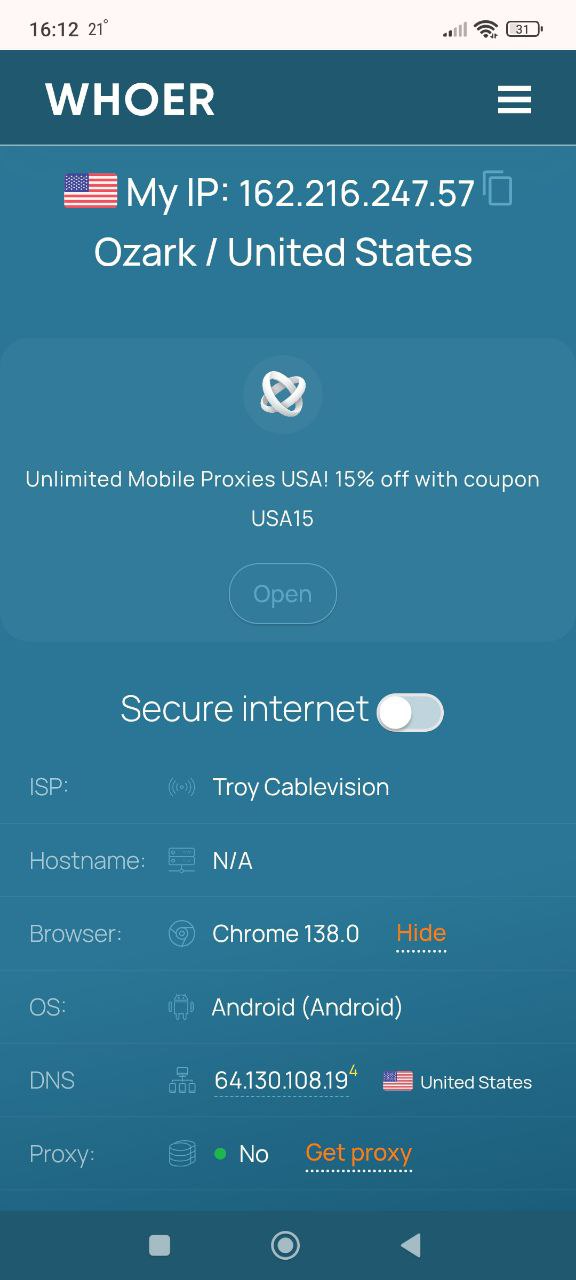
Go to whoer.net website. Everything works!
On PC (Windows, macOS)
For browser it's easier to install an extension. FoxyProxy or Proxy SwitchyOmega are configured in a minute and allow quick switching between proxies.
Settings → Network & Internet → Proxy server → Manual proxy setup → Enter IP and port → Save.
Problem: can't connect if there's login and password. Solution: use Proxifier or ProxyCap.
Let's look at how to configure Proxifier:
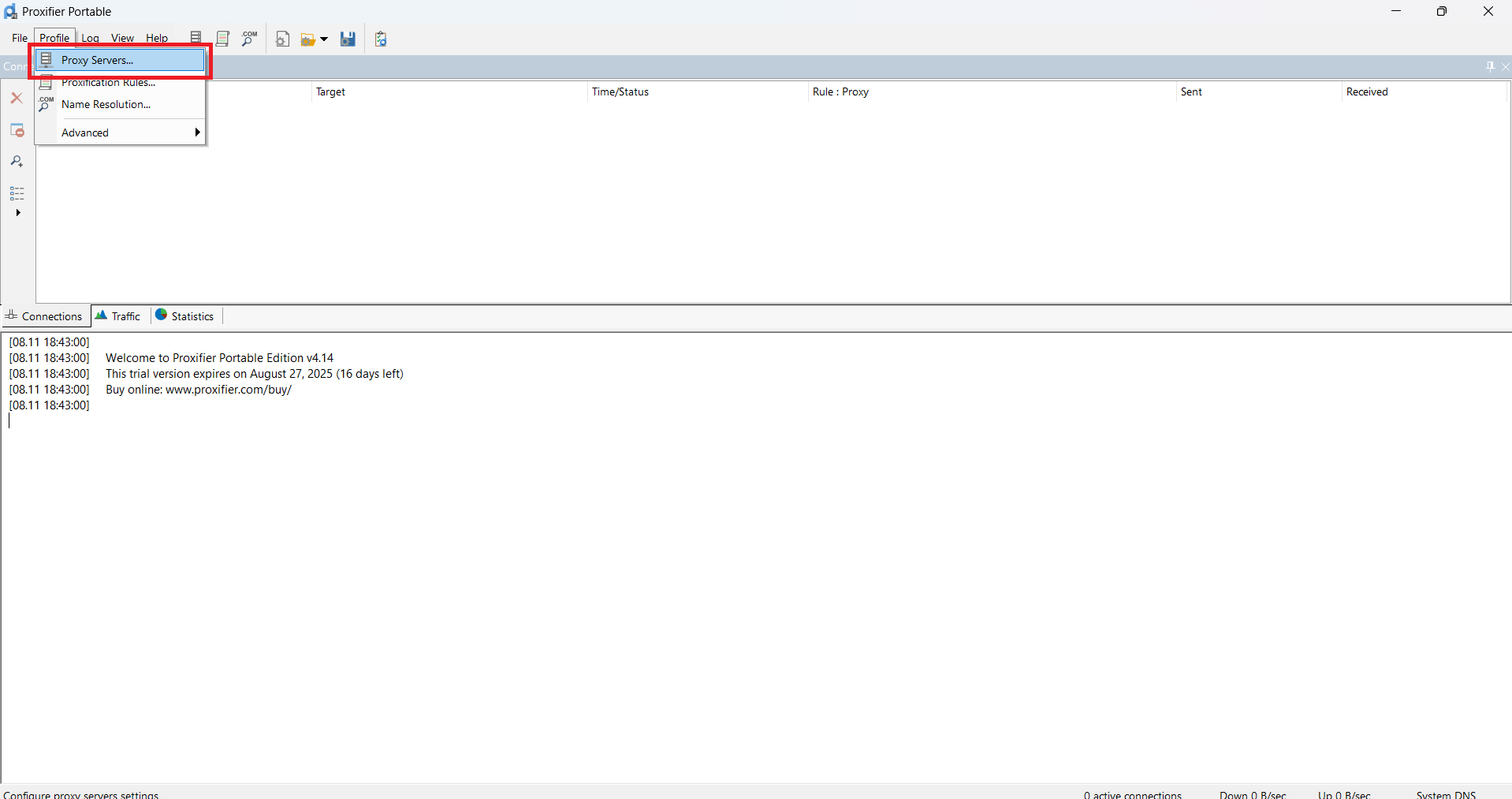
- In Proxifier click on Proxy Servers
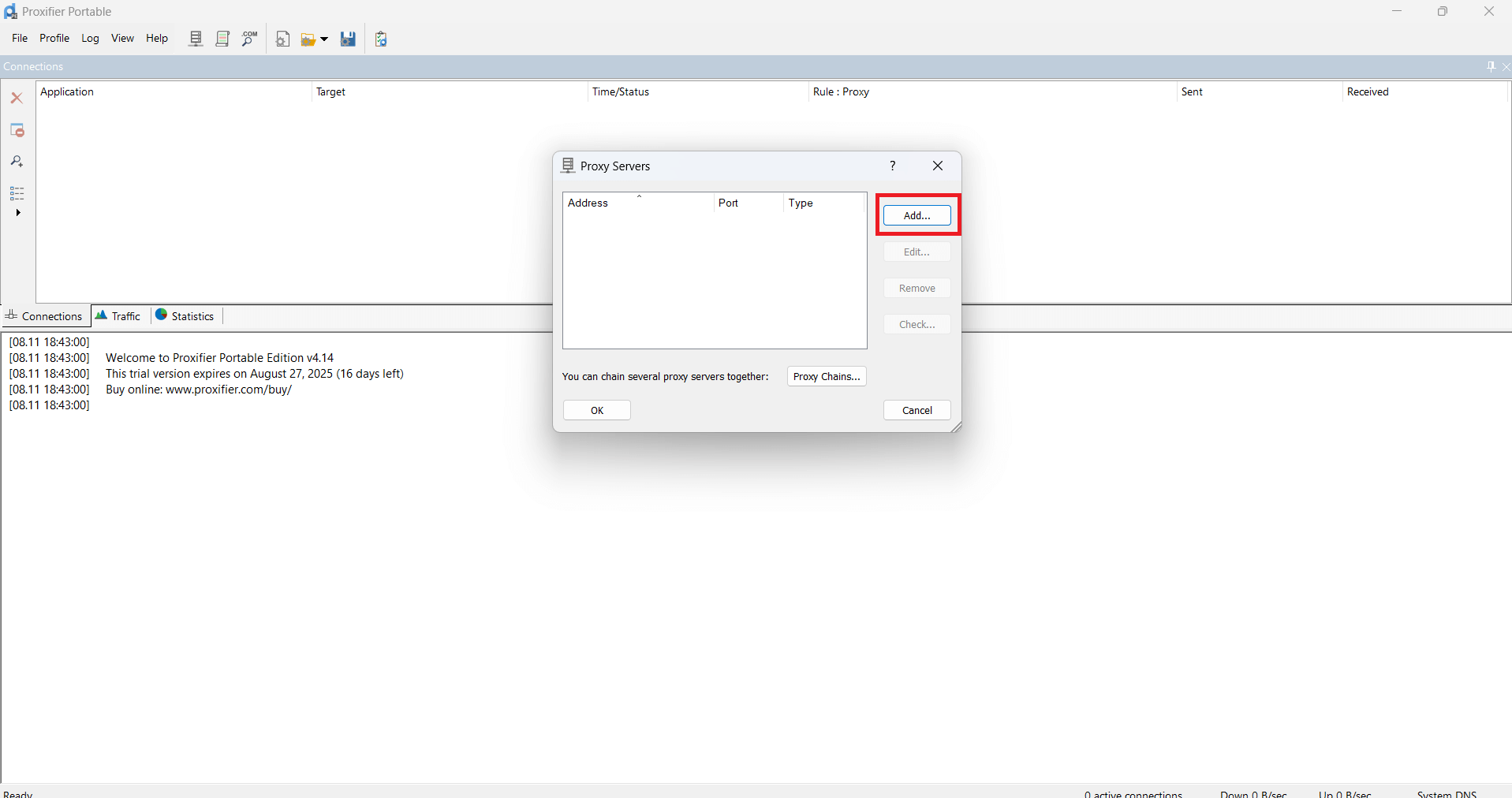
- Then click Add
- In the appeared window paste the received proxy data
For example:
Server/Host: pool.gonzoproxy.com
Port: 1000
Login: Gonzoj9CiIi_c_US_sd_79_city_Ozark_s_87231IXF_ttl_72h
Password: RNW78Fm5
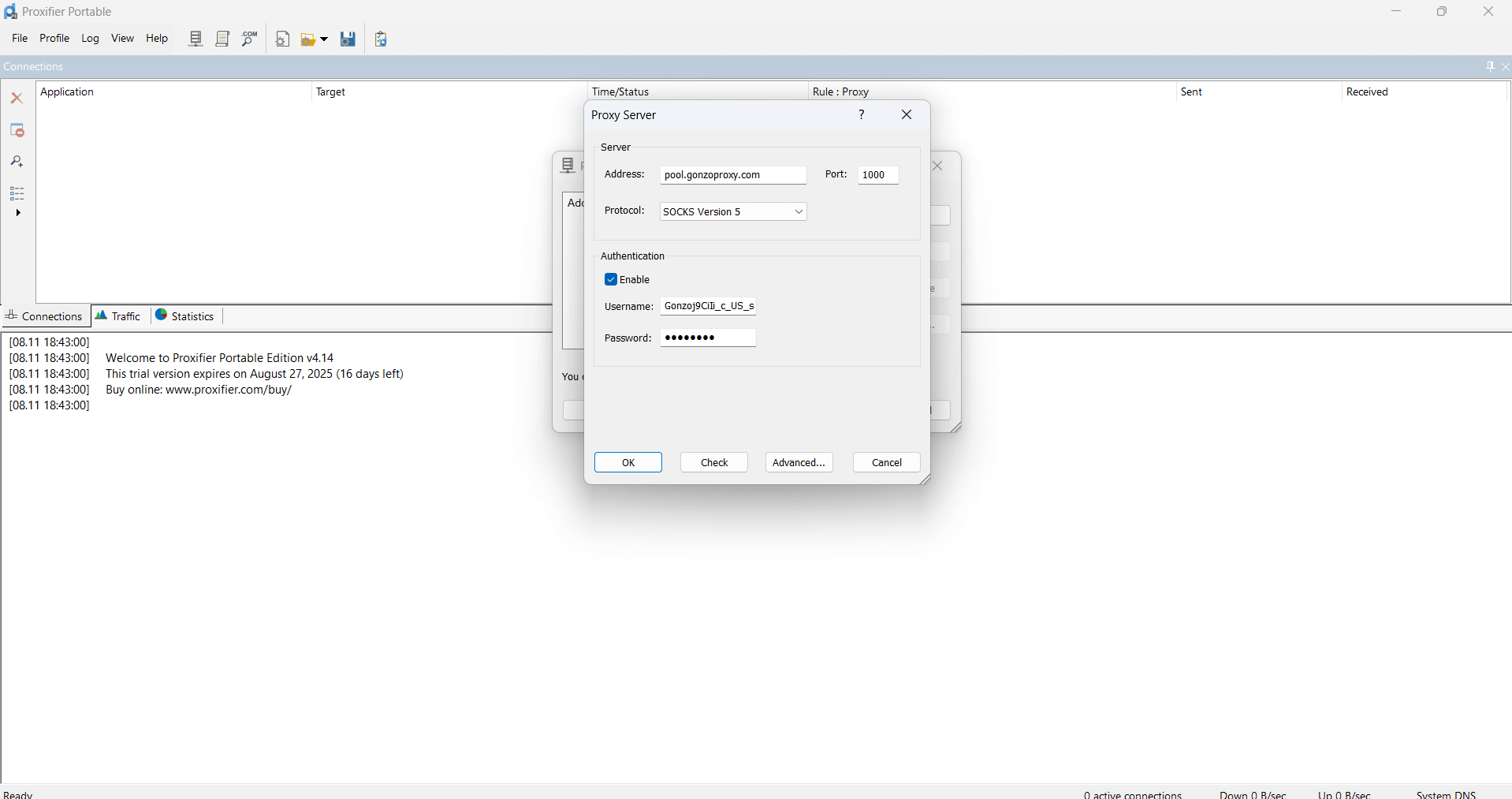
- Click OK
- Go to whoer.net website. Everything works!
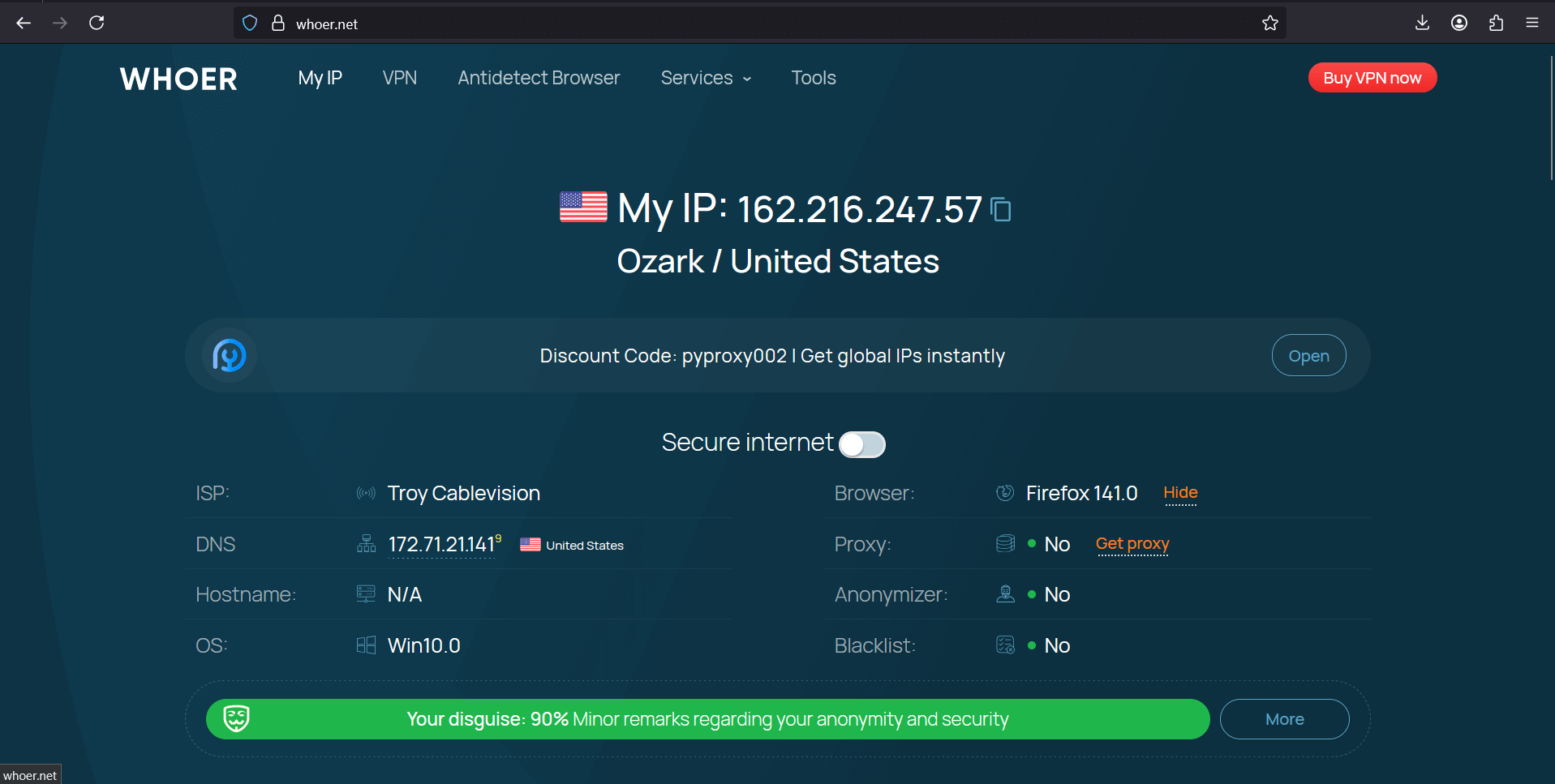
On macOS the path is longer: System Settings, Network, Advanced, Proxies. Enter the received data, apply changes.
Through antidetect browsers or proxy managers
Professional browsers Dolphin, AdsPower, Multilogin are created for working with multiple accounts. Proxies are configured elementarily.
Let's look at Dolphin Anty as example. The principle is the same:
- Create new profile or edit existing
- In "Proxy" section choose "Custom" or "Manual setup"
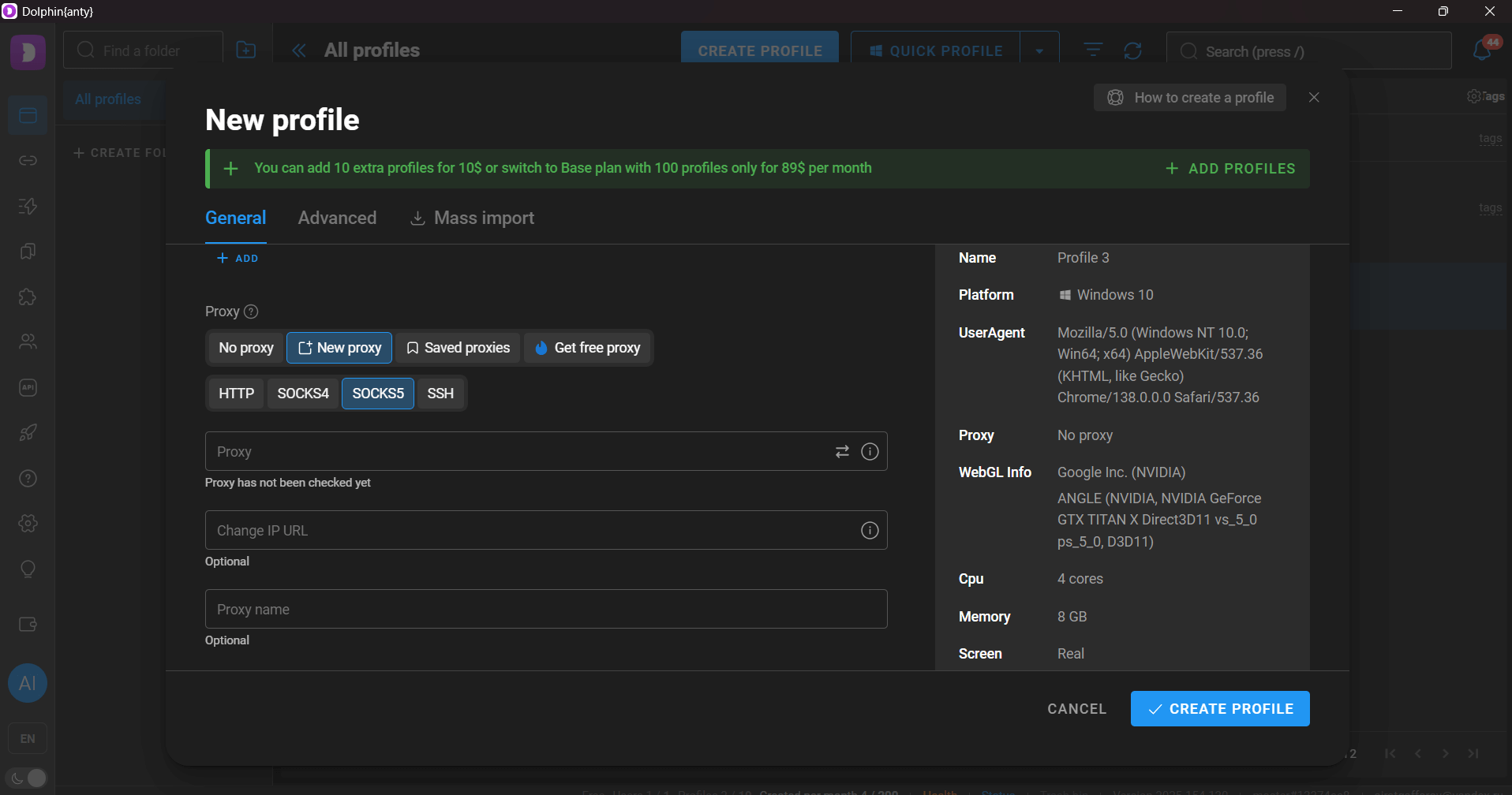
- Specify type HTTP/SOCKS5, enter previously received proxies
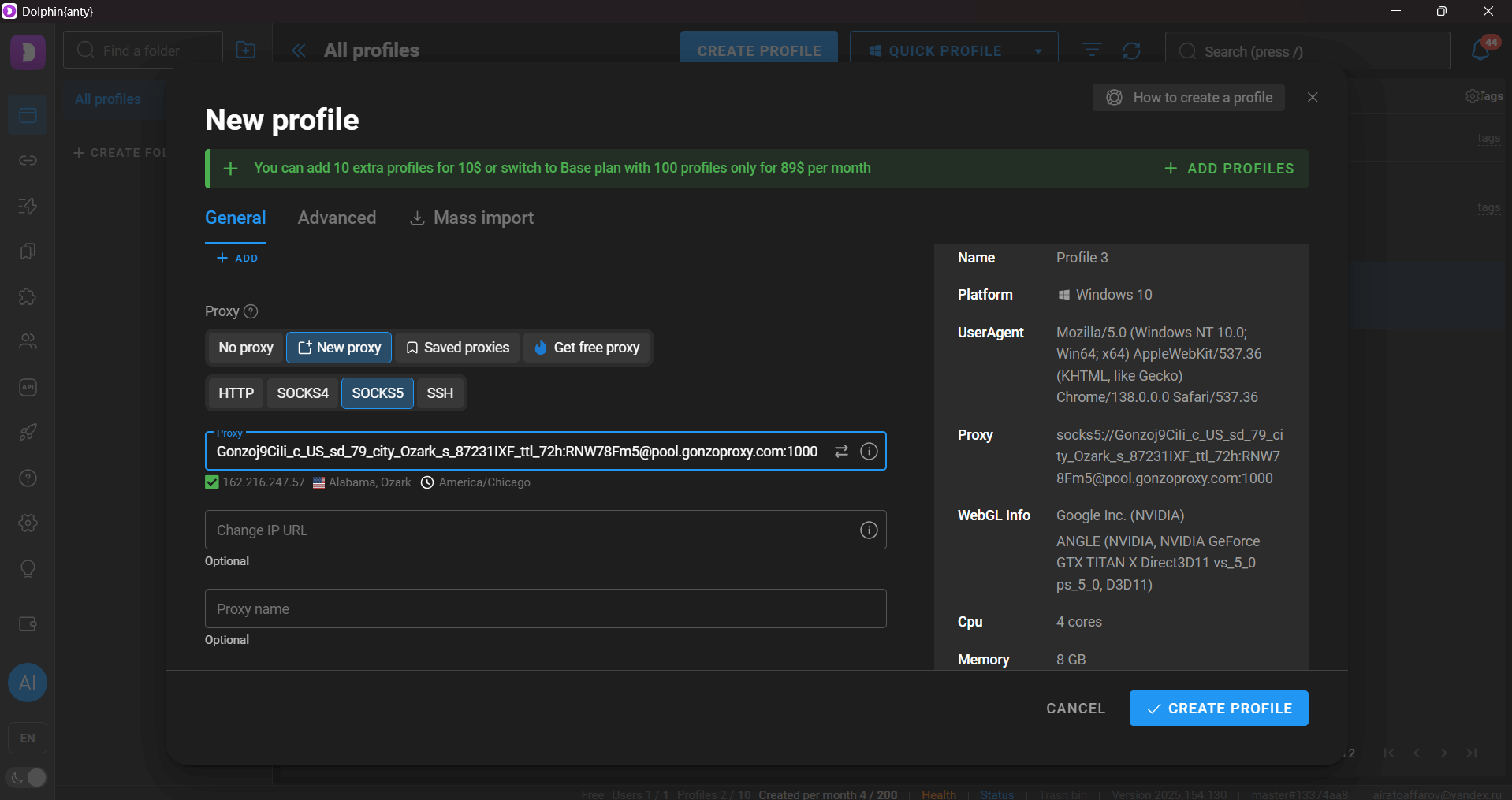
- Test connection and save profile Launch profile.
Browser opens. Go to TikTok. Log in. That's it. This account is now always through this proxy.
Can you catch an account ban? Example situations
Ban risk always exists, but it can be minimized. The main thing is understanding what exactly TikTok blocks accounts for.
✓ Avoid sudden geolocation changes. If in the morning you're in Moscow, and an hour later in Los Angeles, the system will suspect something's wrong. Take a break of at least 12-24 hours when changing country.
✓ Use one proxy/VPN for one account. Never connect multiple accounts to one IP. TikTok tracks connections and bans the whole chain.
✓ Maintain natural behavior. Don't put 1000 likes per hour. Don't follow 500 people per day. Behave like a regular user.
✓ Check that all parameters match. If using American IP, set American time zone and English system language.
✓ Avoid mass actions. Synchronous actions from multiple accounts (likes to one video, identical comments) are instantly detected.
✓ Use quality IPs. Free and cheap proxies are often already on blacklists. Check fraud score before use.
Why "free" becomes the cause of data leaks?
Free services make money on your data. This is an internet axiom.
✓ Password and login interception. All traffic goes through someone else's server. The owner sees everything: passwords, messages, card data.
✓ Selling your activity. Browsing history, interests, contacts are sold to ad networks and data brokers.
✓ Using your device. Some free VPNs turn your phone into a proxy for other users.
✓ Account theft. They wait until the account gains popularity, then change the password and take it.
✓ Installing malware. Along with the VPN client you can get a cryptocurrency miner or spyware.
✓ Real IP leaks. Cheap services often "leak", revealing your real address.
Can you check before buying?
Always test the service before paying for an annual subscription.
✓ Transparency of company information. First thing, google who owns the service. If the company is registered in some basement somewhere in the Cayman Islands, that's a reason to think.
✓ Technical documentation. Check if the site has normal instructions. Not two lines "connect and use", but real setup guides. What protocols they support, what proxy types they have, how to configure all this for different tasks.
✓ Support response speed. Write to support before buying. If they respond quickly and to the point, that's a good sign.
✓ Checking through third-party services. Use IPQualityScore, Scamalytics, MaxMind to check IP quality. Fraud score should be below 75.
✓ Real user reviews. Look for reviews on independent platforms, in specialized chats and forums. Ignore reviews on the provider's website.
✓ Payment methods. Having different payment methods (cards, crypto, PayPal) indicates business legitimacy.
✓ Guarantees and refund conditions. Clearly stated refund conditions, absence of fine print and hidden conditions.
Remember the main rule – the stingy pays twice. Better to pay for quality service than lose accounts with audience. Always start with the minimum tariff, test on one account, and only then scale. Behave like a regular user, avoid sudden changes and mass actions. And never, you hear, never use free proxies for important accounts.
FAQ


Let's sum up. VPN for TikTok is only good for basic video viewing. If you need the platform for work, earning, managing multiple accounts, the choice is obvious. Proxies provide speed, stability and scalability that you can't achieve with VPN.
Residential proxies are especially effective. These are IP addresses of real users, not servers. TikTok perceives you as a regular person, not a bot. They cost more than server ones, but the result justifies the investment.
Among normal services, you can look at GonzoProxy. The guys really have a large base of residential IPs, and you can choose not just a country, but a specific provider in the right city. The trick is that you create as many proxies as you want for different tasks, and they only charge for actually used gigabytes. Newbies get promo code START15 — it gives 15% discount on first purchase.