Favorite site blocked? Worried your personal data might leak? Millions of people face these problems every day. Proxies and VPNs hide your real IP, but they do it in completely different ways. Let's figure out how each tool works, where a proxy will be more effective, and where you definitely can't do without a VPN. By the end of this article, you'll be able to consciously choose the right option for your tasks.

Contents
Understanding what distinguishes VPN from proxy will be helped by several key points.
- Encryption. A proxy simply passes your requests through itself without any encryption (except for HTTPS proxies only). VPN packs all traffic into an encrypted tunnel that's impossible to crack without the key.
- Coverage. A proxy only works with those programs where you manually configured it (browser, torrent downloader). VPN grabs everything that goes to the network from your computer or phone.
- Speed. Proxy runs faster because it doesn't consume resources on cryptography. VPN slows down because each packet needs to be encrypted and decrypted.
- Privacy. Proxy changes your IP to its own, and that's it. VPN not only substitutes the address but also hides all activity from the provider and prying eyes.
- How much it costs. Proxies can be cheap or even free. For a decent VPN with normal support, you'll have to pay money every month.
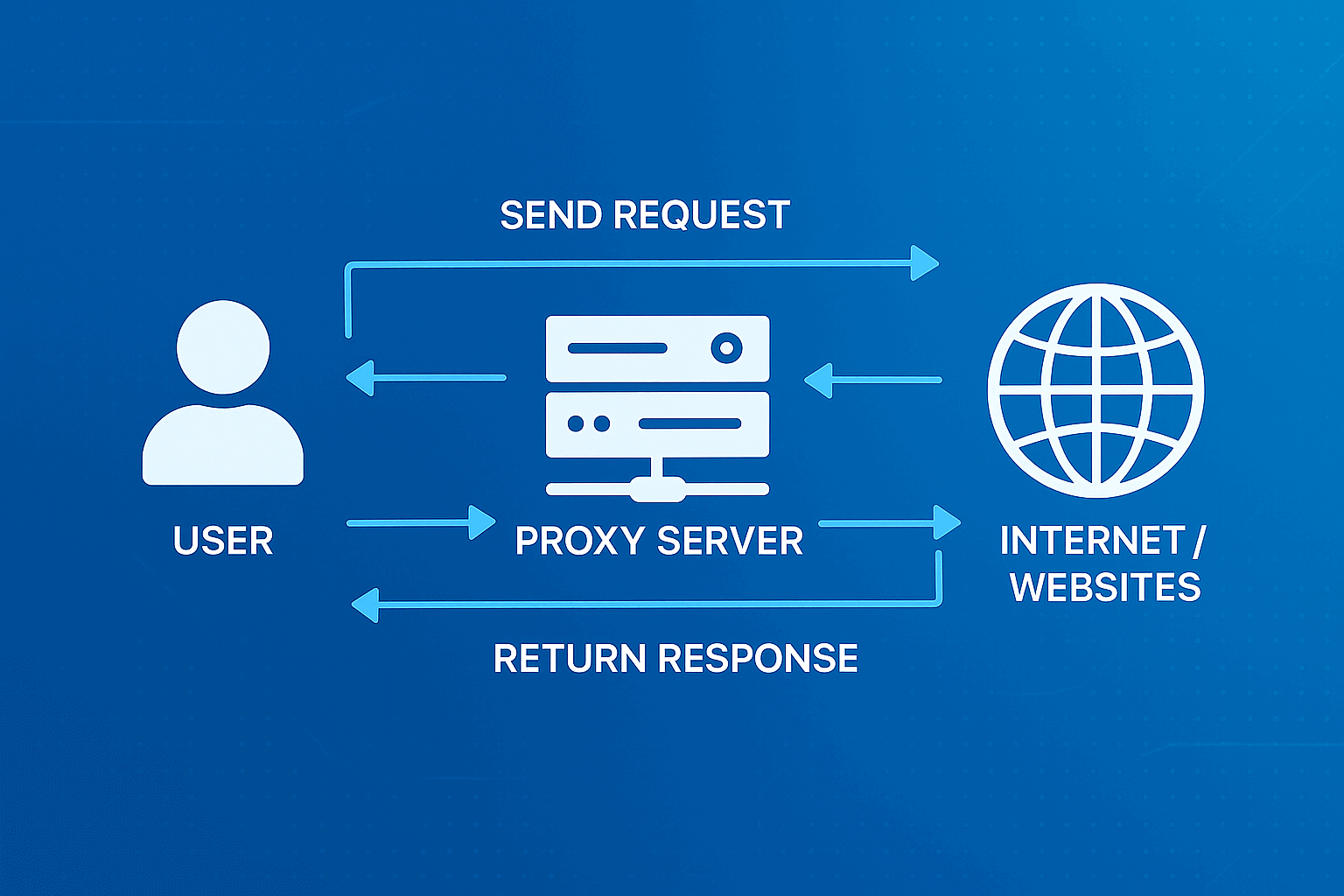
A proxy works as an intermediary between you and the sites you need. You give it a request, it carries it further to the server, gets a response and brings it back. At the same time, the site sees the proxy's address, not yours.
Simple analogy. You need to pass a note to a classmate, but you don't want to be seen. You ask a friend to take it on their behalf. The friend becomes an intermediary, the note reaches the recipient, who sees your friend's name instead of yours. A proxy does the same thing with internet requests.
The main feature of a proxy is IP masking. The site gets the proxy server's address instead of your real one. But there's a catch: most proxies don't encrypt data, so the content of requests can leak to third parties.
Types of Proxy Servers
- Forward Proxy
More common than the rest. Takes user requests and sends them to external resources. Companies often set up such proxies to control where employees browse and for caching popular sites for speed.
- Reverse Proxy
Stands in front of the site's servers and catches incoming requests from visitors. Spreads the incoming flow of requests between several servers so the site holds up under load. People don't even suspect that there's a proxy between them and the server. If you want to dig deeper into how it works, check out our article "Reverse Proxy: What It Is and How It Works".
- Datacenter Proxy
Live in server racks of data centers. Fast and stable, but many platforms have learned to detect and ban them. Suitable for tasks where speed is more important than stealth.
- Residential Proxy
Use addresses of regular home computers and phones. Providers give these IPs to real people, so for sites such traffic looks completely natural.
According to GonzoProxy data, residential proxies provide up to 90% protection from bans on Facebook and Google. The secret is simple: IPs are taken from a P2P network where more than 20 million regular devices voluntarily share their connection.
- Mobile Proxy
Work through mobile carriers (3G/4G/5G). One carrier IP is used by thousands of subscribers per day, so blocking it means cutting off a bunch of real people from the service. Platforms avoid such extreme measures.
Read also:
- Types of Proxy Servers: Complete Overview
- Rotating Proxies: How They Work and When to Use
- Transparent Proxy: Features and Applications
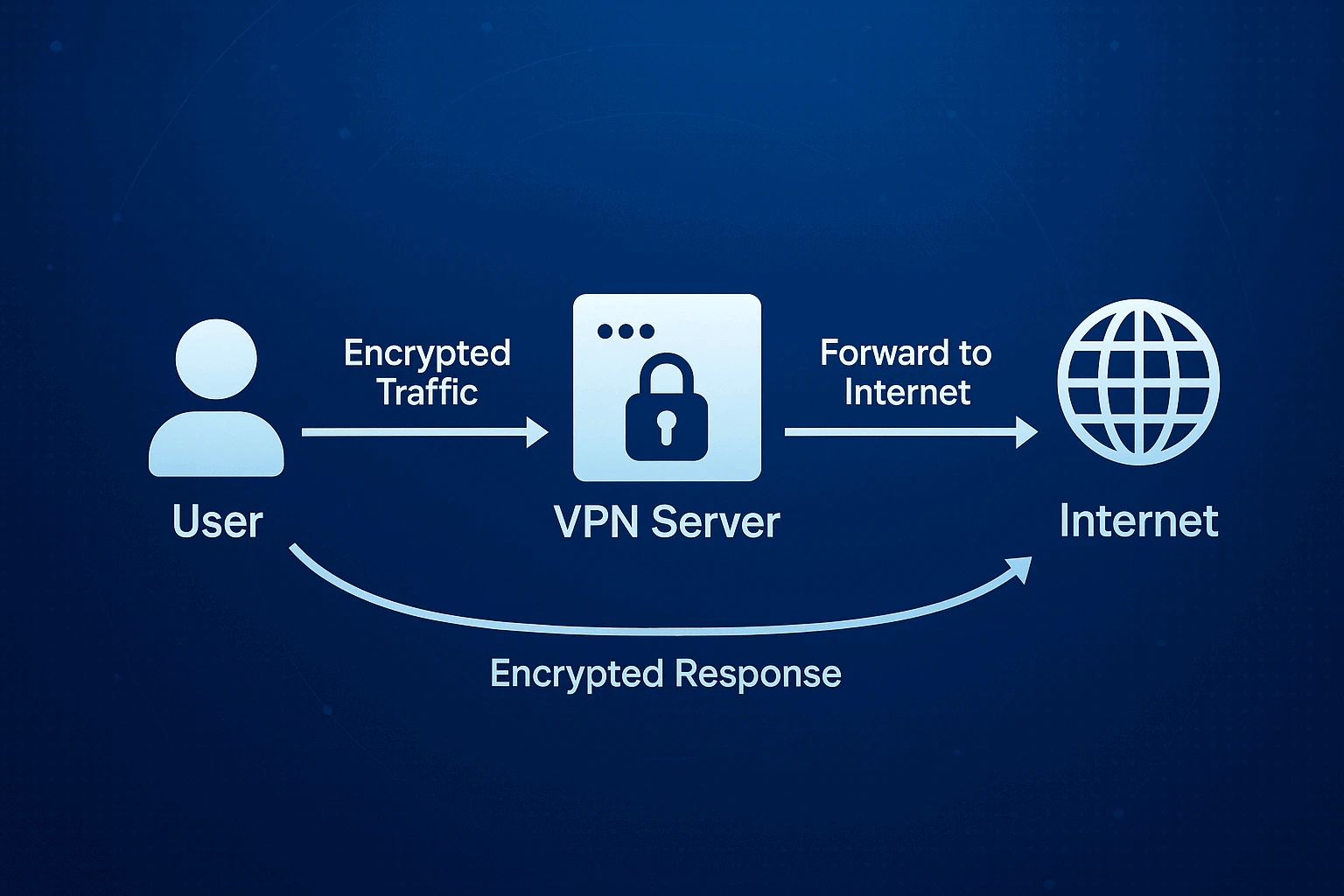
VPN builds an encrypted channel between your device and the provider's server. All traffic goes through this protected route, and it's impossible to intercept or read it with someone else's eyes.
Simple analogy. You need to send a valuable package. Regular mail is risky, they might open it or lose it. You order an armored van with guards that will deliver the cargo directly to the recipient. Nobody will know the contents, nobody will track the sender. VPN works on the same principle with your data.
VPN encrypts everything: browser, messengers, program updates, background processes. The real IP is hidden, instead the VPN server's address shows. This protection is especially important in public Wi-Fi and doesn't let the provider track your actions.
Types of VPN
- Remote Access VPN
Connects individual users to corporate network through the internet. You install the client program, hit the connection button, get access to work systems. Popular with remote workers and freelancers.
- Site-to-Site VPN
Connects entire office networks to each other. Doesn't require installing software on every computer, everything is configured on routers. Used for connecting company branches.
- OpenVPN
Open protocol with flexible security settings. Supports a bunch of authentication and encryption methods. Works practically everywhere, from Windows to routers.
- WireGuard
Fresh protocol tailored for speed and simplicity. Less code equals fewer vulnerabilities. Encrypts no worse than old protocols but works noticeably faster.
The question of data protection shows the main differences between VPN and proxy especially clearly.
- Encryption
Proxy transmits data as is, without encryption. SOCKS5 supports authorization, but the traffic itself goes in plain text. The proxy owner can technically see everything you transmit.
VPN uses powerful algorithms like AES-256 for packing data. Even if someone catches packets, decrypting them without the key is unreal. Your provider sees only mush from encrypted data, not which sites you're really visiting.
- Protected Data
Proxy masks IP only for one program. DNS queries can go past the proxy directly to the provider, revealing your intentions. Other applications on the computer work with the regular address.
VPN covers the entire device completely. All applications, all requests (including DNS) go through the encrypted channel. The provider doesn't even see the names of sites you're opening.
- Logging Policy
Proxy services (especially free ones) often keep detailed logs of your activity. They can sell this data to third parties or hand it over at authorities' request. Transparency of privacy policy is usually low.
VPN with good reputation declares a no-logs policy (absence of logging). Best providers go through independent audits for confirmation. Company jurisdiction plays a role in data storage obligations.
- Leak Protection
Proxy has no protection from DNS leaks, WebRTC and other stuff that exposes your real IP. You'll have to manually configure the browser and system to close the holes.
VPN usually comes right away with protection from DNS and IPv6 leaks. Many have Kill Switch that cuts all internet if VPN suddenly drops.
- Trust in Provider
With proxy you must completely trust the server owner, since they see all unencrypted traffic. With free services it's generally impossible to check reliability.
With VPN you also need trust, but serious providers publish transparency reports, go through audits and sit in countries like Switzerland, Panama or BVI where laws don't require storing data.
In three years of working with arbitrageurs, we noticed an interesting thing. Residential proxies plus anti-detect browser protect ad accounts better than VPN. Facebook and Google detect VPN traffic and look at it sideways. And residential IPs from regular people seem native to them, ban risk drops by 90%. For multi-accounting, the "one proxy per account" scheme with residential addresses tears apart any VPN in effectiveness.
How does a proxy server differ from VPN in speed? This moment is critical for many tasks.
- Encryption and Resources
Proxy drives data with almost no processing. Latency depends mainly on distance to the server. Speed is close to direct connection.
VPN spends processor power on encrypting each packet. Modern chips with hardware acceleration handle it quickly, but on weak hardware the drop is noticeable. Usually speed falls by 10-30% from the original.
- Server Geography
The closer the server, the lower the ping and higher the speed. True for both proxy and VPN. Residential proxies can slow down because they use the donor's home internet, not a powerful data center channel.
- Server Load
Proxy servers with a large number of simultaneous users work slower. Free public proxies are often overloaded to the limit. Paid services control the load and limit the number of connections to one server.
VPN servers during peak hours can also slow down. Normal providers put powerful hardware with channel reserve. Some even show server load so you can choose the least packed one.
- Protocol Type Used
Proxy protocols (HTTP, HTTPS, SOCKS5) have almost no slowdown. SOCKS5 is generally the fastest because it works at a lower level.
VPN protocols have different speeds. OpenVPN slows down due to complexity but it's reliable. WireGuard runs 15-30% faster than OpenVPN with the same protection. IKEv2 is good for mobiles because it reconnects quickly.
- Traffic Routing
Proxy drives data directly from you to the site through one intermediate node. Elementary scheme gives minimum latency.
VPN can spin complex routing schemes. There are providers with Multi-hop (double VPN) – this increases security but speed flies down. Regular VPN adds just one intermediate node.
- Provider Limitations
Proxy providers rarely cut speed on purpose, especially on paid plans. Limitations usually come from real channel bandwidth.
VPN providers on cheap plans can cut speed on purpose so you switch to premium. Free VPNs almost always throttle both speed and traffic.
- Scalability for Tasks
Proxies easily scale for parallel work. You can launch 10, 50, 100 proxies simultaneously for parsing or other tasks. Each proxy works independently at maximum speed.
VPN is limited to one connection per device. For parallel work you need either several devices or virtual machines. Scaling is harder and more expensive.
Impact on Different Task Types:
- Web surfing. Proxy and VPN show similar speed, the difference is almost invisible to the user.
- Streaming video. VPN can slow down on high resolutions (4K). Proxy handles better, but streaming services block proxies more often.
- Online games. Proxy gives lower ping thanks to no encryption. Critical for shooters and MOBA. VPN adds 20-50 ms latency which can be felt.
- File downloads. Proxy provides maximum download speed. VPN reduces speed by 10-30%, but this is often acceptable.
- Data parsing. Proxy is definitely faster and more efficient. You can launch hundreds of parallel streams through different proxies.
The GonzoProxy team parsed data from Amazon through residential proxies and through VPN. Proxies processed a thousand requests 40% faster. The reason is the absence of encryption and the ability to launch several proxies in parallel, distributing the load between them.
VPN or proxy servers to take? There are situations where proxies tear VPN apart on all fronts.
Parsing and Scraping. Need to collect prices from a couple hundred stores or analyze search engine results from different cities. Proxies allow launching a bunch of parallel streams without brakes from encryption. IP rotation doesn't let you catch a ban by request frequency. You pay only for consumed traffic, not for the number of connections.
More details about configuring and choosing proxies for data collection you'll find in our article proxy for parsing.
Ad Accounts. An arbitrageur spins a hundred accounts in Facebook Ads from a dozen countries. The scheme "one account equals one proxy" doesn't let the platform link accounts to each other. Residential IPs with fraud-score below 0.1% look like live users. You can choose a specific city and provider to match the audience. Sticky sessions hold one IP for up to 72 hours without jerking the account with constant changes.
Full guide on working with proxies in arbitrage read in the material proxy for traffic arbitrage and CPA.
Social Media and Multi-accounting. SMM agency manages client profiles on Instagram, Twitter, Reddit. Each account gets its own unique IP. Residential addresses are indistinguishable from regular users. Platforms can't link profiles by IP. Combo with anti-detect browser strengthens masking.
Email Marketing Sending mass mailings through one IP will quickly lead to spam lists. Proxies distribute sending between different addresses, imitating natural behavior. Residential proxies increase email deliverability and reduce the risk of blocking mail accounts.
All the nuances of working with proxies for mailings we covered in the article proxy for email marketing.
Drops and Snippers. A reseller catches limited sneakers or tickets through bots. Proxies bypass store limits on purchases from one address. Residential IPs seem like regular buyers to the store. Low ping decides whether you'll complete the order before competitors. IP from the store's city increases trust from antifraud systems.
What's better VPN or proxy? VPN wins in other scenarios.
- Public Wi-Fi. You work from a cafe, airport or coworking space. VPN encryption protects passwords and payment data from interception. "Man in the middle" attacks become useless. The network admin doesn't see what you're doing.
- Censorship and Blocks. You're in a country where half the internet is blocked. VPN hides the fact of visiting forbidden resources from the provider and authorities. Deep packet inspection can't figure out encrypted traffic. Advanced protocols bypass even VPN blocks themselves.
- Provider Surveillance. Don't want the provider to know about your every step online and sell this info to advertisers. VPN shows the provider only an encrypted connection to the server. Browsing history stays between you and the VPN provider.
Streaming Services. Want to watch Netflix, Hulu or BBC from another country. Streaming platforms detect proxies better than VPN. Stable VPN speed allows watching video in high quality without freezes. One connection protects the entire device.
Can you combine both technologies? Sometimes it gives bonuses, but more often creates problems.
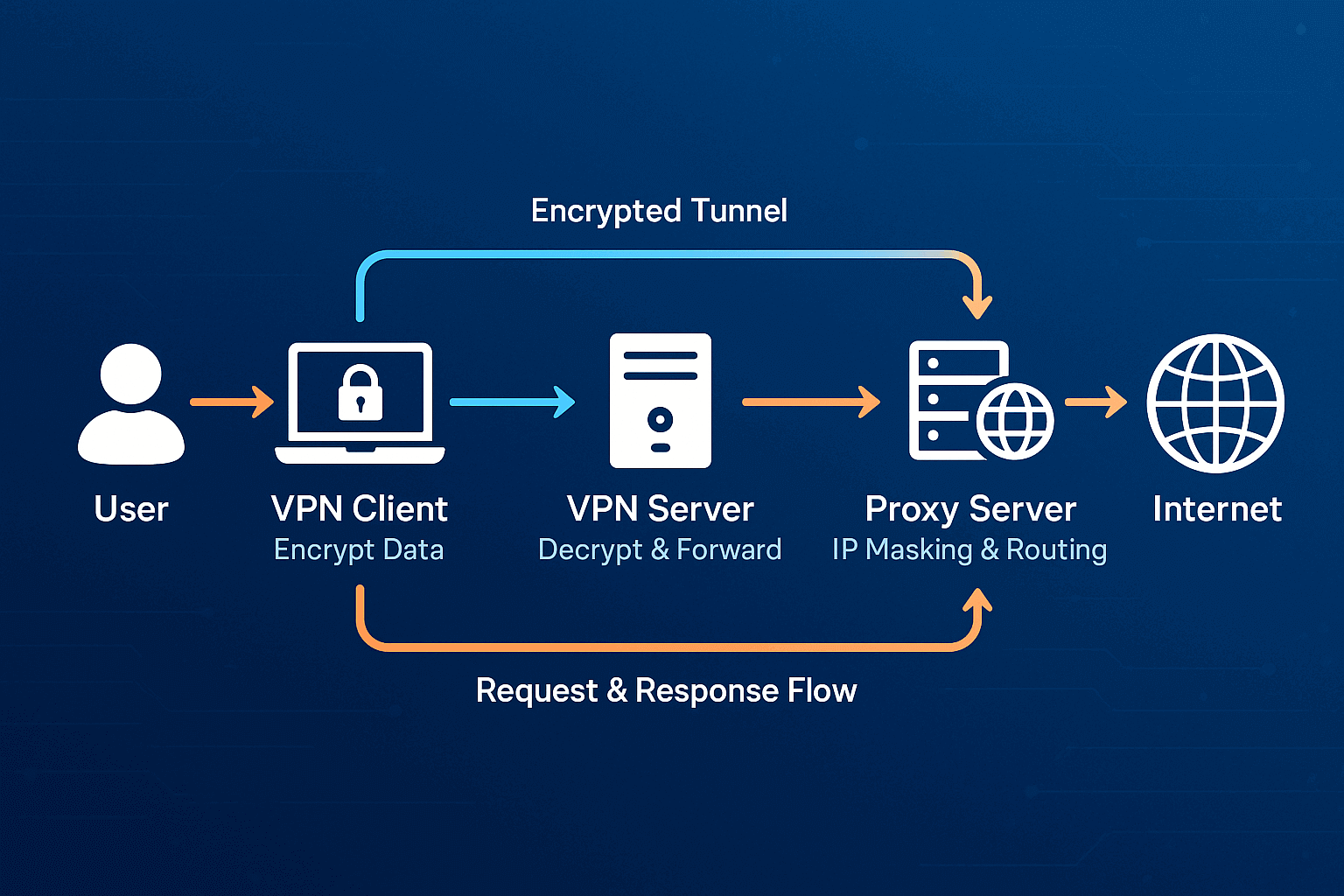
How does the combo work? Traffic first goes through the VPN tunnel to the VPN server. The VPN server decrypts the data and sends it to the proxy. The proxy forwards the request to the final site. The response returns through the same chain backwards.
Pros: The VPN provider doesn't know which sites you visit (sees only the proxy). The proxy doesn't know your real IP (sees only VPN). The target site sees the proxy IP. You get information separation between services.
Cons: Speed drops drastically due to double routing. Additional nodes add latency. This scheme doesn't work for tasks where you need quick work.
Verdict: For 99% of tasks this construction is excessive. One technology is enough. For advertising, parsing or multi-accounting take quality residential proxies. For protecting the whole device install VPN.
Many people make typical screw-ups when choosing between these tools.
Free Services for Serious Business
Trusting free proxies or VPN for working with ad accounts or confidential info is dangerous. Free services make money selling logs of your traffic. IPs from free pools are already in banlists of most platforms. Unstable work threatens loss of accounts.
Wrong IP Type
Taking datacenter proxies for Facebook Ads or Instagram is suicidal. These platforms instantly detect server addresses. High fraud-score leads to instant bans. Accounts constantly require verification with selfie and passport.
One IP for a Bunch of Accounts
Saving on proxies when you use one address for several profiles in one service backfires. Platforms link accounts by shared IP in a second. Blocking one drags all the rest. You lose everything at once.
Crooked Geolocation
Using an IP from Brazil for an account with audience in USA is weird. Mismatch between IP geo and profile settings exposes you immediately. Account activity time doesn't match with IP time zone, which looks suspicious.
There are tons of misconceptions around these technologies. Let's go through the main ones.
- Myth: VPN Makes Me Invisible
VPN hides IP but doesn't protect from tracking through cookies, browser fingerprints and behavioral patterns. Complete anonymity requires a whole complex of measures.
- Myth: Free Stuff Works Fine Too
Free services make money selling your data, shoving in ads or giving out crappy IPs. They categorically don't work for serious business.
- Myth: All Residential Proxies Are the Same
Quality depends on how addresses are obtained. Honest P2P networks like GonzoProxy give clean IPs with natural history. Shady schemes lead to quick bans.
- Myth: Can Spin All Accounts from One Proxy
Direct path to mass bans. The "one proxy per account" rule is critically important for security.
In three years of work, GonzoProxy specialists have seen dozens of misconceptions. The most dangerous is when people think cheap or free solutions will work for commerce. Practice shows otherwise. Low-quality IPs lead to losing 70 to 90 percent of accounts in the first month. Investment in normal residential proxies pays off with absence of bans. Clients who switched from datacenter to residential addresses see blocking drop by 85% on average.
To understand what to take (proxy or VPN), answer yourself a few questions.
- What's the Task?
Protecting the whole device in public networks requires VPN. Managing a hundred accounts in one service is solved by residential proxies. Mass parsing is done through rotational proxies. Bypassing state censorship needs VPN.
Working with ad platforms like Facebook or Google goes more effectively through residential proxies. Watching foreign content on streaming services is more convenient with VPN. Torrents are safer to download through VPN. Buying limited items goes better with residential proxies from the store's city.
- Security Requirements
Full encryption of all traffic is achieved by VPN. If you only need to hide IP, proxy is enough. Working with sensitive data assumes VPN. Importance of low fraud-score points to residential proxies. Protection from interception in public network requires VPN.
- Budget
Protecting one device is more profitable through VPN with fixed subscription. Need for dozens of different IPs is more economically solved by proxies with payment per traffic. Small regular traffic is better to take through proxies where gigabytes don't expire. Constant round-the-clock use justifies unlimited VPN subscription.
- Good Proxy Criteria
IP type determines success. Residential addresses are needed for advertising and social media. Datacenter ones fit for parsing where speed is main thing.
Traffic policy matters. Look for providers where purchased gigabytes don't disappear in a month (like at GonzoProxy). Saves money with uneven work.
Geographic coverage should be wide. Choice of countries, cities and providers without extra charges expands possibilities.
IP quality decides everything. Low fraud-score (less than 0.1%), clean IP history, addresses from live people through P2P – this gives stable work without surprises.
FAQ


Proxy and VPN what's the difference is now clear. These tools solve different problems and complement each other.
Take proxy if you need multiple unique IPs, working with ad platforms, mass data collection, multi-accounting in social media, payment only for actually spent traffic.
Take VPN if you need encryption of all device traffic, protection in public networks, bypassing state blocks, streaming foreign content, comprehensive protection of one device.
Residential proxies outrun datacenter ones and VPN in tasks where traffic naturalness is critical. Up to 90 percent protection from bans is achieved thanks to IPs from regular people. Address quality is more important than price, investment in reliable residential proxies pays off with absence of problems.
What's the difference between proxy and VPN in simple words? Proxy acts as intermediary for individual programs, changing your IP. VPN creates a protected tunnel for the whole device, encrypting all traffic completely.
Try professional residential proxies from GonzoProxy with promo code WELCOME15 to get 15 percent discount on first purchase. Traffic doesn't expire, proxy creation is free, support is round-the-clock in Telegram.
GonzoProxy is an officially registered company (UK LTD) with three years of experience in the market. More than 10 thousand users and over 300 positive reviews confirm the service quality.