Managing multiple online accounts requires sophisticated tools to avoid detection and bans. When running Facebook ad campaigns from different accounts, managing multiple Amazon seller profiles, or conducting market research across regions, platforms track browser fingerprints and IP addresses to identify and link accounts. This leads to mass bans, lost revenue, and destroyed businesses.
VMLogin solves the fingerprint problem by creating unique browser environments for each account. Each profile has distinct characteristics - different screen resolution, timezone, fonts, WebGL parameters, and hundreds of other identifiers. However, without proper proxy configuration, all these profiles still connect from the same IP address, making detection trivial.
This guide demonstrates integration of GonzoProxy residential proxies with VMLogin antidetect browser. The combination provides complete anonymity - unique fingerprints plus real residential IP addresses from actual home users worldwide.

Contents
- Step 1 — Download and Install VMLogin
- Step 2 — Create a New Browser Profile
- Step 3 — Get Your Gonzo Proxy Credentials
- Step 4 — Configure Proxy Settings in VMLogin
- Step 5 — Verify Proxy Connection
- Step 6 — Launch Your Browser Profile
- Step 7 — Optional: Set Up Multiple Profiles / Rotating Sessions
- Step 8 — Troubleshooting Common Issues
- Step 9 — Start Automating with Gonzo Proxy + VMLogin
VMLogin serves as foundation for multi-account infrastructure. The antidetect browser creates isolated browsing environments, preventing websites from linking different accounts through technical fingerprints.
Download VMLogin from official website vmlogin.us. Select version matching your operating system - Windows, macOS, or Linux supported. Free trial provides 3 days full access.
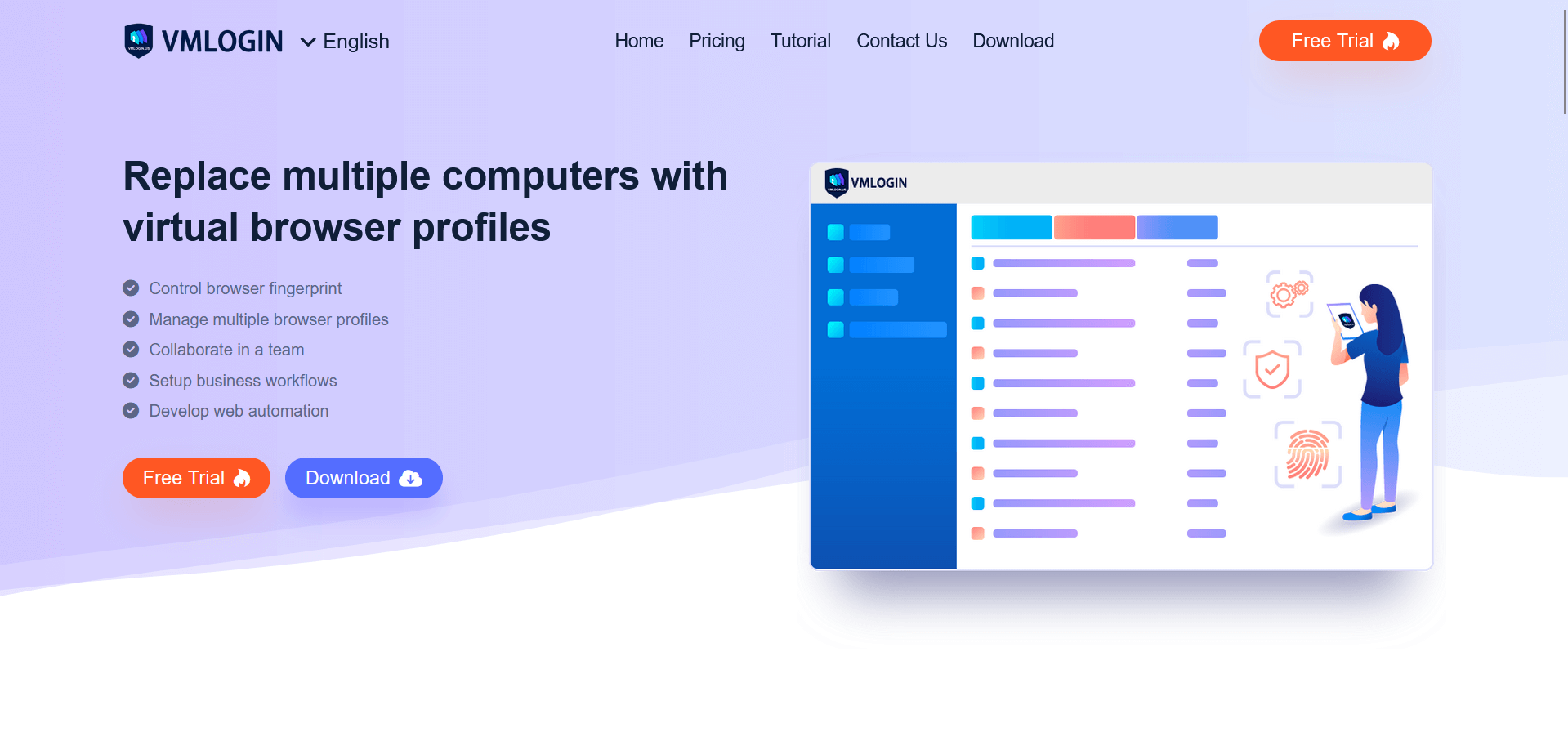
Browser profiles form core of multi-account strategy. Each profile maintains unique fingerprint, cookies, cache, and settings - completely isolated from other profiles.
Click "New Profile" button in VMLogin interface. Configuration window opens with multiple customization options.
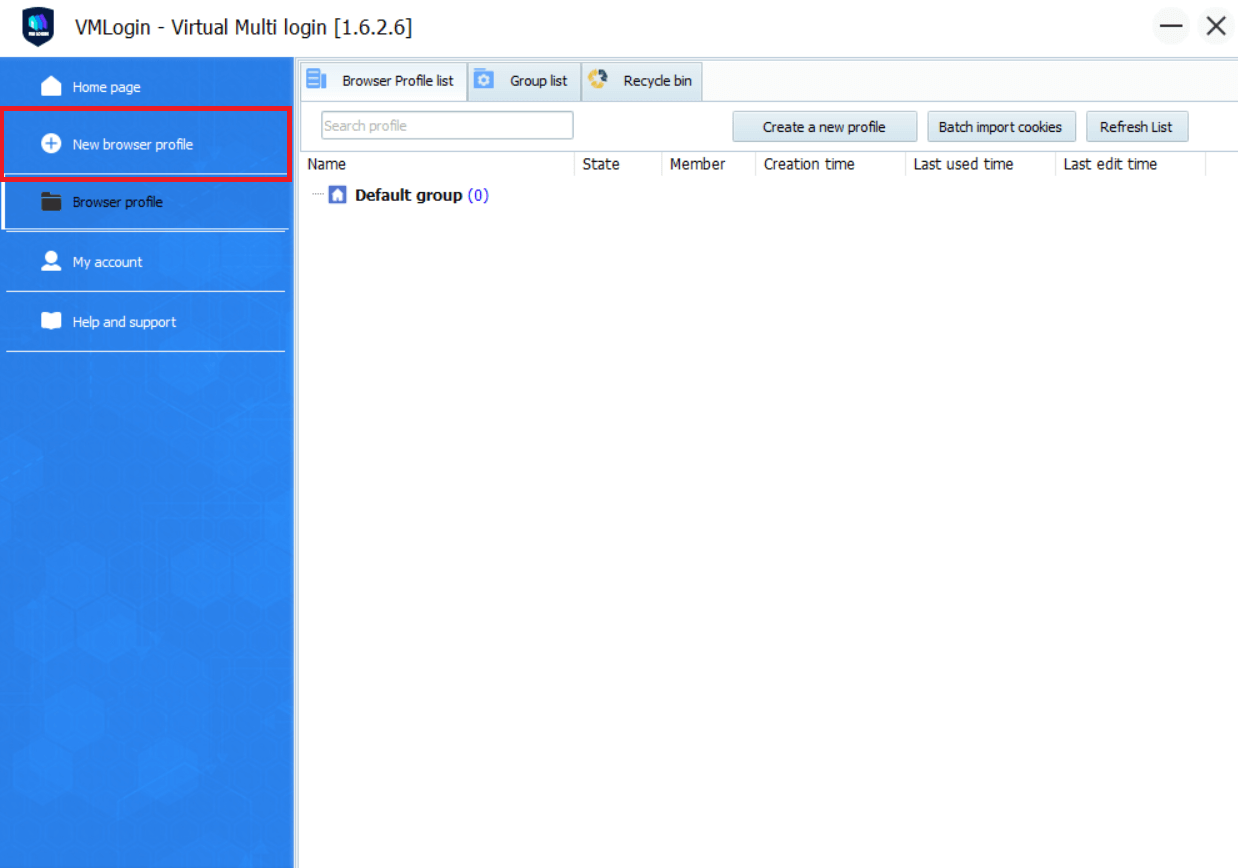
Essential settings for new profile:
- Profile name: Use descriptive naming like "FB_Ads_Cosmetics_US" or "Amazon_Books_Store_01"
- Operating system: Match target audience (Windows, mobile for Instagram)
- Browser version: Recent Chrome/Firefox versions appear most natural
- Screen resolution: Popular resolutions like 1920x1080 or 1366x768
Advanced fingerprint parameters automatically randomized by VMLogin:
- Canvas fingerprint (unique drawing characteristics)
- WebGL properties (graphics rendering details)
- Audio context (sound processing signatures)
- Font list (installed typefaces)
- Hardware concurrency (CPU core count)
- Device memory (RAM amount)
These technical details create unique identity for each profile. Websites cannot detect you're using same computer for different accounts.
Now profiles need different IP addresses. Without proxies, all profiles share your real IP - instant detection guaranteed.
GonzoProxy provides residential IPs from real home internet users. These aren't datacenter servers that websites easily detect - they're actual household connections from people who installed Gonzo's application and share bandwidth for rewards.
Access GonzoProxy dashboard at gonzoproxy.com. Registration takes 30 seconds via Google account - no documents or verification needed.
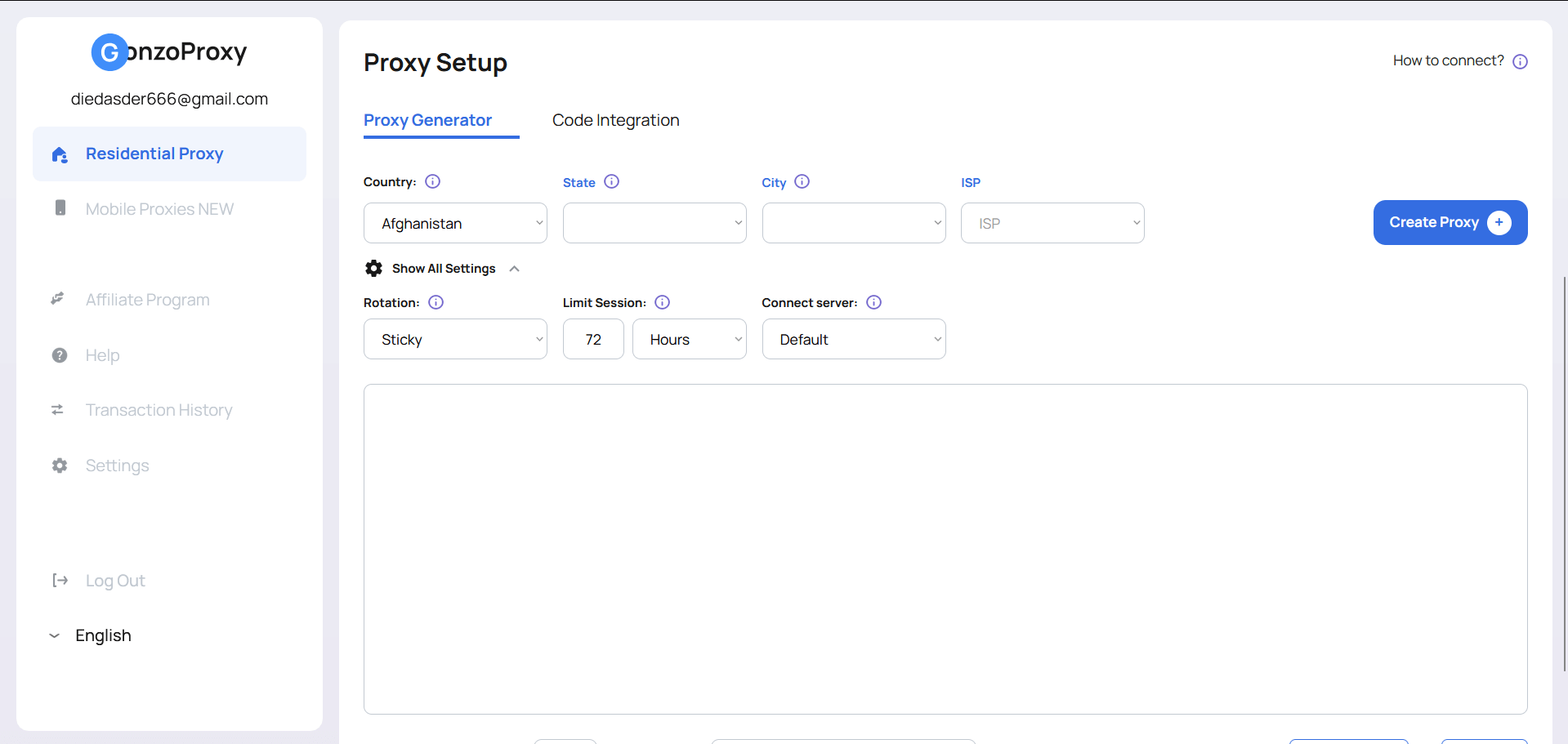
Navigate to "Create Proxy" section. Configuration options:
Geographic targeting: Select country and city for proxy location. Running US Facebook ads? Choose American city. Managing UK Amazon account? Pick British location. Gonzo offers 190+ countries, 2000+ cities.
ISP selection: Advanced feature unique to Gonzo - choose specific internet provider like Comcast, AT&T, Verizon. Most services charge extra for this precision. Gonzo includes it free.
Rotation:
- Sticky: The IP remains stable for a set period — from 30 seconds to 7 days.
- Randomize IP: New IP each request (for web scraping)
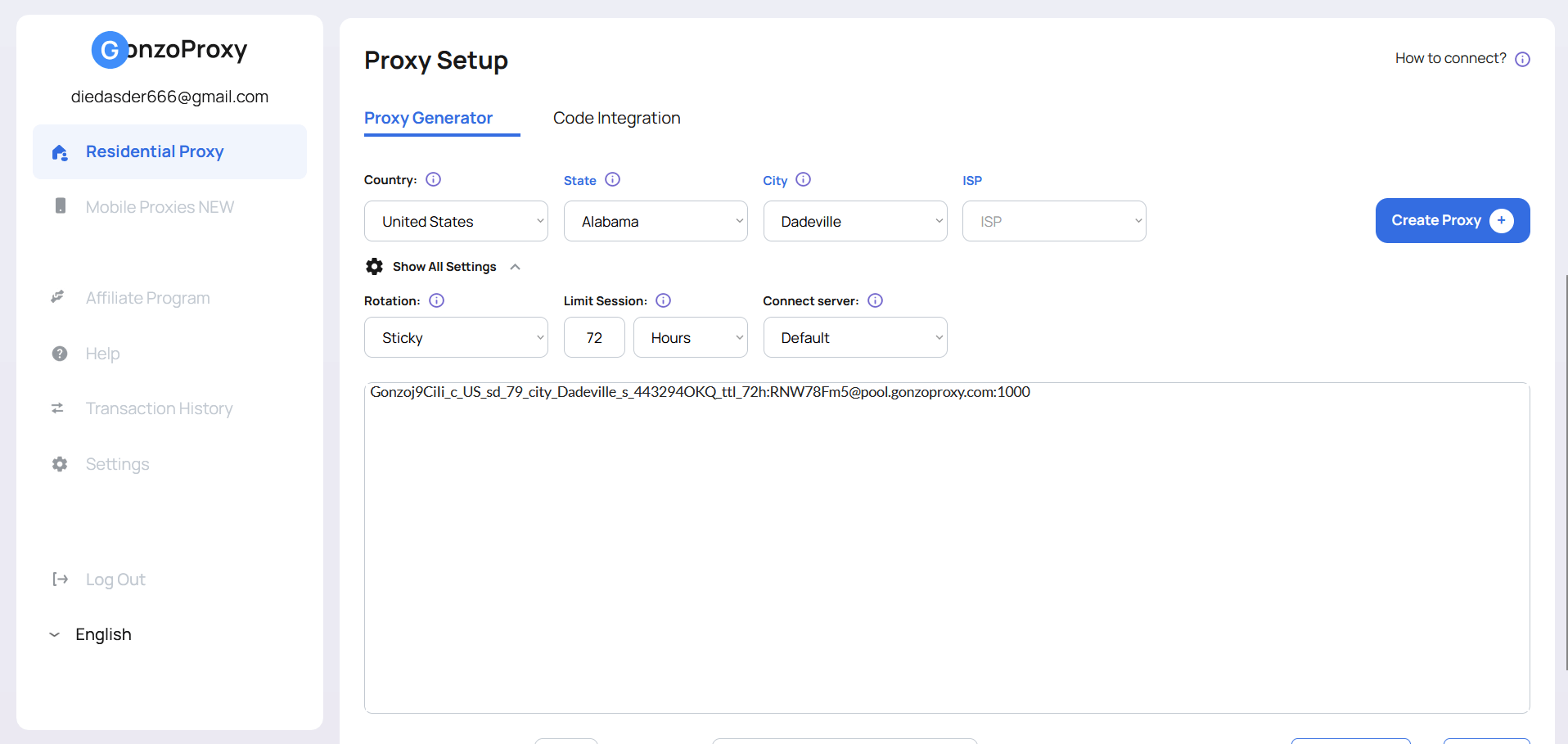
Click "Generate" to receive credentials:
- Host: pool.gonzoproxy.com
- Port: 1000
- Username: Unique identifier
- Password: Unique password
Important: Create separate proxy for each VMLogin profile. Never share proxies between accounts.
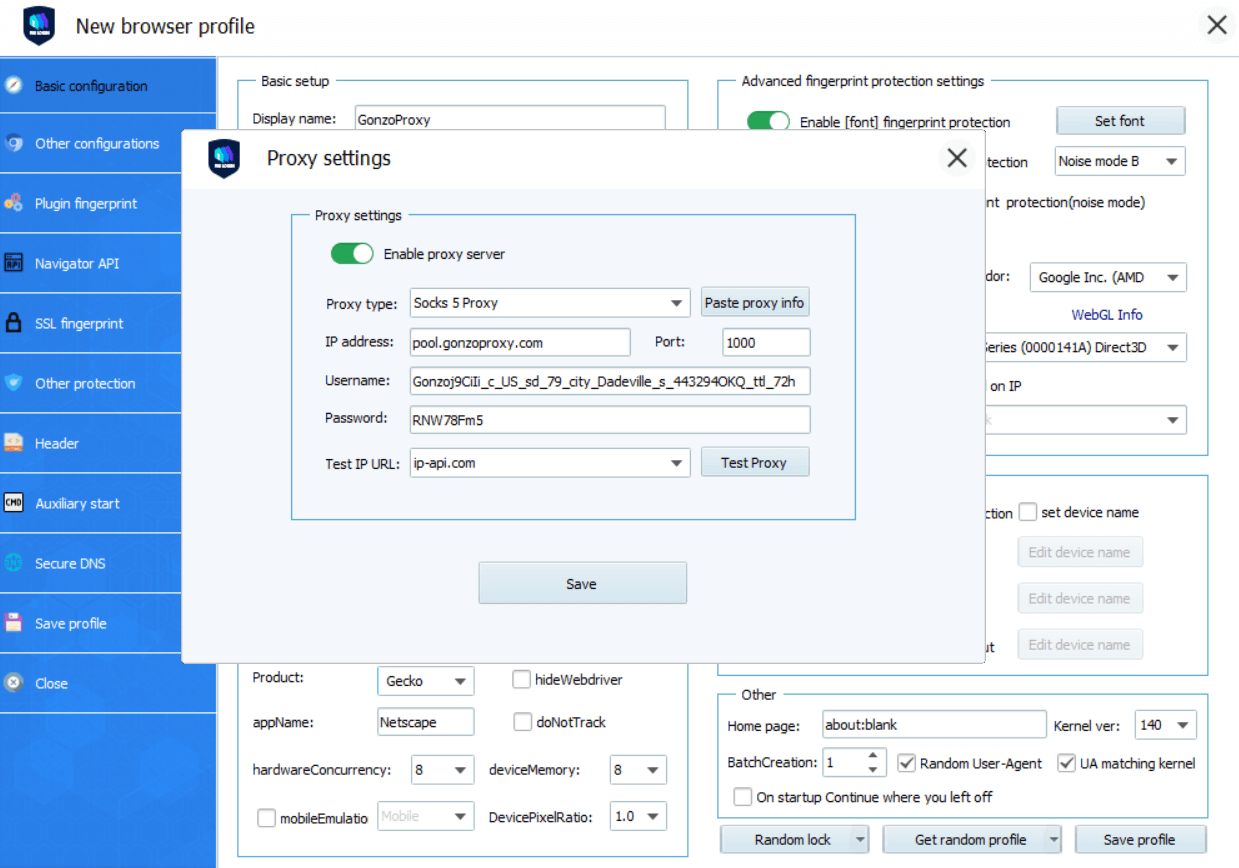
Return to VMLogin profile configuration. Select "Proxy" tab to connect GonzoProxy credentials with browser profile.
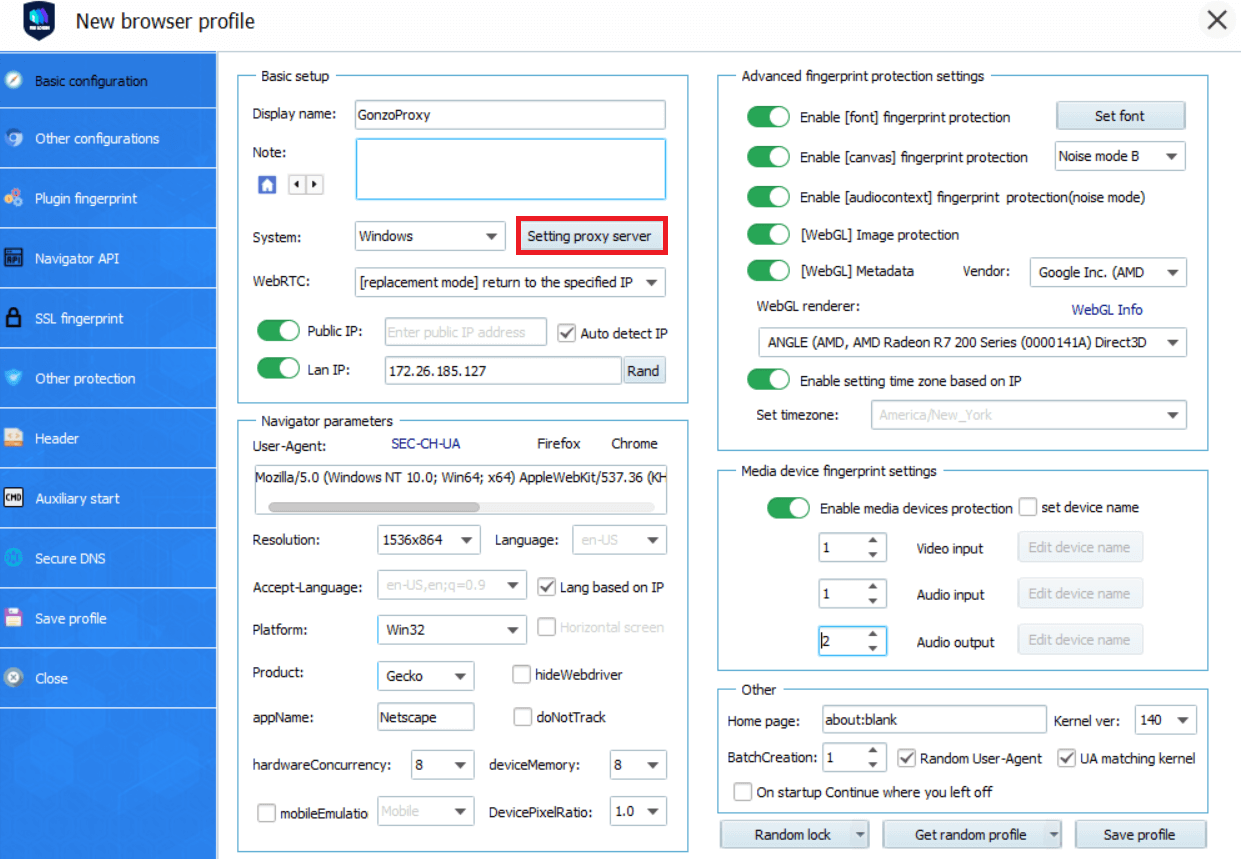
Proxy setup process:
- Choose proxy type: SOCKS5 recommended for best compatibility
- Enter host address from Gonzo dashboard
- Input port number
- Add username and password for authentication
- Enable "Use proxy for DNS" - prevents IP leaks
Testing proxy before use prevents account issues. VMLogin includes connection verification tool.
Click "Check Proxy" button in proxy settings.
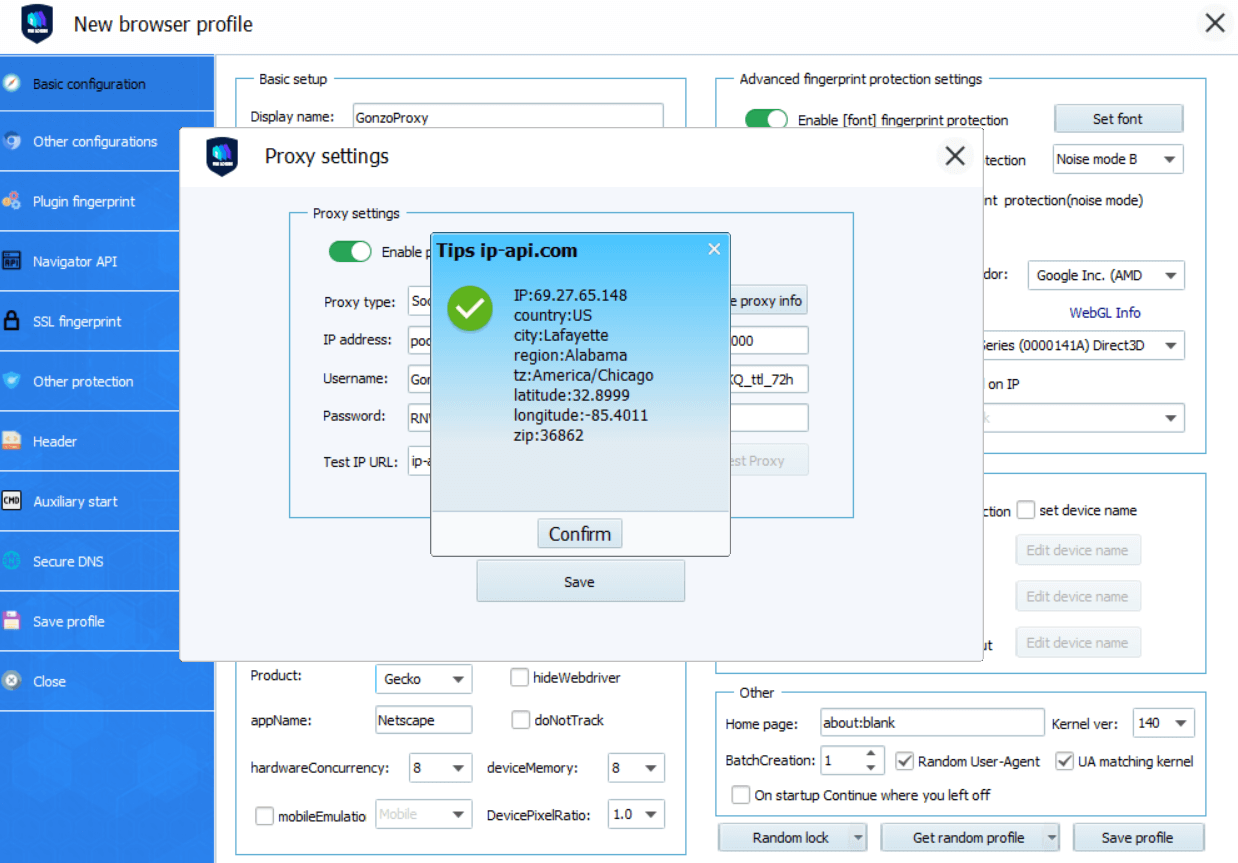
Successful test shows:
- Green checkmark icon
- Detected country/city matching Gonzo selection
- IP address different from your real location
Common test failures and solutions:
- "Connection refused" - Verify credentials in Gonzo dashboard
- "Authentication failed" - Check username/password spelling
- "Timeout error" - Contact support
GonzoProxy maintains 99.6% uptime. Connection problems usually indicate configuration mistakes rather than service issues.
Save configuration. VMLogin stores settings encrypted within profile database.
Configuration complete. Click "Start" button to launch profile.
VMLogin opens new browser window. This isn't regular Chrome or Firefox - it's modified version with altered fingerprint matching profile settings.
Verify setup working correctly:
- Visit whatismyipaddress.com
- Confirm location shows city
- Check timezone matches proxy location
- Test target website (Facebook, Amazon, etc.)
Browser behaves exactly like real user from proxy location. Facebook sees American user with American IP, American timezone, typical American screen resolution. No detection signals triggered.
Keep browser open during work sessions. Closing and reopening maintains same identity - cookies, cache, and settings preserved. Sticky session ensures same IP remains assigned to profile.
Scaling operations requires multiple profile configuration. Common scenarios:
E-commerce multi-store management: Create profile for each Amazon/eBay store. Assign different Gonzo proxy per store. Stores appear operated from different locations by different people.
Social media agency operations: Generate profiles for each client account. Configure proxies matching client target markets. American beauty brand gets US proxy, British fashion brand gets UK proxy.
Affiliate campaign testing: Build profiles for different traffic sources. Test which geographic locations convert best. Compare performance across regions without travel.
Bulk setup process:
- Generate multiple Gonzo proxies (unlimited creation, pay only for traffic used)
- Create corresponding VMLogin profiles
- Import proxy list to VMLogin
- Assign proxies to profiles systematically
Organization critical at scale. Naming convention example:
- Profile: IG_Fitness_NYC_01 → Proxy: Gonzo_US_NYC_01
- Profile: IG_Fitness_LA_02 → Proxy: Gonzo_US_LA_02
For web scraping tasks, configure rotating proxies:
- Set rotation interval in GonzoProxy dashboard
- Enable "New IP per request" for maximum rotation
- Monitor traffic consumption (scraping uses more bandwidth)
Even experienced users encounter technical challenges. Common problems with proven solutions:
Properly configured VMLogin + Gonzo Proxy combination enables powerful automation while avoiding detection.
Real-world applications:
Digital marketing agencies manage 100+ client ad accounts without cross-contamination. Each account operates through unique browser fingerprint and residential IP. Agencies report 90% reduction in account bans after implementing this infrastructure.
E-commerce sellers monitor competitor pricing across regions. Different proxies access different geographic versions of websites. Price differences identified, arbitrage opportunities discovered.
Social media managers schedule content across multiple brand accounts. Automation tools connect through VMLogin API, maintaining separate identities per account. Engagement appears natural, organic growth achieved.
Market researchers collect data from platforms blocking datacenter IPs. Residential proxies bypass anti-scraping systems. Research conducted without interruption or blocking.
Affiliate marketers test campaign performance across geos. Different proxies reveal how offers display in various countries. Optimization based on real regional data.
Key advantages driving success:
Ready to build bulletproof multi-account infrastructure? Start with GonzoProxy , apply promo code START15 for 15% discount on first purchase. Join 10,000+ professionals who stopped worrying about account bans and focused on growing their business.