Google Ads is still one of the most powerful ad platforms out there. But if you’re working in a “sensitive” niche, it can feel like walking through a minefield — bans, payment issues, account freezes… it’s a lot.
The good news? There’s a way to stay under the radar: use virtual cards and reliable proxies to keep your accounts safe and scale your campaigns with confidence.

Contents
- VPN and Proxy: Key Differences
- What is a Proxy Server?
- What is VPN?
- Security and Privacy
- Speed and Performance
- When Should You Use a Proxy Server?
- When Should You Use VPN?
- Is It Worth Using VPN and Proxy Together?
- Mistakes When Choosing Between VPN and Proxy
- Busting Myths About VPN and Proxy
- VPN or Proxy: How to Choose the Right Option?
- FAQ
- Conclusion
- What is a proxy server for Google Chrome and why do you need it
- How proxy works in Chrome browser
- Ways to configure proxy in Google Chrome
- Setting up proxy in Google Chrome through Windows
- Setting up proxy in Google Chrome through macOS
- Setting up proxy for Chrome through extensions
- Setting up proxy in Chrome on Android
- Setting up proxy in Chrome on iPhone and iPad
- Connection check and speed test
- Typical errors when working with proxy in Chrome
- FAQ
- Conclusion
- Why you need proxies for Reddit
- Why Reddit might be blocked
- What restrictions does Reddit have
- Who needs proxies and how they help
- What you can do with proxies for Reddit
- How to choose the right type of proxy for Reddit
- Proxy vs VPN for Reddit
- How to set up and use proxies for Reddit
- Top proxy providers for Reddit in 2025
- Common problems and solutions
- Practical use case scenarios
- FAQ
- Conclusion
- Why LinkedIn requires using proxies
- How proxies help in working with LinkedIn tools
- Types of proxies for LinkedIn and selection criteria
- 10 best proxy providers for LinkedIn
- Setting up and using proxies
- Tips for safe LinkedIn outreach scaling
- FAQ
- Conclusion: how to build a stable system for working with LinkedIn through proxies
- How Amazon detects and blocks proxies
- Benefits of using proxies for Amazon
- Which proxy types work best for Amazon
- Best residential proxy providers for Amazon (2025)
- Key features of a good Amazon proxy provider
- How to set up a proxy for Amazon
- Common problems when working with proxies on Amazon
- How to use Amazon proxies for different tasks
- Best practices for safe Amazon proxy usage
- FAQ
- Conclusion – choose stability, not quantity
- Step 1 — Download and Install VMLogin
- Step 2 — Create a New Browser Profile
- Step 3 — Get Your Gonzo Proxy Credentials
- Step 4 — Configure Proxy Settings in VMLogin
- Step 5 — Verify Proxy Connection
- Step 6 — Launch Your Browser Profile
- Step 7 — Optional: Set Up Multiple Profiles / Rotating Sessions
- Step 8 — Troubleshooting Common Issues
- Step 9 — Start Automating with Gonzo Proxy + VMLogin
- What is an anonymizer in simple terms
- How anonymizers differ from proxies and VPNs
- How an anonymizer works
- Types of anonymizers and anonymity levels
- How to format proxies for working with anonymizers
- How to use an anonymizer to access blocked sites
- Advantages and risks of using anonymizers
- How to choose an anonymizer or proxy for your tasks
- FAQ
- Conclusion
- How to sell quickly and effectively on Avito
- What is mass posting on Avito and why you need it
- Manual and automated mass posting
- Multi-accounting: how to manage multiple accounts on Avito
- Step-by-step launch plan
- How not to get banned with mass posting and multi-accounting
- Mass posting vs alternative sales methods
- FAQ
- Conclusion
- What Is a Proxy for Discord?
- Why You Should Use Proxies on Discord
- How to Use a Proxy on Discord
- Testing and Monitoring Proxy Performance
- Scenarios Where Discord Proxies Help
- Best Practices and Safety Tips
- Why Choose Residential Proxies for Discor
- Common Problems and Troubleshooting
- FAQ
- Final Thoughts — Keep Your Discord Setup Secure and Efficient
- Why TikTok gets blocked and doesn't always work with VPN
- How proxies and VPN differ for TikTok
- When it's better to choose VPN for TikTok
- When it's better to choose proxy for TikTok
- How to set up proxy for TikTok (short instruction)
- Risks and precautions when working with TikTok through VPN and proxies
- FAQ
- Conclusion
- What does transparent proxy mean
- How transparent proxy works in a real network
- Spheres of application for "invisible" proxy
- Advantages and disadvantages of transparent proxy
- Setting up transparent proxy: step by step
- Are transparent proxies secure
- Popular solutions for transparent proxy setup
- Checklist for working with transparent proxies
- FAQ
- Conclusion
- Why proxies are a must for Dolphin Anty
- Types of proxies you can connect to Dolphin
- Rotating vs Static
- Step-by-Step: How to Add a Proxy in Dolphin Anty
- Common proxy connection errors and fixes
- How to choose reliable proxies for Dolphin Anty
- Tips for optimizing costs
- Practical cases of using Dolphin Anty with proxies
- FAQ
- Final thoughts
- Types of proxies used for parsing
- How to choose proxies for parsing
- Setting up and rotating proxies for parsing
- Technical tricks for bypassing blocks
- Practice: building a proxy pool for parsing
- Metrics and monitoring parsing quality
- Best practices and ready solutions
- FAQ
- Summary: Which proxy to choose for parsing
- How proxies work in traffic arbitrage
- Types of proxies for arbitrage and their features
- What problems do proxies solve in arbitrage
- Top proxy providers for arbitrage in 2025
- Comparison table of proxy providers
- How to pick the right proxies for arbitrage
- How to set up proxies for arbitrage
- Safe proxy usage tips
- FAQ
- Conclusion
- What are residential proxies needed for?
- How do residential proxies work?
- How do residential proxies differ from others?
- Connecting residential proxies from GonzoProxy
- Examples of using GonzoProxy residential proxies in Python
- Pros and cons of residential proxies
- How to check residential proxies
- Common usage errors
- FAQ
- Conclusion
- Why does Facebook often block accounts and cards?
- Why use a virtual card for Facebook Ads?
- Multicards.io — a trusted virtual card service for Meta Ads
- Should you buy or create Facebook ad accounts?
- Why proxies are essential
- What kind of proxies are best for Facebook Ads?
- GonzoProxy — premium residential proxies for Facebook Ads
- How to safely link a virtual card to Facebook Ads
- Final recommendations
- What’s a DePIN farm and why should you care?
- So, what exactly is DePIN?
- Other DePIN projects already killing it
- What do you need to start your DePIN farm?
- How to create profiles and set up the antidetect browser
- How to choose and set up a proxy?
- What about Twitter/X accounts?
- How to get email accounts?
- Before you launch — one last tip!
- How to properly chain your accounts?
- How modern fraud detection systems track violators
- Google Ads: anti-fraud specifics in 2025
- How to tell your proxies aren't working?
- Why most proxies no longer work with ad platforms
- How to select and verify proxies for ad platforms
- Strategy for stable operation with ad platforms
- Conclusion: don't skimp on infrastructure

A virtual card is basically a digital version of a regular bank card — no plastic, no bank visits, just fast and secure online payments.
Here’s why they work great with Google Ads:
🔹 Safer — Your real bank account stays protected
🔹 Easy to replace — If a card gets blocked, you can issue a new one in seconds
🔹 Higher approval rate — Google tends to accept virtual cards more easily
🔹 Scalable — Create multiple cards from the same wallet
🔹 Private — Top-up with crypto, no need for banks or KYC
FlexCard is one of the best virtual card services for advertisers. It offers two card types:
- ADS Cards: For Google Ads, ad networks, SaaS, etc.
- Universal Cards: For general online purchases (no gambling or gas stations)
Why FlexCard?
✅ Works with Google Pay & Apple Pay
✅ Crypto top-up (USDT)
✅ Easy card creation and balance control
🎁 Bonus: Use promo code PROXY to get 10 free virtual cards
👉 flexcard.cards/?utm_source=gonzoproxy_crosspromo
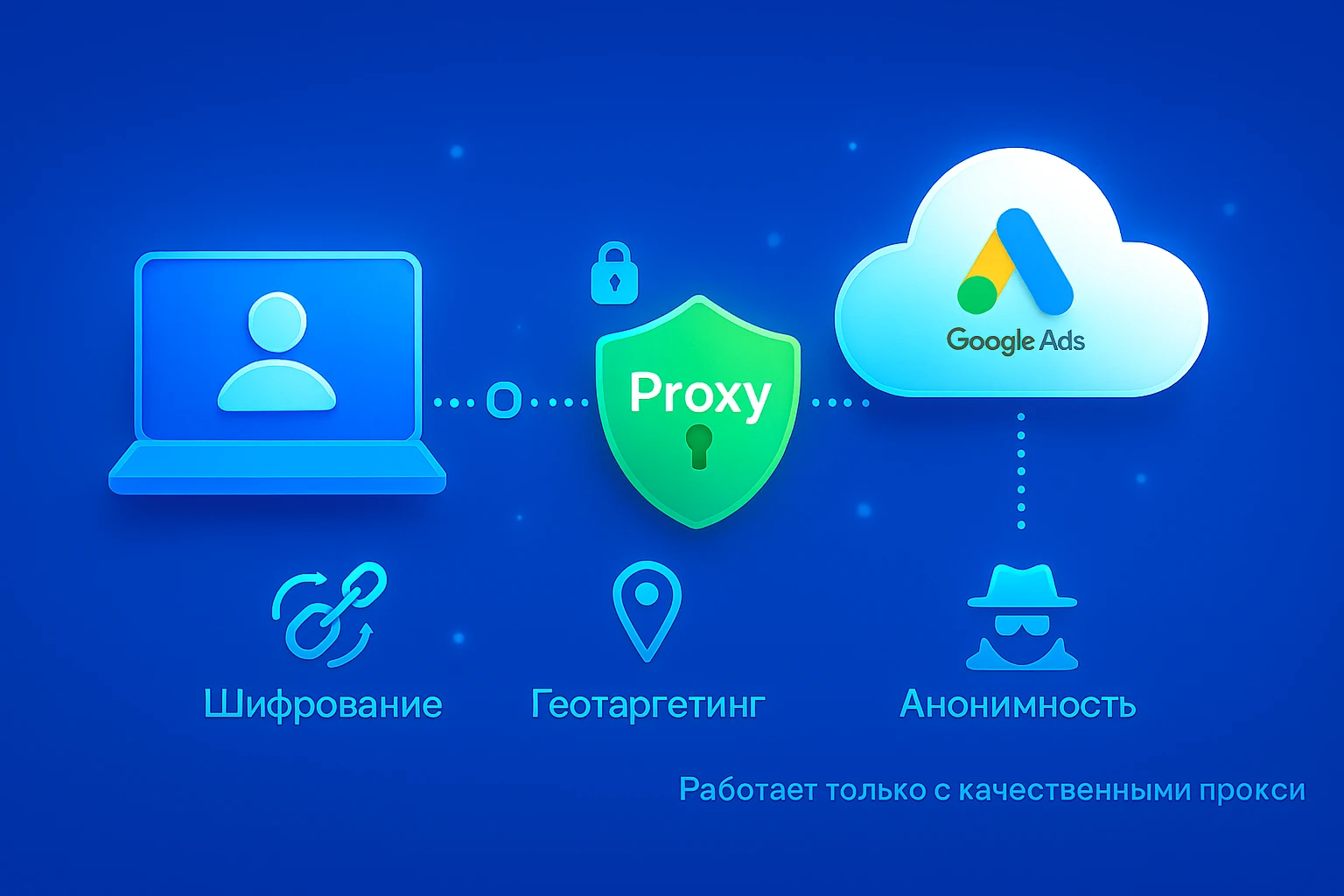
Google watches everything: your IP, your location, your device fingerprint, your behavior. If something looks suspicious — boom, your account’s gone.
Things that trigger bans:
❗️ Frequent IP changes
❗️ Location mismatch
❗️ Weird or duplicate fingerprints
❗️ Sketchy-looking activity
To stay safe, you’ll need residential proxies — and GonzoProxy delivers exactly that:
✅ Real residential IPs
✅ Stable connections that don’t randomly switch
✅ No KYC needed
✅ Supports any geo: US, EU, LATAM, etc.
✅ Works with anti-detect browsers (Dolphin, Indigo, Octo, etc.)
✅ Proven track record — 3+ years on the market
Common mistakes to avoid:
❌ Logging in without a proxy or using free/public ones
❌ Switching IPs and devices too often
❌ Wrong or inconsistent location
❌ Using invalid or duplicate card info
Step-by-step: How to safely run Google Ads using a virtual card + proxy
Step 1: Create a virtual card via FlexCard
1. Sign up at FlexCard
2. Top up your wallet with USDT
3. Choose a BIN and transfer funds to it

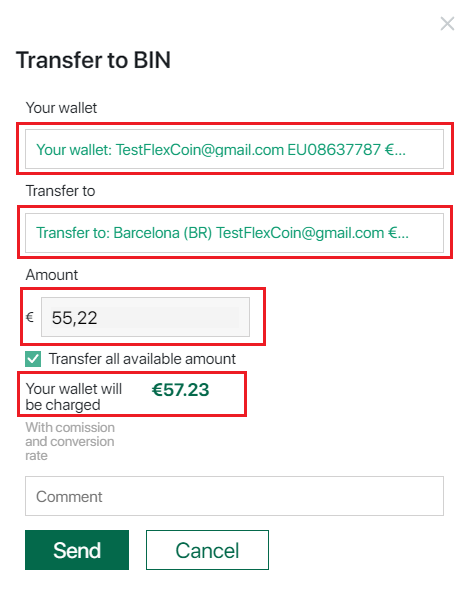
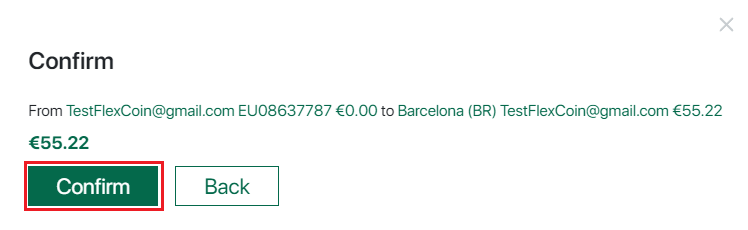
4. After the transfer, issue a virtual card in 1 click
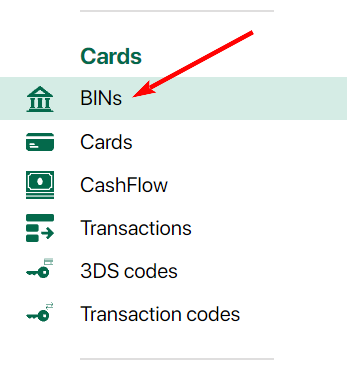
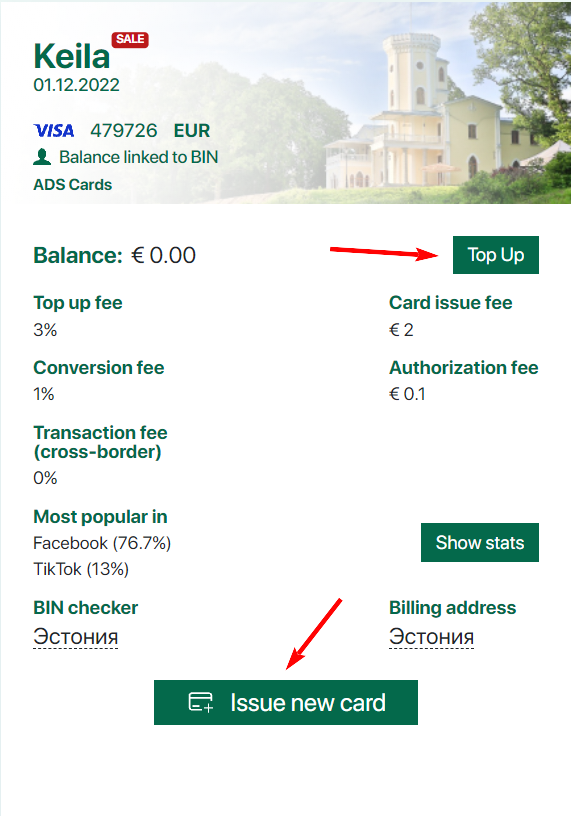
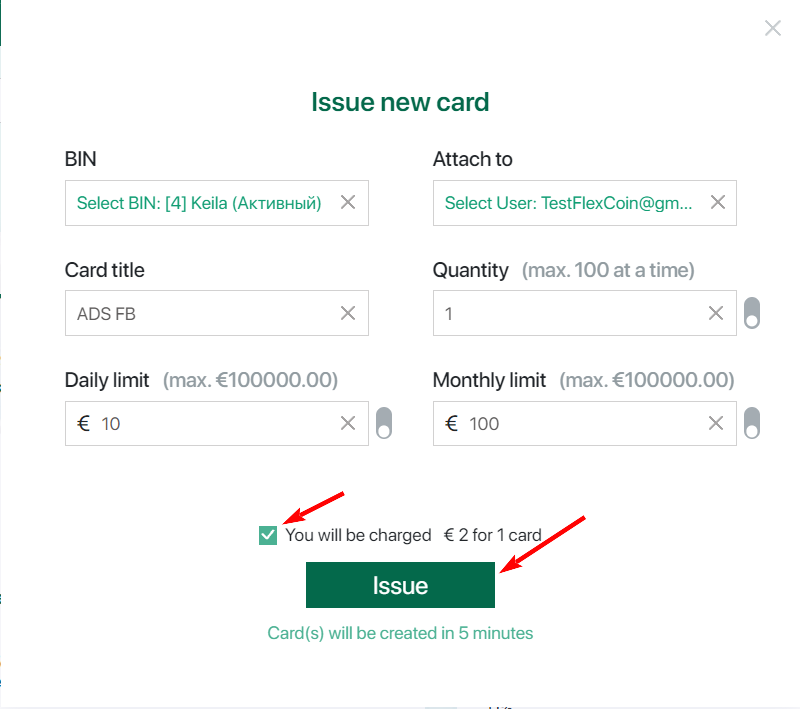
BIN — choose one of the available BINs on which you want to issue the card. (You must have a balance on the BIN you plan to use.)
Attach to — select who the card should be issued for (available to Owner and Manager roles).
Name — give the card a name (for example, to indicate its intended purpose).
Daily limit — set the daily spending limit for the card.
Monthly limit — set the monthly spending limit for the card.
Quantity — the number of cards you want to issue.
Step 2: Set up a residential proxy with GonzoProxy
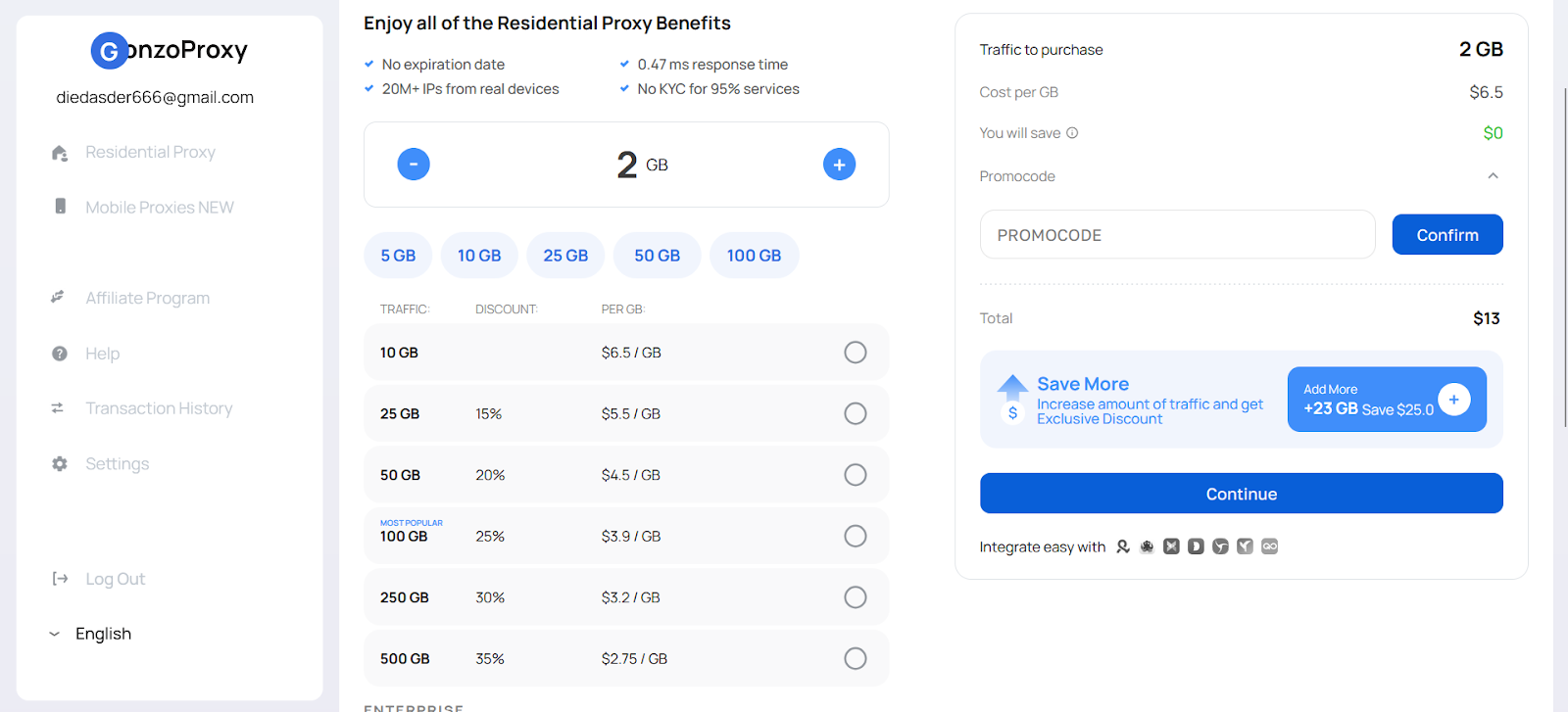
1. Create an account at GonzoProxy and buy traffic (GBs)
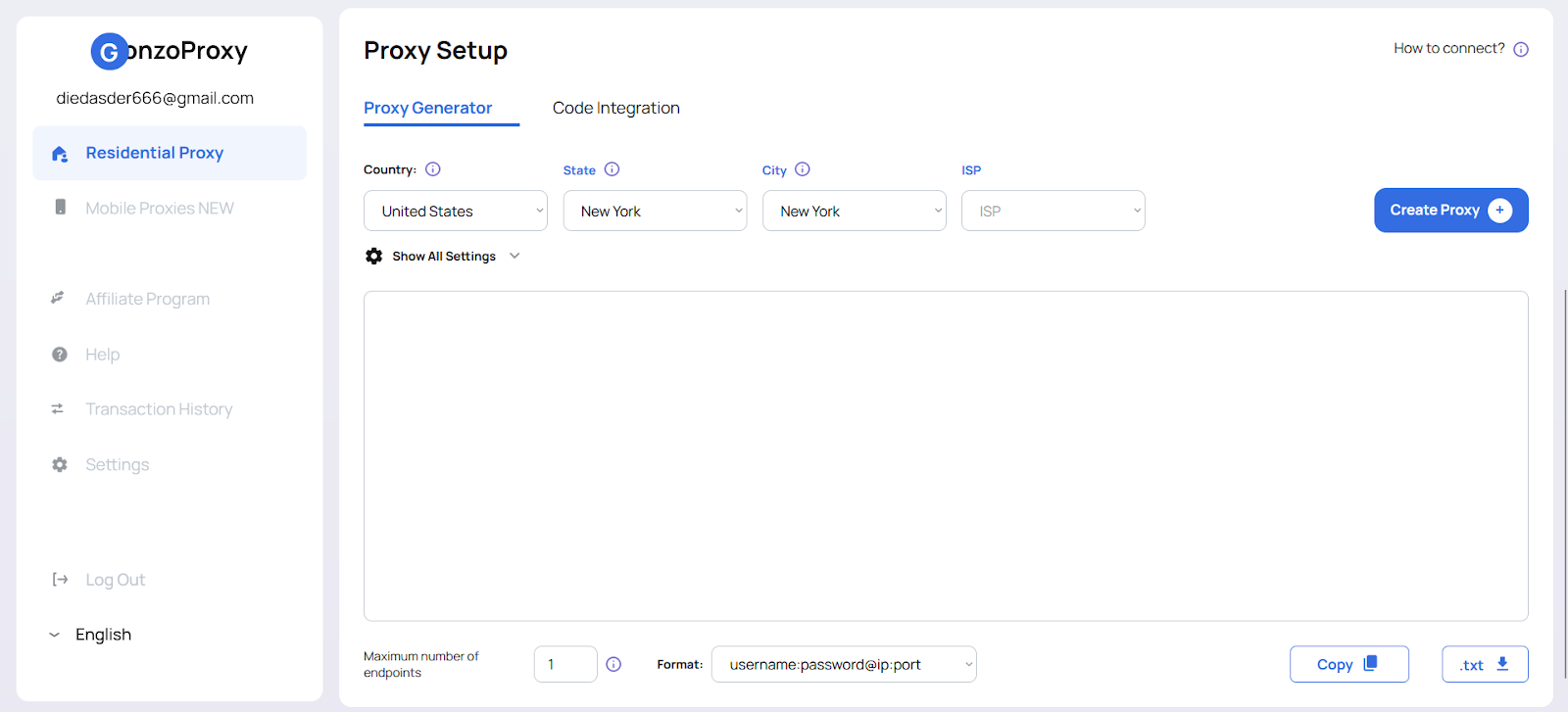
2. Choose your desired geo and generate a proxy
3. Connect the proxy to your anti-detect browser (we’ve covered how in earlier posts)
Step 3: Log in to Google Ads via anti-detect browser
1. Launch the anti-detect browser with your proxy profile
2. Log in to your Google Ads account
Step 4: Add your virtual card to Google Ads
1. Go to the Payments section
2. Add your card info (number, CVV, expiry date)
3. Make sure the billing info matches the card details
Step 5: Run a test payment and scale carefully
1. Start with a small test charge ($10–20)
2. If everything goes through — slowly increase your ad spend
FAQ
Final checklist for safe Google Ads management:
✅ Use virtual cards (FlexCard)
✅ Use stable residential proxies (GonzoProxy)
✅ Always go through an anti-detect browser
✅ Keep everything consistent — IP, geo, payment details
Stick to this setup, and you’ll minimize the risk of bans and be able to run your Google Ads campaigns without the constant stress. Good luck and stay safe out there!