A proxy is a middleman between your device and internet resources — a service that reroutes requests, hides your IP address, and helps bypass restrictions.
What the numbers say
Automated traffic is now the majority of the web: Imperva's 2026 Bad Bot Report puts bots at 53% of all web requests in 2025, against 47% from humans — the first year machines outnumbered people by this margin. Imperva Bad Bot Report 2026.
IPv6 has crossed the halfway mark in practice: Google's own measurement shows about 47% of its users arriving over IPv6 (4 August 2026), peaking above 50% at weekends — the swing itself is a residential signal, since home connections dominate off-hours. APNIC, measuring differently, reports roughly 42% worldwide capability. Google IPv6 Statistics.

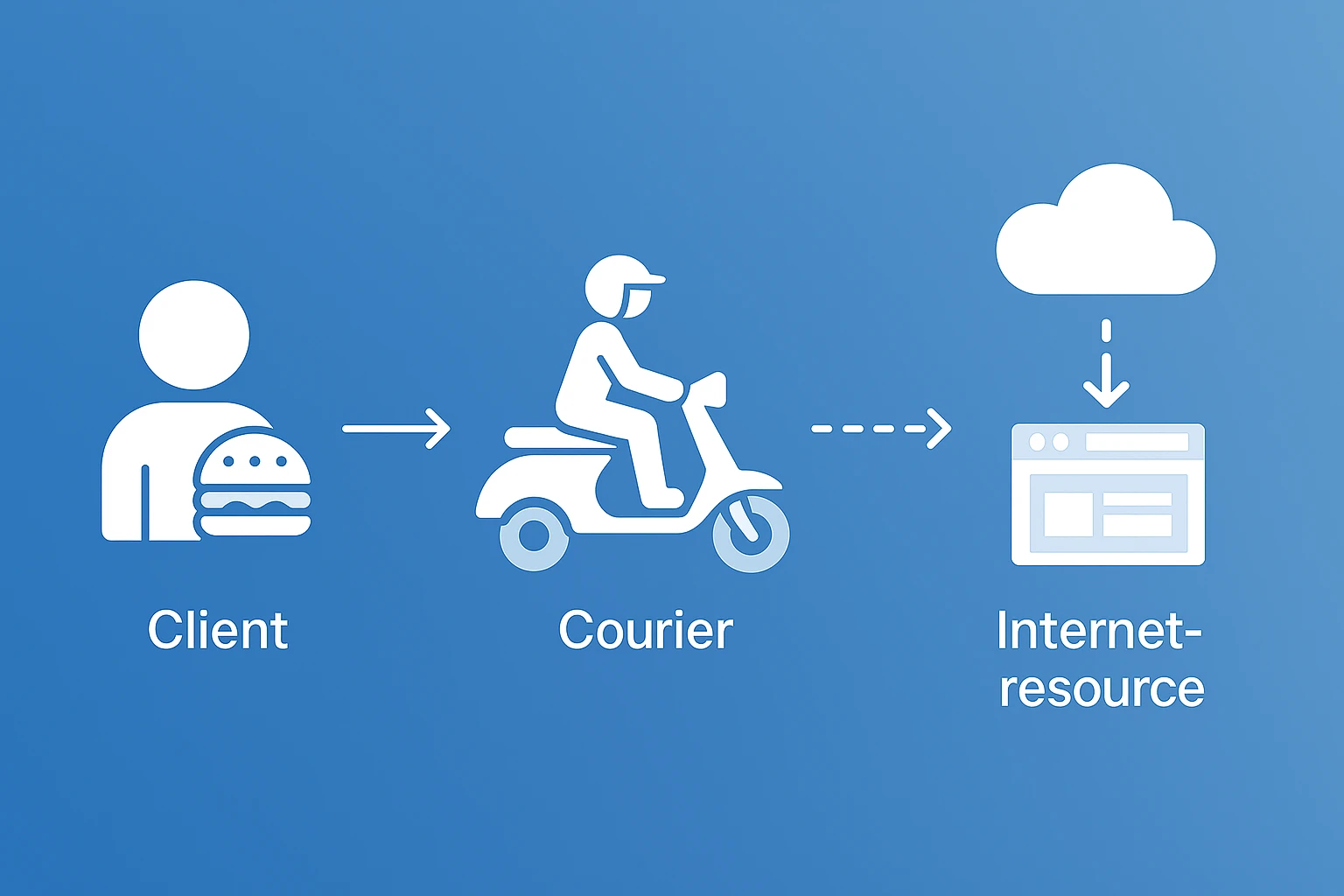
A simple analogy: You = the customer 🍔
Proxy = the delivery guy 🛵
You give the delivery guy an address and task. He goes instead of you, gets the info, brings it back. The one giving out the info doesn’t know who the real requester is — they only see the delivery guy.
We looked at these criteria: Speed – ping, latency, bandwidth. Stability – uptime, how often it fails. Price – rates, flexibility, pay-as-you-go options. Anonymity – types of IPs (residential, mobile, datacenter). Support – 24/7 help, docs, integrations.
Now to the top proxy services.
1. GonzoProxy

GonzoProxy is a next-gen proxy network built on P2P tech. Over 20 million IPs worldwide — real users voluntarily sharing their internet through our app and earning rewards.
✅ This means: 100% legal network Natural “digital footprint” for every IP
Features: – No data expiration – Fully legal & anonymous – Unlimited proxies – No KYC, easy to start – UK company with 3 years experience – 24/7 Telegram support
Pricing: Residential: from $2/GB to $6.5/GB Mobile: unlimited traffic, pay-per-day – from $1.35 to $2.5/day
Speed, support, coverage: Fast, stable connections Helpful support Coverage by country, region, city, ISP
Great for: Ad campaigns – Real IPs reduce blocks by 90% – Fewer checkpoints & selfie verifications on Facebook/Google – Ad accounts stay stable even in risky niches
Account farming & validation – Unique IP for each account from any region – No cross bans when mass registering – Profiles last longer with fewer red flags
Scraping & crawling – No blocks even under heavy load – Auto IP rotation when limited – Access to data blocked for datacenter proxies
Automation – Direct integration with bots & scripts – Stable, no dropouts – Supports antidetect browsers for full user emulation
Multi-accounting – Safely manage dozens or hundreds of profiles – Prevent cross-account bans – Reliable for Facebook, Twitter, Instagram, OnlyFans, etc.
Pros & Cons: ✅ No expired traffic ✅ Clear pricing, big IP pool ✅ Great support ✅ Refunds available ⚠ Few free trials ⚠ May be pricey for low-volume users
👉 Go to GonzoProxy Registration
2. 911 Proxy

Popular SOCKS5 & HTTP(S) residential proxy provider, made for scraping, marketing, ad-checking, and social media.
Features: – Huge network: 70–90M IPs from ~195 countries – Rotating & sticky sessions for SOCKS5 – API support, unlimited sessions & parallel requests
Pricing: From $0.88/GB to $2.70/GB Reasonable rates, but no free trials or refunds
Speed, support, coverage: Average but usable speed API integration, responsive support Global coverage (~195 countries), P2P-based
Best for: Long-term scraping, marketing, price/ad monitoring, multi-sessions
Pros & Cons: ✅ Big IP pool, rotation support
✅ API-ready ⚠ No refund, no trial
⚠ Some offline proxies & malware concerns
⚠ Traffic may be time-limited
3. S5 Proxy (922 S5 Proxy)
Global SOCKS5 provider of residential and ISP proxies with 200M+ IPs in 190+ countries. Focused on speed and uptime.
Features: – Supports dynamic/static ISP proxies, billing by IP or GB – High speeds (20–50 MB/s), 99% uptime, unlimited sessions – API auth, sub-accounts, 800+ tool integrations
Pricing: Per-IP or per-GB plans, from $0.86/GB to $3.3/GB
Speed, support, coverage: 20–50 MB/s; ~99% uptime Decent support; works with GoLogin, Dolphin Anty IPs from 190+ countries, 200M+ residential IPs
Great for: Scraping, geo-content, ad verification, social media
Pros & Cons: ✅ Huge pool, fast and stable
✅ API, sub-accounts, easy integration
⚠ No free trial
⚠ Mixed opinions on support quality
4. AstroProxy
Residential, mobile & datacenter proxies with flexible billing and geo-targeting
Features: – 100+ countries for residential, 55+ for DC – HTTP/SOCKS5, auto-rotation, analytics – KYC/AML, traffic logs
Pricing: Starts from 1GB at ~$7.5
Speed, support, coverage: Average – Europe fast (~1s), US slower (~3s) 24/7 support, known for being reliable and helpful
Best for: Marketing, scraping, bypassing blocks, social media, marketplaces
Pros & Cons: ✅ Reliable, strong geo options
✅ Low entry cost
⚠ Slower than premium services
⚠ Traffic logging
5. Best Proxies

Russian SOCKS provider with auto-delivery and export formats (TXT/CSV/JSON)
Features: – Up to 10,000 online SOCKS proxies – Download lists in many formats – Telegram/X support
Pricing: From 15.4₽ to 99₽/day
Speed, support, coverage: Speed depends on type (ISP/DC) 24/7 Telegram support 300+ global locations
Great for: Scraping, geo-unblocking, competitive intelligence
Pros & Cons: ✅ Wide IP selection & export formats
✅ Many locations & protocols
⚠ Higher entry cost for newbies
⚠ Speed varies by region
6. Luna Proxy
Residential proxies with a large pool (~200M IPs), built for account management
Features: – SOCKS5/HTTP, integrates with Multilogin – Great price-quality balance, overview monitoring
Pricing: $0.85/GB to $3.3/GB
Speed, support, coverage: Fast, but some users report delays or downtime Support responds but delays during negative feedback
Best for: Managing social accounts, many sessions, avoiding bans
Pros & Cons: ✅ Massive pool, good value
✅ Works with multi-profile browsers
⚠ ~95% uptime – some drops
⚠ Not always stable speed
7. Mango Proxy
Residential and mobile proxies with great geo coverage and active support
Features: – 90M+ IPs, 220+ countries, retail & DC proxies – High anonymity, stable connections
Pricing: From $0.5/GB to $5.2/GB
Speed, support, coverage: Excellent speed & uptime based on reviews Quick, responsive support
Great for: Socials (Reddit, TikTok), shopping bots, value scraping
Pros & Cons: ✅ Clean pool, few bans
✅ Wide geo reach
⚠ Some accounts got blocked right after payment
8. Nexus Proxy

Focused on affiliate and ad campaigns using residential & mobile IPs (~7M IPs), no traffic limits
Features: – No time-bound traffic – Works with anti-fraud browsers (Multilogin, etc.) – Refunds up to $1 if claimed within 3 days
Pricing: $4.13/GB to $5.5/GB
Speed, support, coverage: High speed, IP stability Support via Telegram, email, Skype; responds to 100% of complaints Geo-targeting to city level, ~7M IP pool
Great for: Affiliate targeting, social ads, multi-language/regional campaigns
Pros & Cons: ✅ Traffic doesn’t expire
✅ Flexible pricing, geo micro-targeting
⚠ Smaller pool than big players
⚠ Some red tape with refunds
9. Proxy Seller
Residential and datacenter proxies with small packages from just 1 IP
Features: – HTTP/HTTPS/SOCKS, IPv4/IPv6, ISP proxies – 24/7 support, flexible payment
Pricing: $2.2/GB to $3.5/GB
Speed, support, coverage: High speed & reliability Good support, but some IPv6 issues
Great for: Scraping, social media, region-targeted browsing
Pros & Cons: ✅ Many proxy types
✅ 24/7 help, flexible plans
⚠ IPv6 bugs/updates
⚠ Reviews are mixed
10. Shop Proxy

Russian provider of IPv4/IPv6, mobile & service-specific proxies (Avito, Steam, Mail.ru, etc.)
Features: – Private proxies for platforms like Avito, Auto.ru – Supports all protocols (HTTP/SOCKS5), IPv6 – Auto management via dashboard
Pricing: IPv4/IPv6: from ~25₽/IP/month (shared) Mobile: from ~295₽/IP/month Specialized: from ~70₽ (Avito) Discounts up to –50% for 10+
Speed, support, coverage: High speed, stable like a DC provider Support via tickets, email, Telegram; Trustpilot 4⭐ (mixed) Geo: Russia, platform-specific proxies
Great for: Avito/Auto.ru, scraping, multi-accounting, SEO
Pros & Cons: ✅ Platform-specific options
✅ Flexible pricing, mobile/IPv6
⚠ Some reports of wrong proxy type post-payment
⚠ Vague SLA, minor support issues
11. SOAX
UK-based service with a massive pool of residential & mobile proxies, focused on fine-grained geo-targeting
Features: – 155M residential + 33M mobile IPs – Protocols: HTTP/SOCKS5/UDP/QUIC, fixed/dynamic IPs – Geo-targeting: country, city, ISP
Pricing: Subscription: $90/25GB to $1600/800GB/month Pay-as-you-go: $4/GB, trial − 400MB for $1.99
Speed, support, coverage: Great US speed, slower in APAC 24/7 support, personal manager for biz users IPs in 195+ regions, mobile strong in US/India
Great for: Mid-to-large projects: SEO, scraping, social, Telegram bots, region testing
Pros & Cons: ✅ Huge pool, detailed geo-targeting
✅ Top quality & speed in key areas
✅ Support + trial option
⚠ Expensive for light users
⚠ UK-regulated, needs KYC, some mobile IP issues
- Combines speed, ease of use, stability, and legal clarity
- No KYC, traffic doesn’t expire, 24/7 support
- Transparent pricing, refund-friendly
- Perfect for both beginners and pros
- SMM, scraping, unblocking
- Proxy type: Residential (more anonymous), Mobile (great for socials), Datacenter (cheap, fast, easier to detect)
- Speed & uptime: Look for ≥ 99% uptime
- Geo options: Do you need specific countries or cities?
- IP rotation: Auto or manual?
- Payment: Pay-as-you-go, subscription, crypto?
- Support: Live chat, help center, API access?
- Trial: Test before you buy
- Integrations: Scraping/bot support
FAQ


GonzoProxy stands out by combining speed, stability, flexible payments, and a powerful pool of residential/mobile proxies. It’s a go-to choice in 2025 — whether for ads, scraping, or browsing. Sign up and get started now!

![Top 10 Geosurf Alternatives and Competitors [2026]](/assets/696a47ea854a36d67efb9776_16.%20geosurf.webp)