Monday morning, office, coffee not yet drunk. You open YouTube to watch an Excel tutorial. But there's a white page saying "Access blocked by administrator". Though everything worked at home yesterday. And there's no proxy settings in the browser. What the hell?
Congratulations, you've been caught in a transparent proxy net. This technology watches your every click on the internet while remaining completely invisible. How does this magic work and can you bypass it? Let's explain everything now.

Contents
Definition
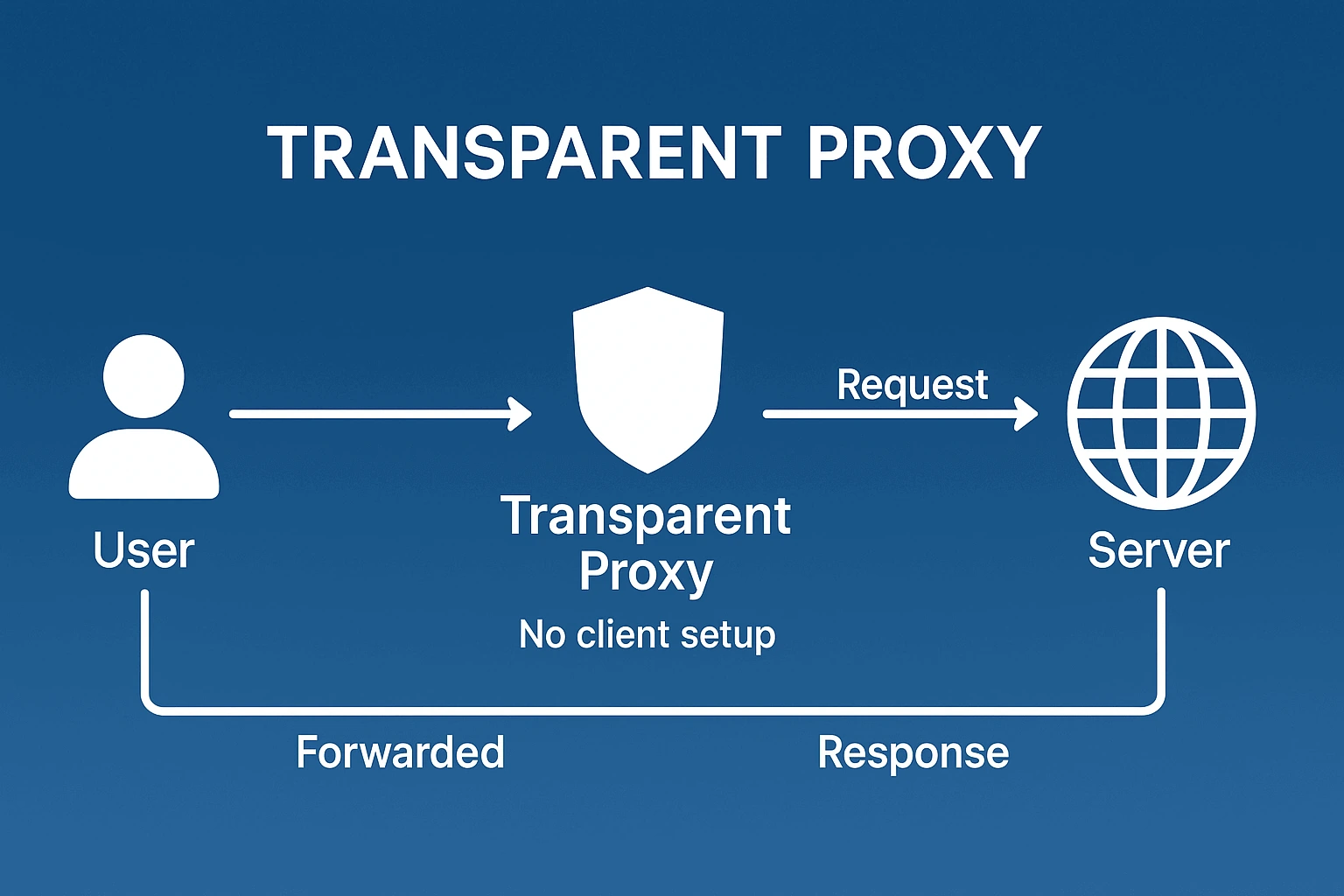
A transparent proxy server works like an invisible man. It intercepts all network traffic automatically, without any settings on your part. The computer is sure it's communicating with the site directly. In reality, there's an intermediary between them that sees and controls everything.
Technical documentation is full of synonyms. Intercepting proxy, forced proxy, inline proxy, transparent proxy. Different words, same essence. A server that forcibly embeds itself between you and the internet. Without asking permission.
How transparent proxy works
Imagine a bus going along its route. Passengers think they're going straight to the final stop. But the driver turns onto a detour through a checkpoint. There they check documents, inspect luggage. And only then let you through. Or turn you back if something's wrong.
Same story with network packets. Computer sends a request "want to go to facebook.com". Router catches this packet and thinks "so-so, port 80, HTTP traffic". Instead of sending it to the internet, the router wraps the packet to a local proxy server. It looks at its lists. Facebook on the blacklist? Return a blocking page. Allowed? Go to Facebook on behalf of the user, grab the page, give it back.
Differences from regular (explicit) proxy
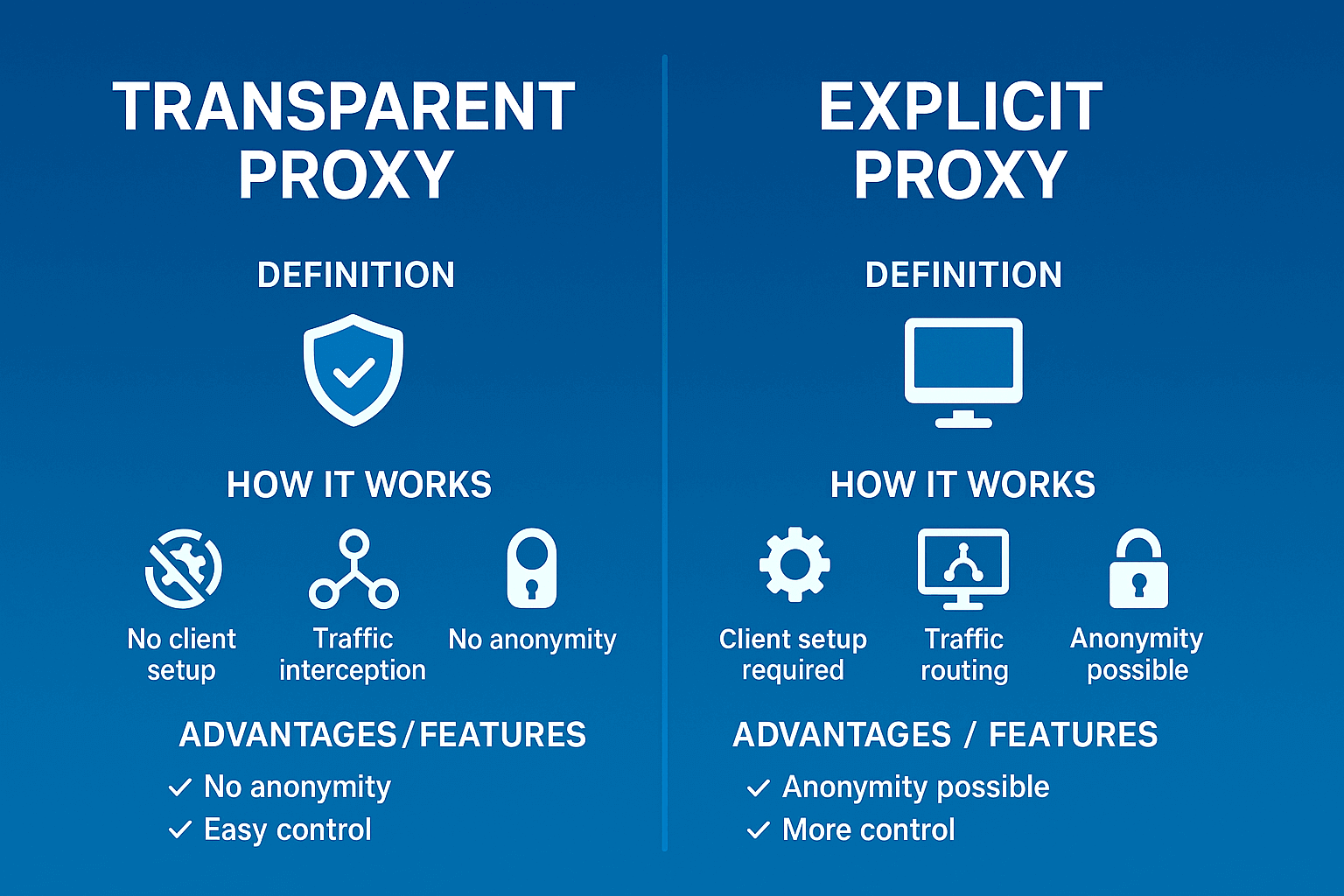
Regular proxy is an honest thing. You entered the address in settings, it works. Fed up? Unchecked the box, working directly. Everything's transparent and clear.
With transparent proxy this trick won't work. No settings. Can't turn it off. Can only bypass through VPN or changing connection point. And the main difference: regular proxy can hide your IP from sites, make you anonymous. Transparent does the opposite. Adds information to every request "look, here's his real IP, here's which proxy it's going through".
How transparent proxy works in a real network
Traffic redirection through NAT/iptables
Linux admins love iptables for flexibility. A couple lines of code and the whole office traffic is under control. Look how elegant:
iptables -t nat -A PREROUTING -s 192.168.1.0/24 -p tcp --dport 80 -j REDIRECT --to-port 3128
iptables -t nat -A PREROUTING -s 192.168.1.0/24 -p tcp --dport 443 -j REDIRECT --to-port 3129
Decoding for the uninitiated. We take all packets from the local network (192.168.1.0/24). If packet goes to port 80 (regular sites) we throw it to port 3128. If to 443 (secure sites) throw to 3129. Squid sits on these ports and figures out what's what.
Processing HTTP and HTTPS requests
HTTP is like a postcard. Everything's visible to the naked eye. Which site was requested, what was entered in the form, what cookies were passed. Admin can not only watch but also change. Cut out ads. Insert their scripts. Replace pictures with kittens (joke, but technically possible).
HTTPS is another story. It's like a letter in a sealed envelope. Proxy only sees the recipient's address (through SNI). What's inside is a secret. Of course admins found a way out. They install their security certificate on all office computers. Now proxy can open envelopes, read, seal back. Called SSL inspection. Questionable from a privacy perspective but works.
Adding headers revealing client IP
Internet standards require honesty. If proxy processed a request, must confess. Special marks are added. Via says "proxy version such-and-such was here". X-Forwarded-For reports "real client IP is this one". X-Real-IP duplicates for reliability.
Turns out a paradox. Proxy is invisible to the user but shouts about itself to every site. This isn't a bug, it's a feature. Transparent proxy's job isn't to hide, but to control.
Corporate networks
Big business loves control. Transparent proxy gives it in full. Statistics for each employee. Who spent how much time on social networks. Who downloads torrents during work hours. Who tries to visit competitor sites.
Plus savings. Company of 500 people. Every month a Windows update comes out weighing 5 gigabytes. Without proxy that's 2.5 terabytes of traffic. With proxy it downloads once, the rest get it from local server. Savings of tens of thousands of rubles monthly.
Educational institutions
Schools and universities are in a difficult position. On one hand, law requires blocking "adult" content. On the other, students must have access to educational resources. On the third, teacher wants to show YouTube video but doesn't want students hanging out there.
Transparent proxy solves everything at once. YouTube blocked for students. Open for teachers. Social networks unavailable during school hours. After classes, please. Flexible, convenient, nobody's offended.
Internet service providers
Your ISP almost certainly uses transparent proxies. Not for surveillance (though who knows). For optimization. Million subscribers watching the "Game of Thrones" finale? Why download a million times? Downloaded once to local server, distribute to everyone from there.
Mobile operators go further. Compress pictures on the fly. JPEG weighed a megabyte, became 200 kilobytes. Quality worse but pages load faster. Subscriber happy with speed, operator saves on traffic.
MikroTik and routers
MikroTik is a network admin's Swiss army knife. Router, firewall, proxy in one box. Perfect for small office. Plugged in, configured in 10 minutes, works for years.
Transparent proxy MikroTik is configured through web interface. No command line, everything on buttons. Want to block Instagram? Three clicks. Need statistics on who goes where? Here it is, with graphs. Limit YouTube to 1 megabit? Please.
Pros
Deployment simplicity is captivating. No need to run around the office, configure each computer. Put server in server room, wrote a couple rules on router. That's it, whole office under the hood. New employee brought their laptop? Automatically falls under same rules.
Caching saves crazy money. Real example. Design studio, 50 people, constantly downloading sources from photo stocks. Without cache internet bill 120 thousand per month. With cache 40 thousand. Proxy paid for itself in first month.
Security on point. Employee clicked on phishing link in email? Proxy blocks. Trying to download cracked Photoshop from sketchy site? Block again. Miners, botnets, trojans cut off on approach.
Cons
Speed can drop several times. Especially if server is weak or incorrectly configured. Saw a case: office of 200 people, proxy on ancient Pentium 4. Sites opened after a minute. Put normal server, problem gone.
Applications glitch and fall off. Bank clients see proxy and panic "what if it's hackers". Skype for business loses connection. Corporate VPN refuses to connect. Have to make exceptions, and each exception is a hole in defense.
Forget about anonymity forever. Transparent proxy is like a surveillance camera. Created to watch, not hide. Your IP, browser, OS, even browser extensions, everything visible to admin and transmitted to sites.
Where better not to use
Need to parse competitor prices? Transparent proxy worst choice. After a dozen requests your IP will fly into ban. Site will see real address and block forever.
Want to see what ads look like in USA? Useless. Transparent proxy doesn't change geolocation. Google will still show Russian ads.
For such tasks specialized services exist. Same GonzoProxy gives access to millions of residential IPs worldwide. Sites see regular users from needed country. No bans, full anonymity.
Say you're a tester checking how client's site looks for users from Brazil. Transparent proxy useless. Geolocation doesn't change.
Server installation (Squid, 3proxy etc.)
Step 1. Server preparation
Take clean Ubuntu 22.04 LTS server. Minimum requirements:

- 2 CPU cores (for 50 users)
- 4 GB RAM (plus 100 MB per user)
- 100 GB SSD for cache
- 2 network cards (one looks to internet, other to local network)
Step 2. System update
sudo apt update
sudo apt upgrade -y
sudo reboot
Step 3. Squid installation
sudo apt install squid squid-common -y
Step 4. Backup original config
sudo cp /etc/squid/squid.conf /etc/squid/squid.conf.original
Step 5. Basic configuration
sudo nano /etc/squid/squid.conf
Find and change lines:
# Allow local network
acl localnet src 192.168.1.0/24
# Enable transparent mode
http_port 3128 transparent
# Configure cache
cache_dir ufs /var/spool/squid 10000 16 256
Step 6. Creating cache directory
sudo squid -z
Step 7. Start and check
sudo systemctl restart squid
sudo systemctl enable squid
sudo systemctl status squid
Configuring iptables for redirection
Step 1. Enabling packet forwarding
sudo nano /etc/sysctl.conf
Add to end of file:
net.ipv4.ip_forward=1
net.ipv6.conf.all.forwarding=1
Apply:
sudo sysctl -p
Step 2. Interface configuration
Check which interfaces exist:
ip addr show
Usually eth0 looks to internet, eth1 to local network.
Step 3. Creating iptables rules
Create script:
sudo nano /etc/iptables-transparent.sh
Insert:
#!/bin/bash
# Clear old rules
iptables -F
iptables -t nat -F
# Allow local traffic
iptables -A INPUT -i lo -j ACCEPT
# Allow established connections
iptables -A INPUT -m state --state ESTABLISHED,RELATED -j ACCEPT
# HTTP redirection
iptables -t nat -A PREROUTING -i eth1 -p tcp --dport 80 -j REDIRECT --to-port 3128
# HTTPS redirection (optional)
iptables -t nat -A PREROUTING -i eth1 -p tcp --dport 443 -j REDIRECT --to-port 3129
# Masquerading for internet access
iptables -t nat -A POSTROUTING -o eth0 -j MASQUERADE
# Allow forwarding
iptables -A FORWARD -i eth1 -o eth0 -j ACCEPT
iptables -A FORWARD -i eth0 -o eth1 -m state --state RELATED,ESTABLISHED -j ACCEPT
Step 4. Applying rules
sudo chmod +x /etc/iptables-transparent.sh
sudo /etc/iptables-transparent.sh
Step 5. Saving rules
sudo apt install iptables-persistent -y
sudo netfilter-persistent save
Example configuration on MikroTik
Step 1. Connecting to router
Download WinBox from mikrotik.com. Connect by MAC address (Neighbors tab).
Step 2. Basic proxy setup
Open IP → Web Proxy:
- Check Enabled box
- Port: 8080
- Cache Administrator: admin@company.local
- Max. Cache Size: Unlimited
- Max. Cache Object Size: 50000 KiB
Click Apply.
Step 3. Redirection setup
Open IP → Firewall → NAT → Add New:
- Chain: dstnat
- Src. Address: 192.168.88.0/24 (your local network)
- Protocol: 6 (tcp)
- Dst. Port: 80
- Action: redirect
- To Ports: 8080
Step 4. Blocking rules
Open IP → Web Proxy → Access → Add New:
- Dst. Host: *.facebook.com
- Action: deny
- Redirect To: 192.168.88.1/blocked.html (blocking page)
Step 5. Cache configuration
In same Web Proxy section:
- Cache On Disk: yes
- Cache Path: disk1/proxy-cache
Step 6. Checking operation
Open IP → Web Proxy → Cache Contents. Cached objects should appear.
Caching and traffic filtering
Cache configuration in Squid
Edit /etc/squid/squid.conf:
# Memory for cache
cache_mem 1024 MB
# Maximum object size in memory
maximum_object_size_in_memory 10 MB
# Disk cache
cache_dir aufs /var/cache/squid 50000 16 256
# Maximum file size
maximum_object_size 4 GB
# Minimum file size
minimum_object_size 0 KB
# Replacement algorithm
cache_replacement_policy heap LFUDA
# Cache refresh rules
# Cache images for a week
refresh_pattern -i \.(gif|png|jpg|jpeg|ico)$ 10080 90% 43200 override-expire ignore-no-cache ignore-no-store ignore-private
# Cache video for a month
refresh_pattern -i \.(mp4|avi|mkv|flv|wmv)$ 43200 90% 432000 override-expire ignore-no-cache ignore-no-store ignore-private
# Archives and executables
refresh_pattern -i \.(iso|deb|rpm|zip|tar|gz|bz2|rar|exe|msi)$ 43200 90% 432000 override-expire ignore-no-cache ignore-no-store ignore-private
# CSS and JS files for a day
refresh_pattern -i \.(css|js)$ 1440 40% 40320
# Windows updates
refresh_pattern windowsupdate.com/.*\.(cab|exe|msi|psf) 4320 100% 43200 override-expire ignore-no-cache
Filtering configuration
Create file with blocked sites:
sudo nano /etc/squid/blocked_sites.txt
Add domains:
.facebook.com
.instagram.com
.tiktok.com
.vk.com
In squid.conf add:
# ACL for blocked sites
acl blocked_sites dstdomain "/etc/squid/blocked_sites.txt"
http_access deny blocked_sites
# Blocking page
deny_info ERR_BLOCKED blocked_sites
Create custom blocking page:
sudo nano /usr/share/squid/errors/en/ERR_BLOCKED
<!DOCTYPE html>
<html>
<head>
<meta charset="utf-8">
<title>Access Blocked</title>
</head>
<body>
<h1>Site %U is blocked</h1>
<p>This resource is blocked by company security policy.</p>
<p>If you think the block is an error, contact IT department.</p>
</body>
</html>
Restart Squid:
sudo systemctl reload squid
Why transparent proxy isn't anonymous
Anonymity and transparent proxy are incompatible like vodka and kefir. Every request screams "here's my real IP, here's my browser, here's my time zone". Via and X-Forwarded-For headers give you away completely.
Want to check? Go to httpbin.org/headers. You'll see everything any site sees. No secrets, full transparency. Ironic for a proxy called transparent.
Limitations when working with HTTPS
HTTPS was invented so nobody could peek. And works great. Proxy only sees where connection is going (domain in SNI). What's transmitted inside is a black box.
Corporations bypass protection roughly but effectively. Install their root certificate on all computers. Now proxy can decrypt any HTTPS traffic. But if this certificate falls into wrong hands, consider all passwords compromised.
Vulnerabilities: traffic substitution, MITM attacks
Hacked transparent proxy is a catastrophe. Hacker gets all organization traffic on a silver platter. Can read, change, forge. Inject viruses into downloaded files. Steal passwords and cookies. Redirect to phishing site copies.
Hard to protect. User can't disable proxy. Can't check its settings. Can only hope admin knows what they're doing and regularly updates software.
How to know if there's transparent proxy in network
Detect in several ways. Simplest - go to 2ip.ru to proxy check section. If it says proxy detected, means admin isn't hiding.
Method for geeks. Open terminal:
traceroute google.com
Look at hops. If there's more than one or two jumps inside local network, probably there's a proxy.
Another option - compare TTL. Ping google.com from home and office. If TTL in office is less, traffic is being processed somewhere additionally.
For tasks where privacy is critical use proven VPN or proxy services. GonzoProxy for example provides residential IPs that security systems can't distinguish from regular users.
Squid as transparent proxy
Grandpa of all proxies, developed since 1996. Can do absolutely everything. Complex ACL, AD integration, detailed logging. Minus - config of thousand lines scares newbies.
OpenWRT as transparent proxy
Turns home router into combine harvester. Installs on any hardware from TP-Link to Asus. Built-in tinyproxy will handle apartment or small office.
ByeDPI and transparent proxy
Fresh development for fighting blocks. Fragments packets to fool provider's DPI. Works as transparent proxy with tricks.
FreeBSD transparent HTTP proxy
For stability connoisseurs. BSD + pf is performance standard. Processes gigabits of traffic without breaking a sweat. Requires experienced admin.
MikroTik and transparent proxy mode
Plug and play solution. Bought a box, plugged wires, clicked in web interface. Works in an hour. Basic functionality but enough for most.
UserGate as transparent proxy
Enterprise solution with Russian roots. FSTEC certificates, integration with RKN registries, compliance with all laws. Costs like a plane but if you need papers - no choice.
- Test on small group before rolling out to everyone.
- Check critical applications, they love to fall off.
- Set up load monitoring, otherwise you'll learn about problems when everything crashes.
- Prepare white-list for VIP and problematic services.
- Make config backups before each change.
- Keep change log, in a month you'll forget what and why you changed.
FAQ


Transparent proxy is powerful tool for corporate network control and optimization. Saves traffic, protects from viruses, increases productivity. But don't expect miracles in terms of anonymity or bypassing blocks.
For professional parsing, automation, geo work tasks need specialized solutions. GonzoProxy offers premium residential proxies indistinguishable from regular users. Use promo code WELCOME15 for 15% discount.