Discord blocked again? Happens all the time. Works perfectly yesterday, today you get "Connection failed" and nothing loads. Maybe it's your office firewall. Maybe school IT locked it down. Or maybe your whole country just decided Discord isn't welcome anymore. Community managers wake up locked out of hundreds of servers. Streamers go live and realize they can't access voice channels. Marketing teams lose contact with their Discord communities overnight.
Getting proxies to actually work means knowing the difference between solutions that hold up and ones that collapse within days. This guide covers real-world scenarios where Discord proxies make the difference.
Why Discord Blocks Connections and Accounts
Discord's anti-abuse systems trigger faster than most people realize. Here's what actually gets you blocked:
Regional IP bans after spam detection or automation. Send 100 messages in 30 seconds across different servers? Their system flags it as bot activity. Doesn't matter if you're manually typing — the pattern looks automated.
Shared datacenter IPs triggering Discord's protection. Discord maintains databases of all datacenter IP ranges (AWS, Google Cloud, DigitalOcean). When you connect from datacenter IP, their system immediately suspects bot activity. Accounts get hit with CAPTCHA loops after just two logins from datacenter proxies.
Frequent logins from different geolocations. Your account was in Moscow yesterday, London today, Tokyo tonight? Discord's fraud detection reads this as either a compromised account or someone running automation. Either way, expect a ban.
Mass account creation from same IP. Try registering 20 Discord accounts from one IP address. You'll make it through maybe three registrations before hitting the wall. Discord caps new accounts per IP to stop spam operations.
Web3 project managers have learned this the hard way. Managing 30 community Discord accounts for different NFT projects from one home IP leads to Discord connecting the dots within two weeks. Every single account gets banned. Access to communities representing $200K in client contracts — lost.

Contents
- VPN and Proxy: Key Differences
- What is a Proxy Server?
- What is VPN?
- Security and Privacy
- Speed and Performance
- When Should You Use a Proxy Server?
- When Should You Use VPN?
- Is It Worth Using VPN and Proxy Together?
- Mistakes When Choosing Between VPN and Proxy
- Busting Myths About VPN and Proxy
- VPN or Proxy: How to Choose the Right Option?
- FAQ
- Conclusion
- What is a proxy server for Google Chrome and why do you need it
- How proxy works in Chrome browser
- Ways to configure proxy in Google Chrome
- Setting up proxy in Google Chrome through Windows
- Setting up proxy in Google Chrome through macOS
- Setting up proxy for Chrome through extensions
- Setting up proxy in Chrome on Android
- Setting up proxy in Chrome on iPhone and iPad
- Connection check and speed test
- Typical errors when working with proxy in Chrome
- FAQ
- Conclusion
- Why you need proxies for Reddit
- Why Reddit might be blocked
- What restrictions does Reddit have
- Who needs proxies and how they help
- What you can do with proxies for Reddit
- How to choose the right type of proxy for Reddit
- Proxy vs VPN for Reddit
- How to set up and use proxies for Reddit
- Top proxy providers for Reddit in 2025
- Common problems and solutions
- Practical use case scenarios
- FAQ
- Conclusion
- Why LinkedIn requires using proxies
- How proxies help in working with LinkedIn tools
- Types of proxies for LinkedIn and selection criteria
- 10 best proxy providers for LinkedIn
- Setting up and using proxies
- Tips for safe LinkedIn outreach scaling
- FAQ
- Conclusion: how to build a stable system for working with LinkedIn through proxies
- How Amazon detects and blocks proxies
- Benefits of using proxies for Amazon
- Which proxy types work best for Amazon
- Best residential proxy providers for Amazon (2025)
- Key features of a good Amazon proxy provider
- How to set up a proxy for Amazon
- Common problems when working with proxies on Amazon
- How to use Amazon proxies for different tasks
- Best practices for safe Amazon proxy usage
- FAQ
- Conclusion – choose stability, not quantity
- Step 1 — Download and Install VMLogin
- Step 2 — Create a New Browser Profile
- Step 3 — Get Your Gonzo Proxy Credentials
- Step 4 — Configure Proxy Settings in VMLogin
- Step 5 — Verify Proxy Connection
- Step 6 — Launch Your Browser Profile
- Step 7 — Optional: Set Up Multiple Profiles / Rotating Sessions
- Step 8 — Troubleshooting Common Issues
- Step 9 — Start Automating with Gonzo Proxy + VMLogin
- What is an anonymizer in simple terms
- How anonymizers differ from proxies and VPNs
- How an anonymizer works
- Types of anonymizers and anonymity levels
- How to format proxies for working with anonymizers
- How to use an anonymizer to access blocked sites
- Advantages and risks of using anonymizers
- How to choose an anonymizer or proxy for your tasks
- FAQ
- Conclusion
- How to sell quickly and effectively on Avito
- What is mass posting on Avito and why you need it
- Manual and automated mass posting
- Multi-accounting: how to manage multiple accounts on Avito
- Step-by-step launch plan
- How not to get banned with mass posting and multi-accounting
- Mass posting vs alternative sales methods
- FAQ
- Conclusion
- What Is a Proxy for Discord?
- Why You Should Use Proxies on Discord
- How to Use a Proxy on Discord
- Testing and Monitoring Proxy Performance
- Scenarios Where Discord Proxies Help
- Best Practices and Safety Tips
- Why Choose Residential Proxies for Discor
- Common Problems and Troubleshooting
- FAQ
- Final Thoughts — Keep Your Discord Setup Secure and Efficient
- Why TikTok gets blocked and doesn't always work with VPN
- How proxies and VPN differ for TikTok
- When it's better to choose VPN for TikTok
- When it's better to choose proxy for TikTok
- How to set up proxy for TikTok (short instruction)
- Risks and precautions when working with TikTok through VPN and proxies
- FAQ
- Conclusion
- What does transparent proxy mean
- How transparent proxy works in a real network
- Spheres of application for "invisible" proxy
- Advantages and disadvantages of transparent proxy
- Setting up transparent proxy: step by step
- Are transparent proxies secure
- Popular solutions for transparent proxy setup
- Checklist for working with transparent proxies
- FAQ
- Conclusion
- Why proxies are a must for Dolphin Anty
- Types of proxies you can connect to Dolphin
- Rotating vs Static
- Step-by-Step: How to Add a Proxy in Dolphin Anty
- Common proxy connection errors and fixes
- How to choose reliable proxies for Dolphin Anty
- Tips for optimizing costs
- Practical cases of using Dolphin Anty with proxies
- FAQ
- Final thoughts
- Types of proxies used for parsing
- How to choose proxies for parsing
- Setting up and rotating proxies for parsing
- Technical tricks for bypassing blocks
- Practice: building a proxy pool for parsing
- Metrics and monitoring parsing quality
- Best practices and ready solutions
- FAQ
- Summary: Which proxy to choose for parsing
- How proxies work in traffic arbitrage
- Types of proxies for arbitrage and their features
- What problems do proxies solve in arbitrage
- Top proxy providers for arbitrage in 2025
- Comparison table of proxy providers
- How to pick the right proxies for arbitrage
- How to set up proxies for arbitrage
- Safe proxy usage tips
- FAQ
- Conclusion
- What are residential proxies needed for?
- How do residential proxies work?
- How do residential proxies differ from others?
- Connecting residential proxies from GonzoProxy
- Examples of using GonzoProxy residential proxies in Python
- Pros and cons of residential proxies
- How to check residential proxies
- Common usage errors
- FAQ
- Conclusion
- Why does Facebook often block accounts and cards?
- Why use a virtual card for Facebook Ads?
- Multicards.io — a trusted virtual card service for Meta Ads
- Should you buy or create Facebook ad accounts?
- Why proxies are essential
- What kind of proxies are best for Facebook Ads?
- GonzoProxy — premium residential proxies for Facebook Ads
- How to safely link a virtual card to Facebook Ads
- Final recommendations
- What’s a DePIN farm and why should you care?
- So, what exactly is DePIN?
- Other DePIN projects already killing it
- What do you need to start your DePIN farm?
- How to create profiles and set up the antidetect browser
- How to choose and set up a proxy?
- What about Twitter/X accounts?
- How to get email accounts?
- Before you launch — one last tip!
- How to properly chain your accounts?
- How modern fraud detection systems track violators
- Google Ads: anti-fraud specifics in 2025
- How to tell your proxies aren't working?
- Why most proxies no longer work with ad platforms
- How to select and verify proxies for ad platforms
- Strategy for stable operation with ad platforms
- Conclusion: don't skimp on infrastructure
A proxy sits between you and Discord's servers. Simple as that. Instead of your computer talking directly to Discord, it talks to the proxy first. The proxy then talks to Discord on your behalf.
The basic flow: User → Proxy (Resident IP) → Discord Server
Discord only sees the proxy's IP address, not yours. This lets you access Discord from restricted networks, manage multiple accounts without cross-contamination, mask your real location, and route through locations with better server connections.
The proxy type determines how Discord perceives your connection. A residential proxy makes you look like a regular home user. A datacenter proxy screams "automation bot." A mobile proxy appears as a smartphone user on cellular data.
Stay Private and Undetectable
Your IP address reveals more than you think. Location down to the city level. Your internet service provider. Device fingerprints. Time zone. Discord collects all of this to build your digital profile.
For streamers with 10K+ audiences, this creates real risks. One determined person finds your IP, traces it to your home address. Now you're dealing with swatting attempts, DDoS attacks during crucial streams, or harassment that spills into real life.
An American streamer had his IP leaked through Discord voice chat. Someone geolocated his address, ordered 50 pizzas to his house, then called SWAT claiming hostages. He nearly got shot during his own livestream.
Proxies hide your actual IP address. Attackers only see the proxy server's location. Want to DDoS? Go ahead and attack the proxy infrastructure — professional providers have DDoS protection built in.
Bypass Regional Restrictions
China blocks Discord completely. Same with UAE, Iran, Turkmenistan. Corporate networks and universities block it to "improve productivity." Company IT departments see all Discord traffic as a distraction.
In Dubai, UAE bans all VoIP services at the government level. Connecting through a German proxy means the local ISP just sees encrypted traffic to a German server. No way to identify it as Discord.
Manage Multiple Accounts Safely
You're promoting an NFT collection. Need active presence on 50 Discord servers. Each server requires 2-3 accounts: main account, moderation account, technical support account. That's 150 profiles total.
Discord's fraud detection isn't stupid. It sees 150 accounts logging in from one IP address. The system flags all of them. Mass ban. Months of community building wiped out.
Solution: One proxy per account. Discord sees 150 different users from different cities. One in Berlin, another in Paris, third in Madrid. No connection between them.
Marketing agencies managing 20 client accounts from their office IP face bans within one week. Loss of access to paid server memberships and client contact lists. Total damage: around $5,000 in lost clients plus reputation hit. Switching to residential proxies — one unique IP per account — eliminates bans completely.
Improve Connection Stability
You're in Vladivostok. Closest Discord server is in Tokyo. But your ISP routes traffic through Moscow first. Ping jumps to 280ms. Voice chats lag constantly.
Get a proxy in South Korea. Now your route: Vladivostok → Seoul → Tokyo. Ping drops to 70ms. Voice crystal clear. Streams smooth.
There's another issue called throttling. Evening hits. Everyone's downloading torrents, streaming Netflix, gaming. Your ISP sees heavy traffic and starts limiting "entertainment services." Discord gets identified by its network patterns. Suddenly your bitrate drops.
But Discord traffic through a proxy? Just looks like regular HTTPS to your ISP. They can't distinguish it from accessing your bank's website. No throttling applied.
Types of Proxies Suitable for Discord
For a detailed technical comparison of all proxy types, see our proxy server types overview.
Step 1 — Choose a Reliable Proxy Provider
Here's your checklist for finding a trustworthy proxy service:
✓ Fast support response. Test by messaging at 2 AM. Good providers have 24/7 real human support.
✓ Specific IP pool size. They should state exact numbers like "20 million IPs," not vague claims.
✓ Cryptocurrency payment accepted. Signals they work with privacy-conscious users.
✓ API access available. Essential for automation and bulk account management.
✓ Clear logging policy. They should explicitly state whether they log your traffic.
✓ City-level targeting. Can you select specific cities, not just countries?
✓ Authentication options. Both username/password and IP whitelist should be available.
Step 2 — Acquire and Test Your Proxies
After purchasing, you'll receive proxy credentials in this format:
Server:Port@Username:Password
Before using these for Discord, test them first:
- Visit ipinfo.io through the proxy
- Verify the location matches what you ordered
- Check whoer.net for IP reputation score (should be above 70%)
- Run speed test at fast.com (should be at least 10 Mbps for voice)
- Test on abuseipdb.com (confidence score should be 0%)
For detailed testing methods, check out comprehensive guides on proxy verification techniques.
Step 3 — Configure Proxy Settings
Discord doesn't have built-in proxy settings. It uses your system-wide proxy configuration.
Windows 10/11:
Settings → Network & Internet → Proxy → Manual proxy setup → Enter IP and port → Save.
Problem: can't connect if there's a login and password. Solution: use Proxifier or ProxyCap.
Let's look at how to set up Proxifier:
- In Proxifier click on Proxy Servers
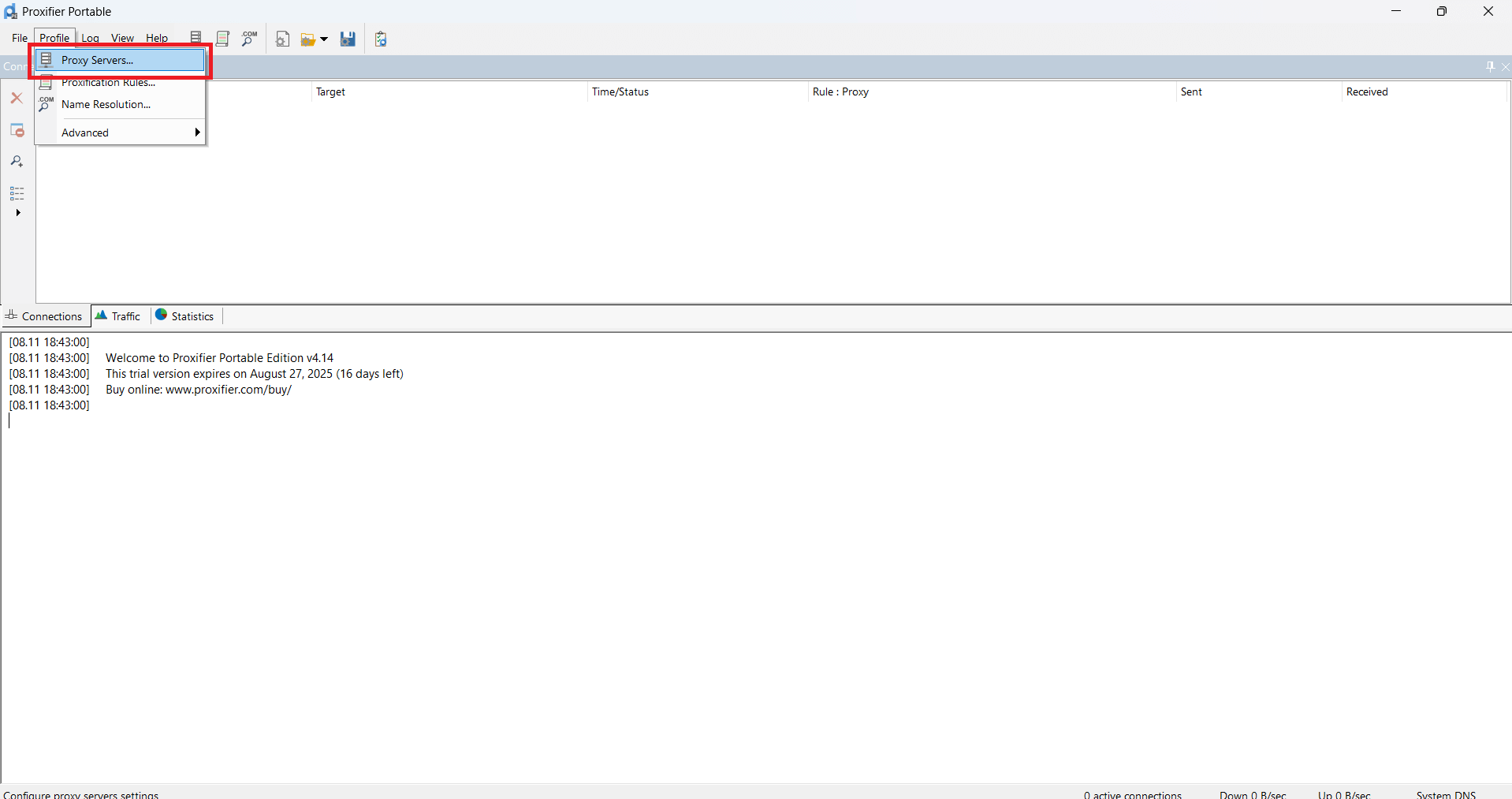
- Then click Add
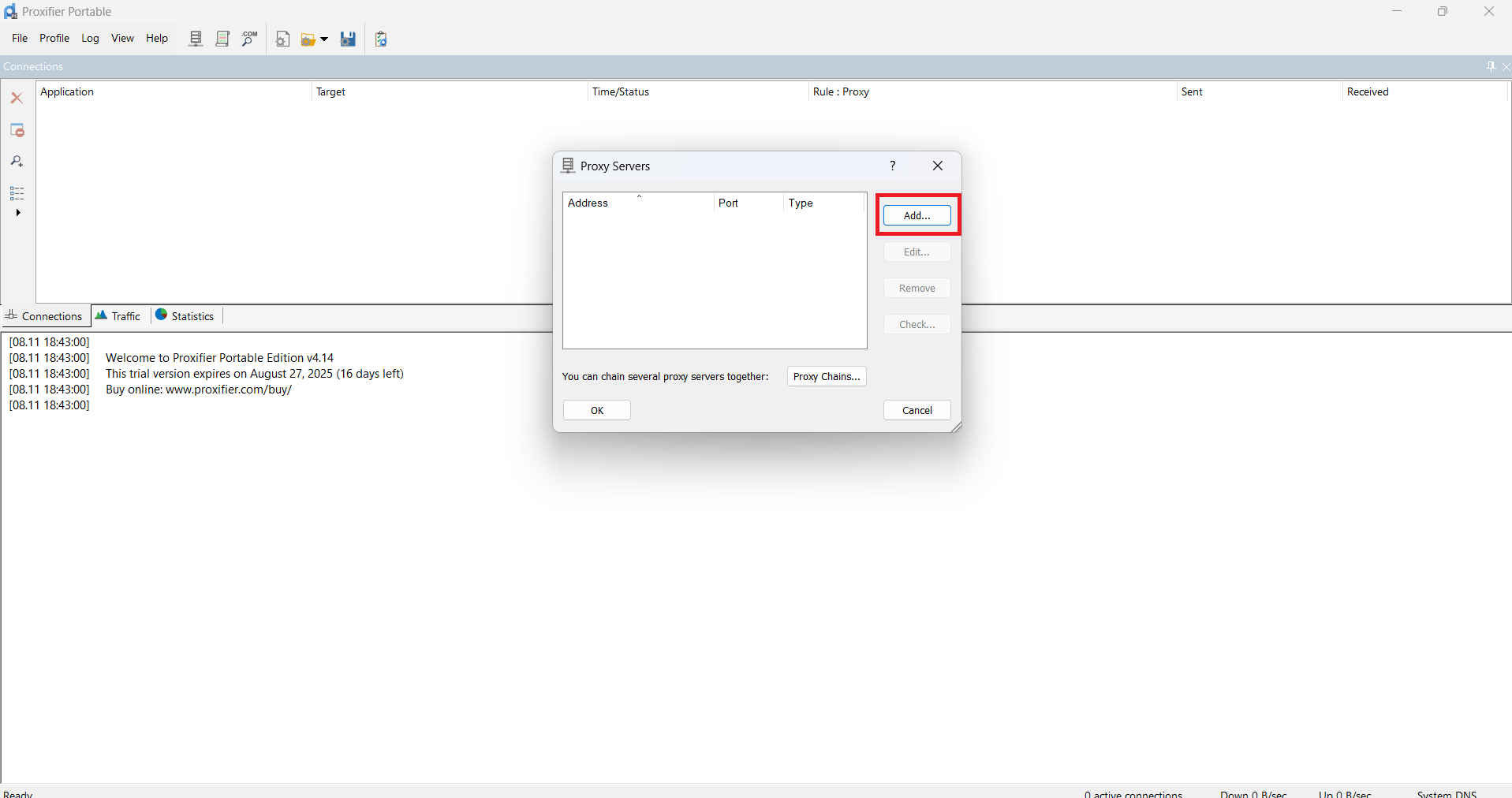
- In the window that appears paste the proxy data you received
For example:
Server/Host: pool.gonzoproxy.com
Port: 1000
Login: Gonzoj9CiIi_c_US_sd_79_city_Ozark_s_87231IXF_ttl_72h
Password: RNW78Fm5
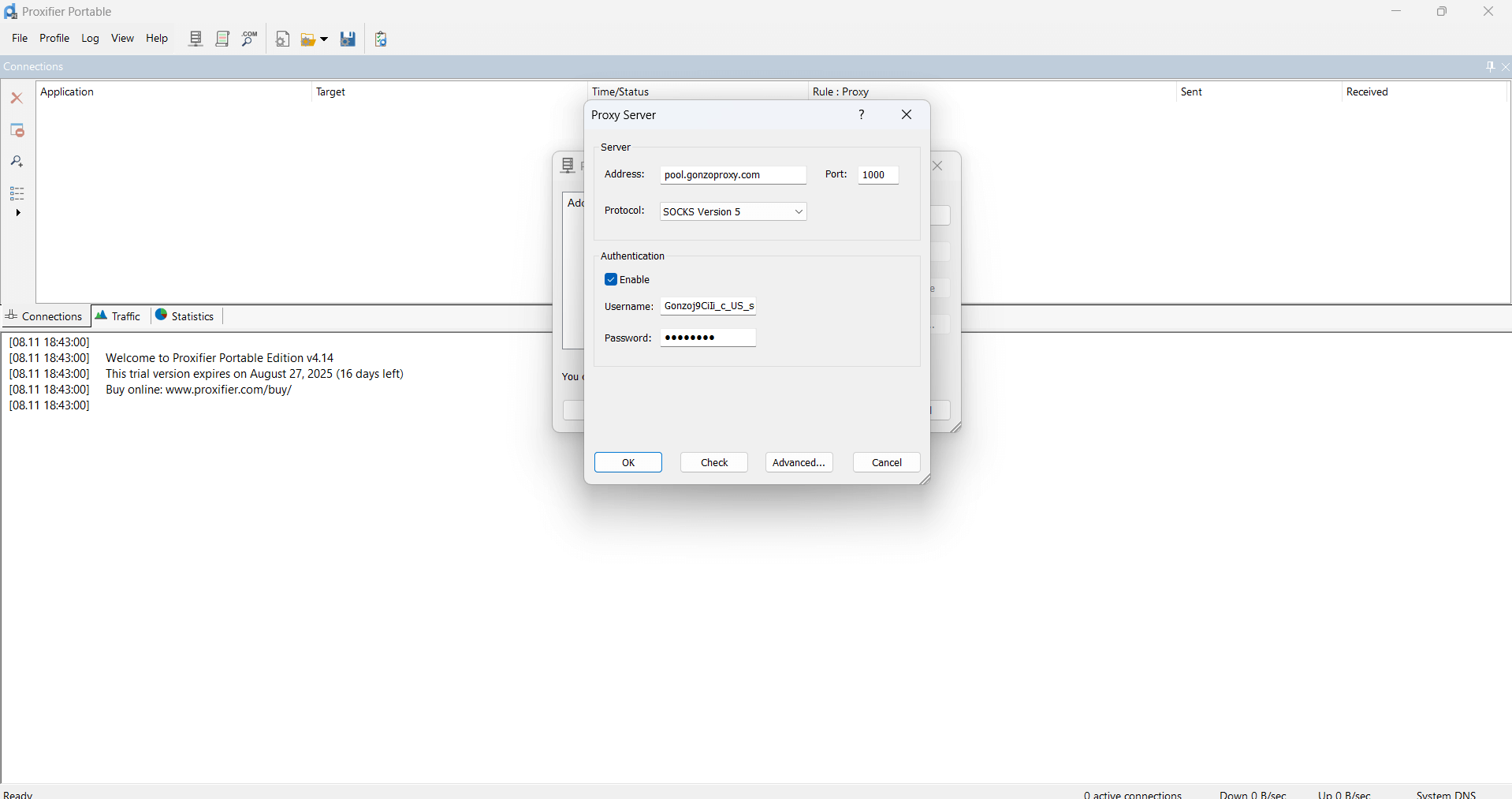
- Click OK
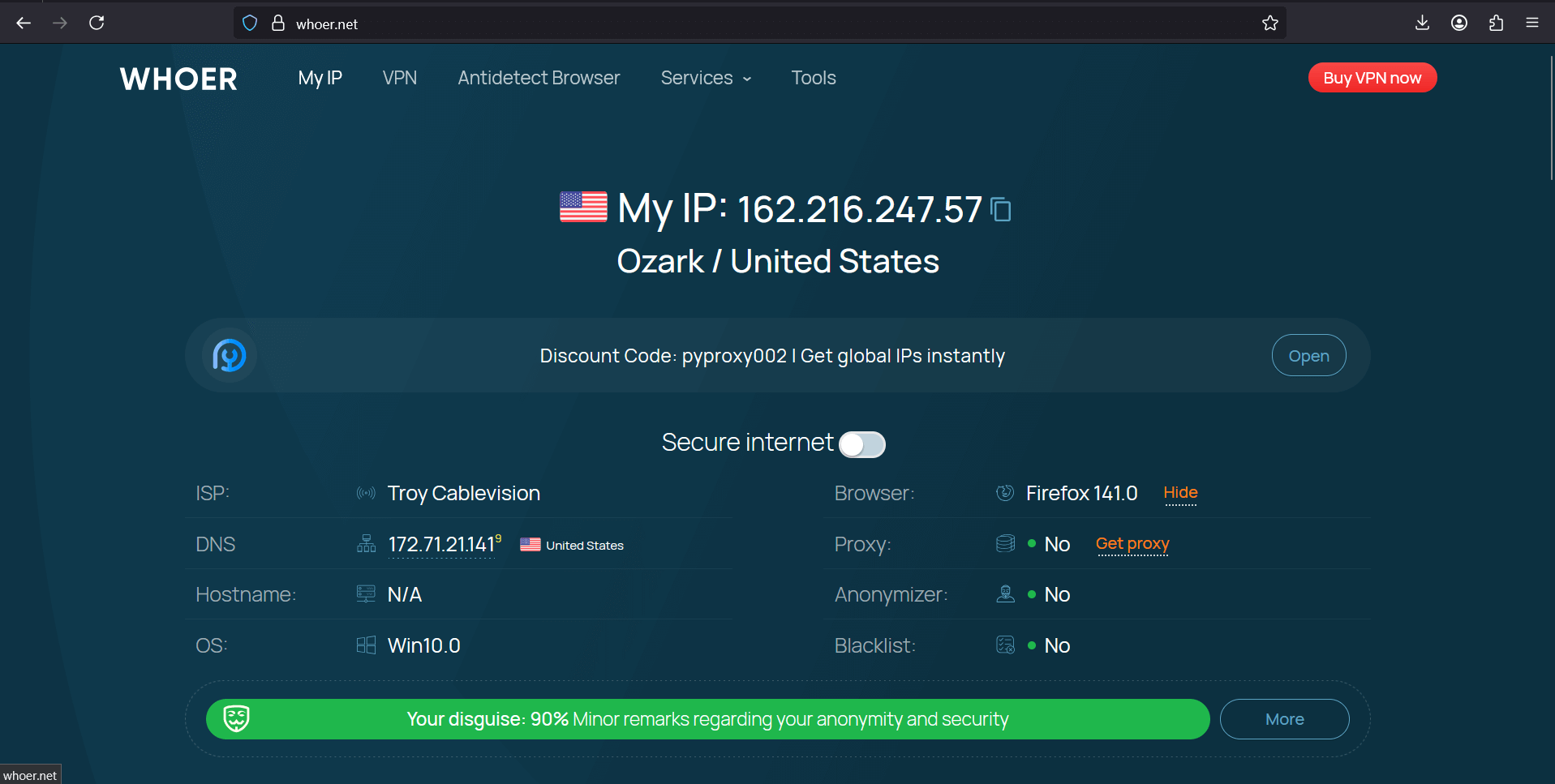
- Go to whoer.net. Everything works!
Save. Restart Discord. Done. Now Discord works through a proxy.
macOS:
Go to System Settings, then "Network". Click on your connection, there's an "Advanced" button. "Proxies" tab. Enable HTTP, HTTPS or SOCKS5. Enter proxy data. Apply.
Discord Web (Browser)
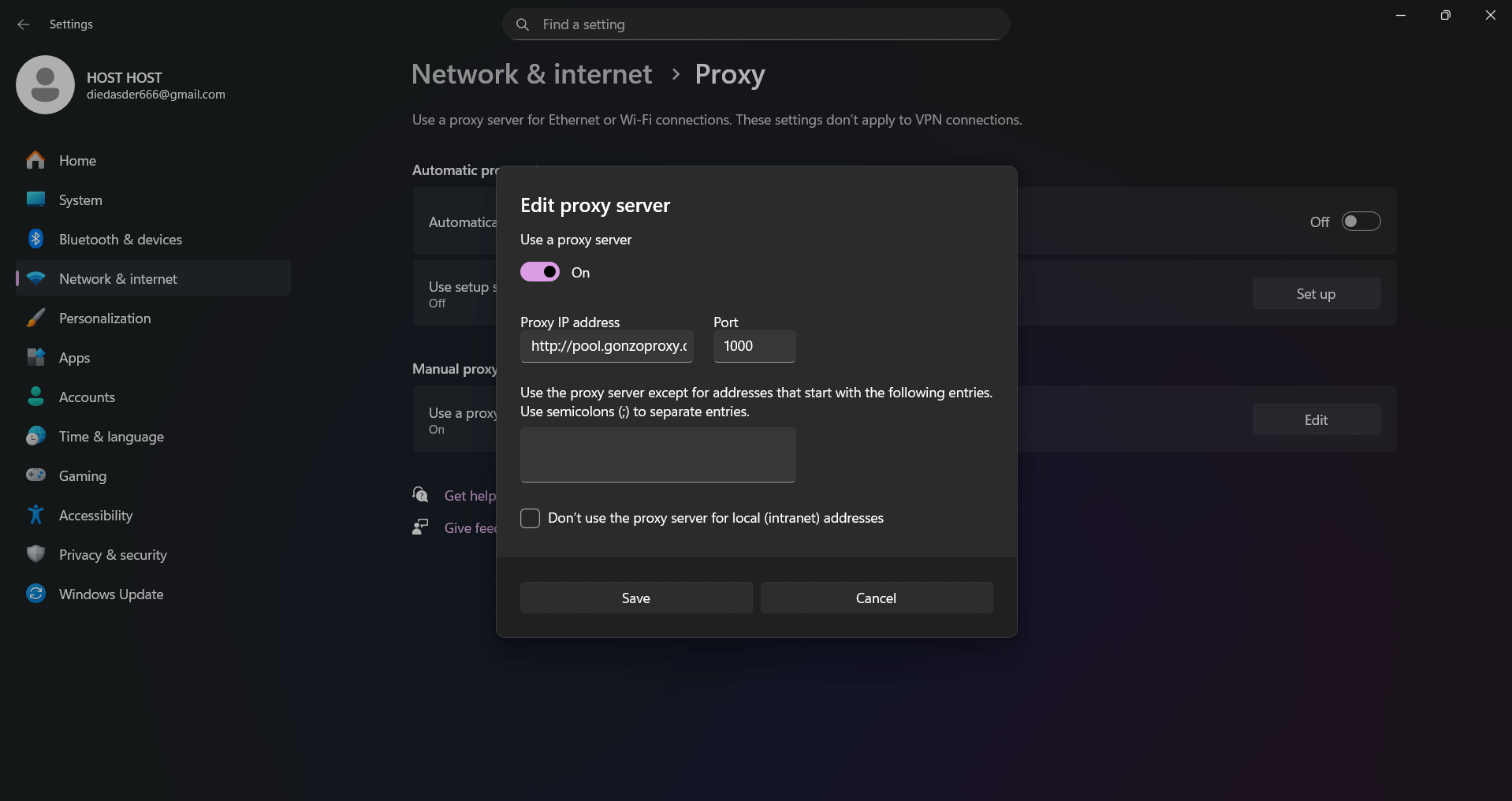
In Chrome open three dots, then Settings, System
- "Proxy server settings". Then it'll take us to system settings.
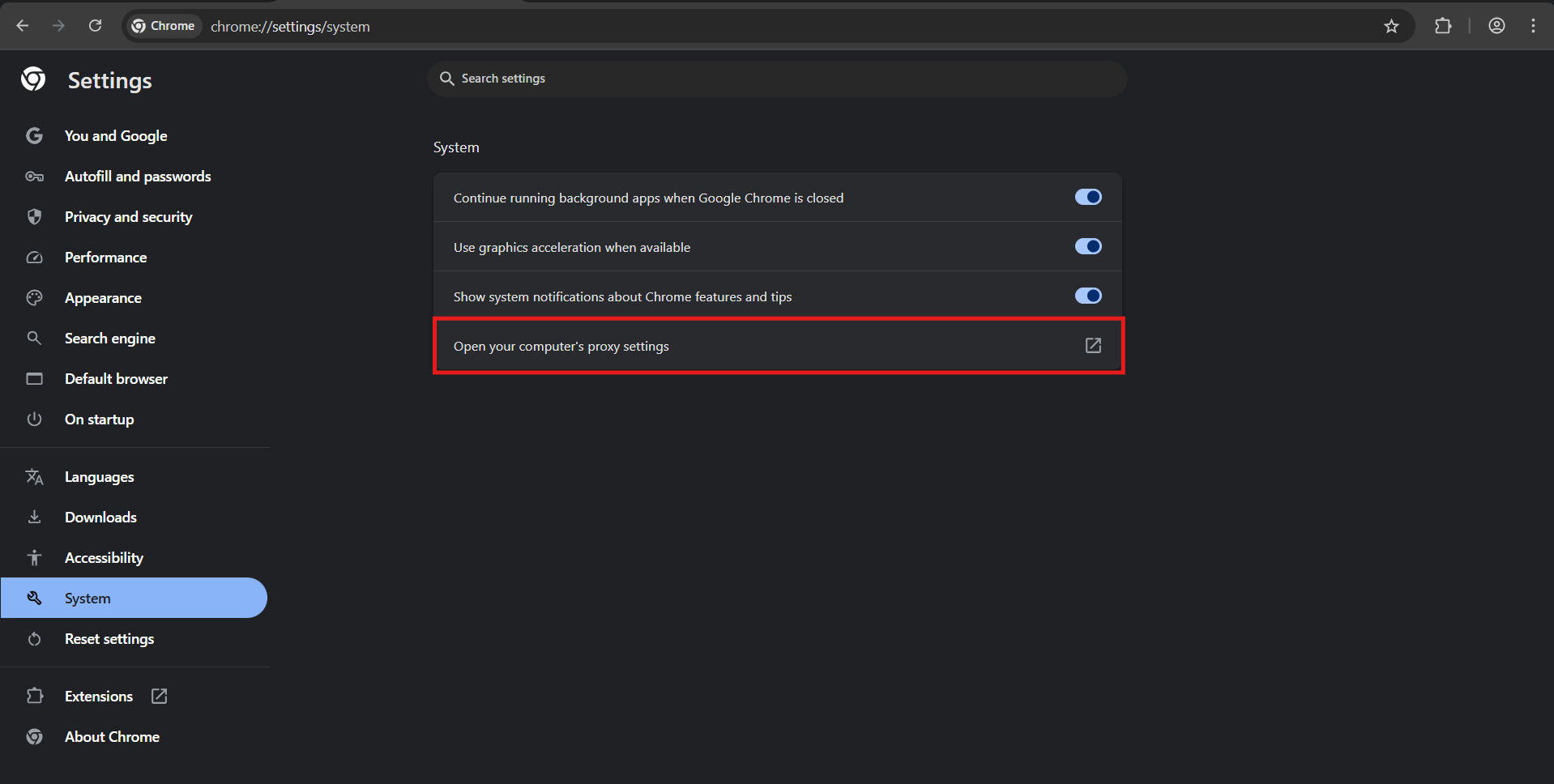
- Turn on toggle "Use proxy server".

- In address field enter IP from GonzoProxy panel and port. Click save.
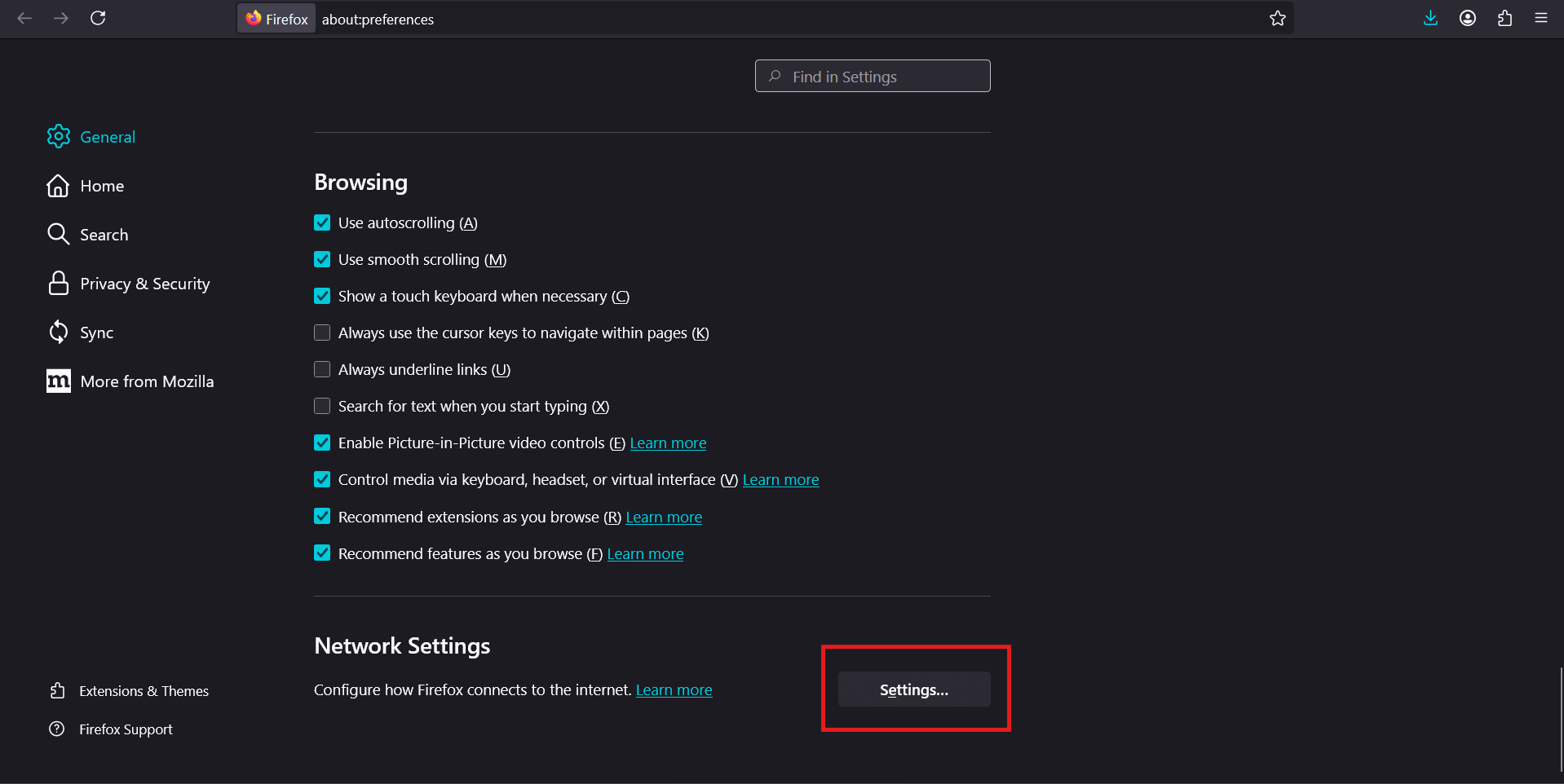
Firefox lives its own life, it has separate proxy settings from system ones.
In Firefox click three lines
- Then Settings, scroll down to "Network Settings" section
- Choose "Manual proxy configuration", enter data
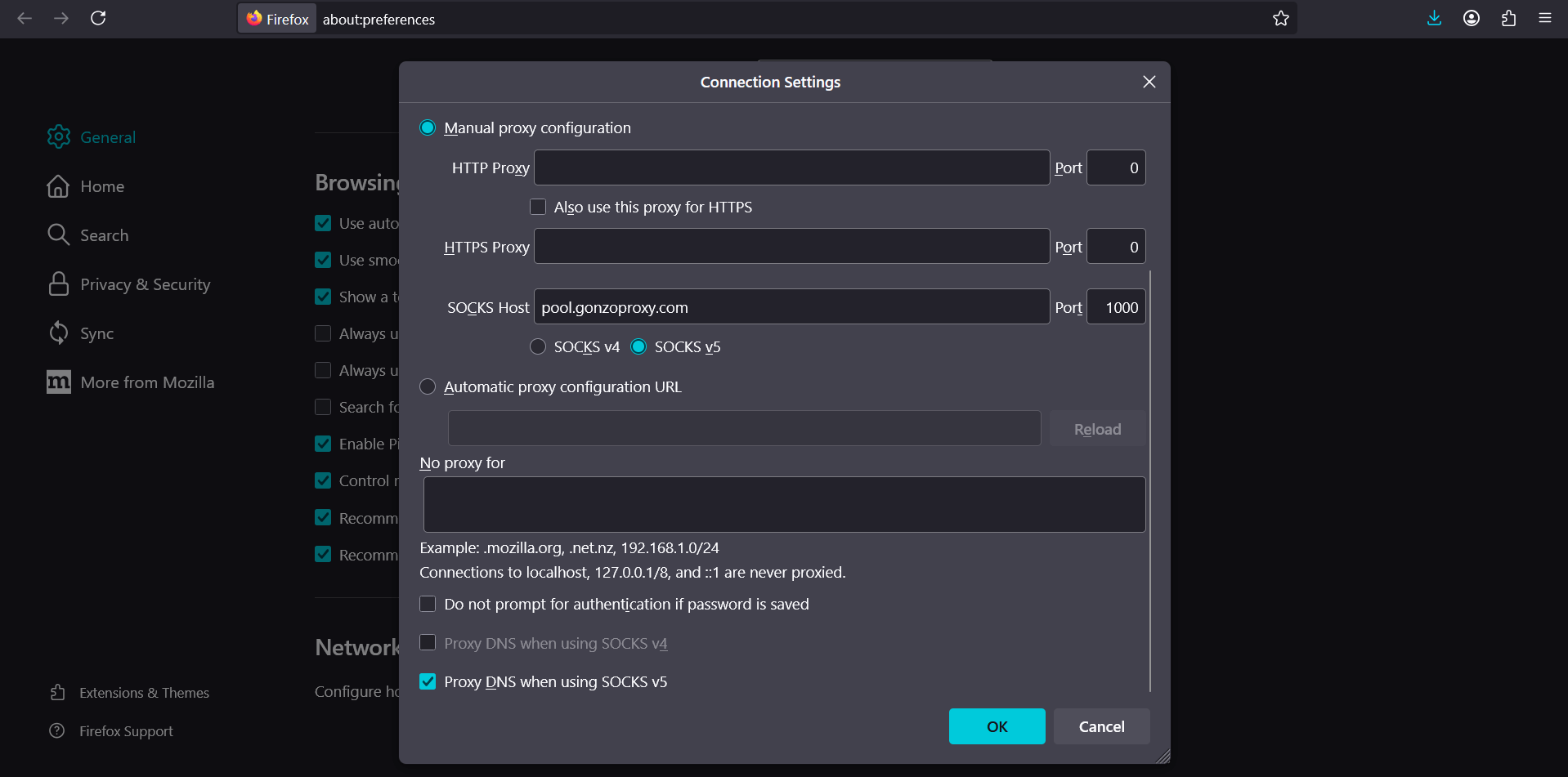
- Open any link in browser, it'll ask for proxy login and password
Method works for simple tasks, but inconvenient. If need to frequently switch between proxies or use several at once, you'll tire yourself out.
Mobile (Android / iPhone)
Android:
On smartphones proxy is set up in a minute right in the system:
- Open phone settings, find Wi-Fi section
- Tap on the arrow in your network name
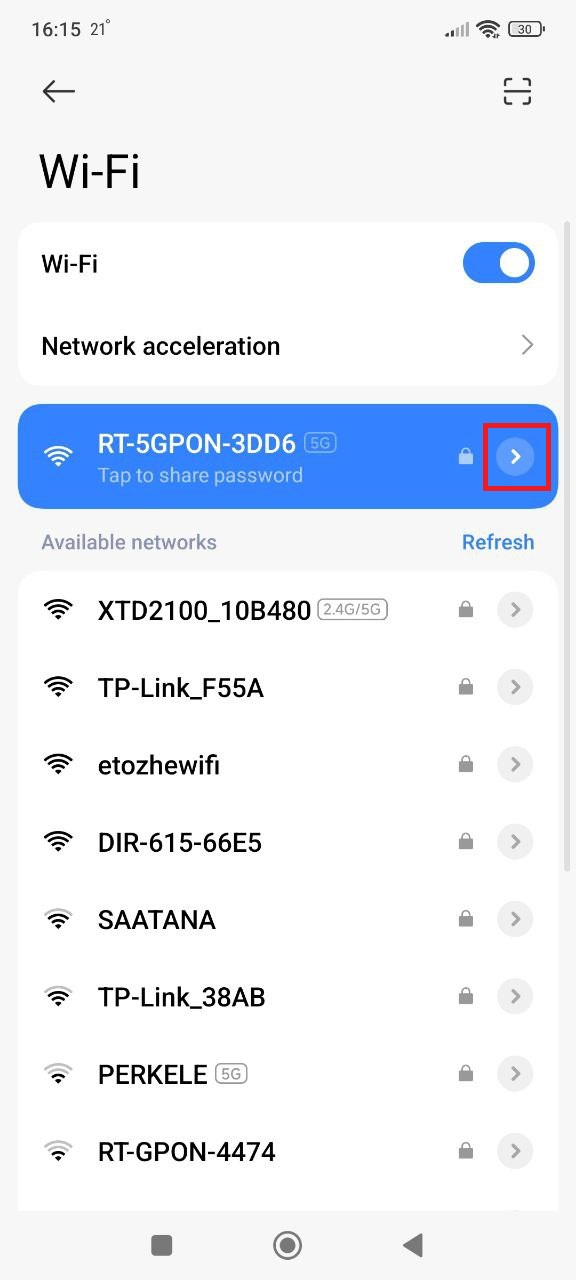
3. Look for proxy and select manual setup
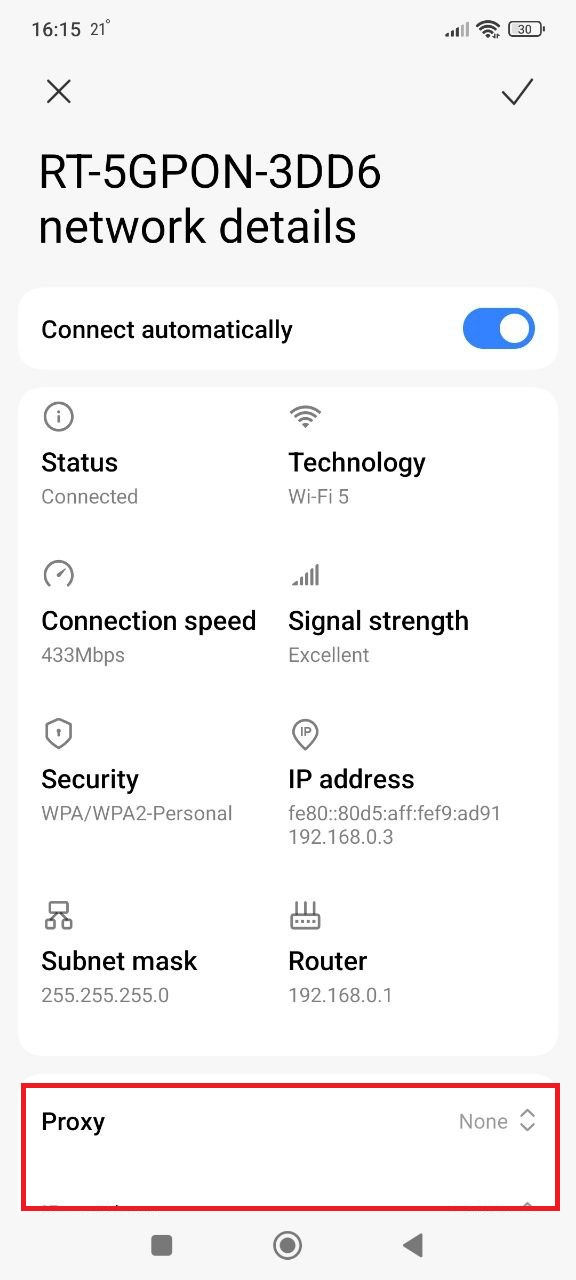
4. Enter proxy data:
For example:
- Server/Host: pool.gonzoproxy.com
- Port: 1000
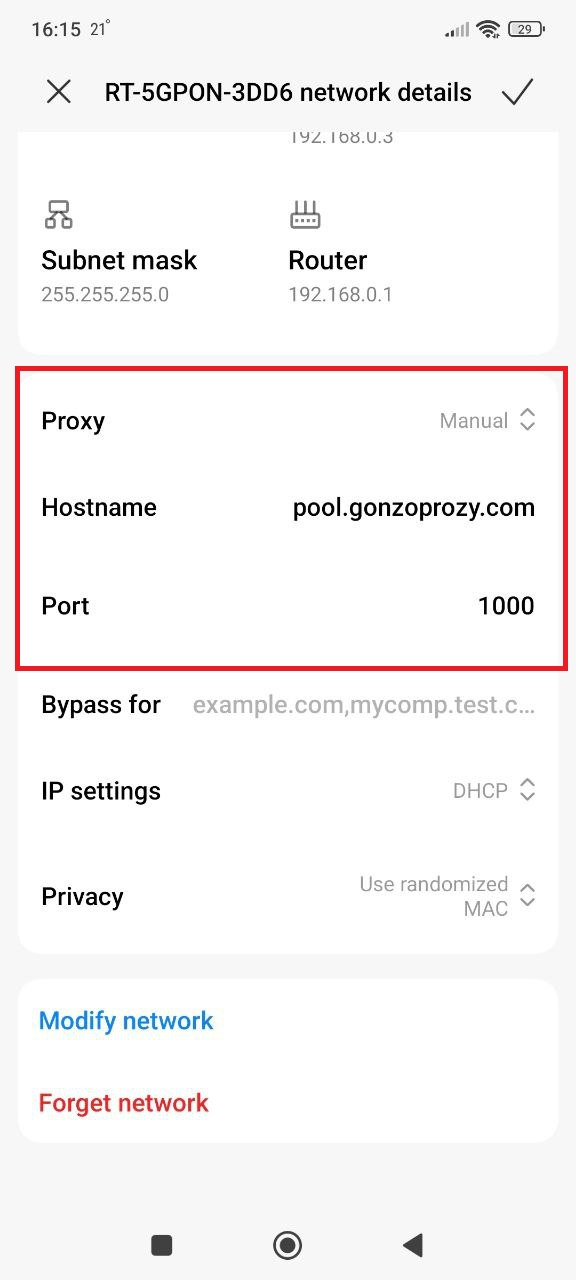
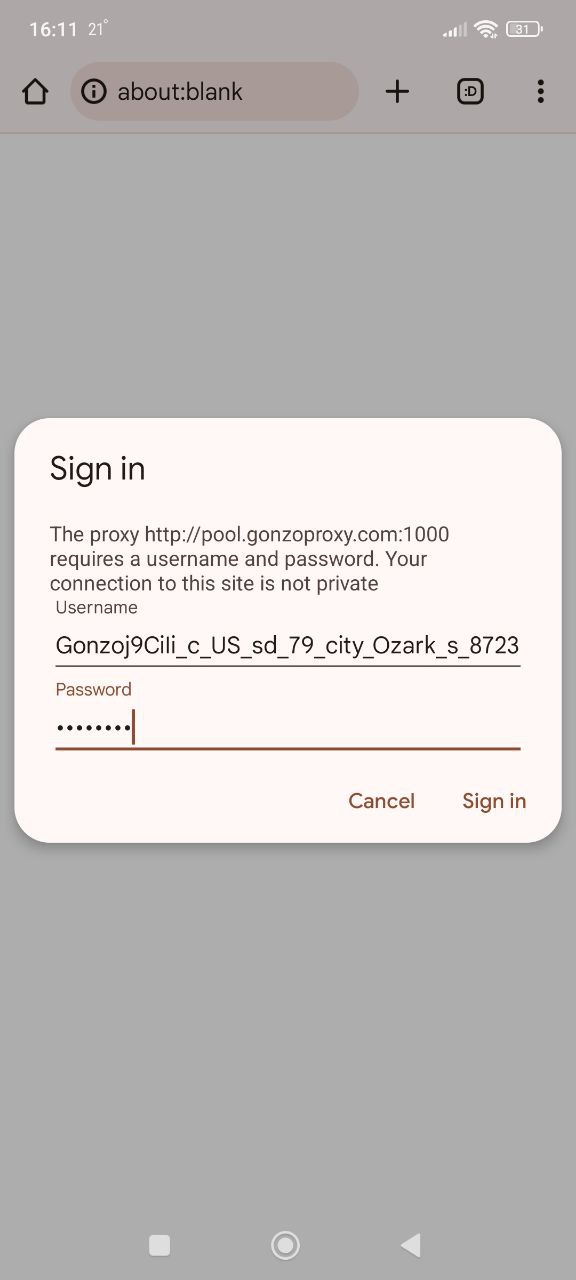
- Launch browser, it'll ask for login and password, enter:
- Login: Gonzoj9CiIi_c_US_sd_79_city_Ozark_s_87231IXF_ttl_72h
- Password: RNW78Fm5
Go to whoer.net. Everything works!
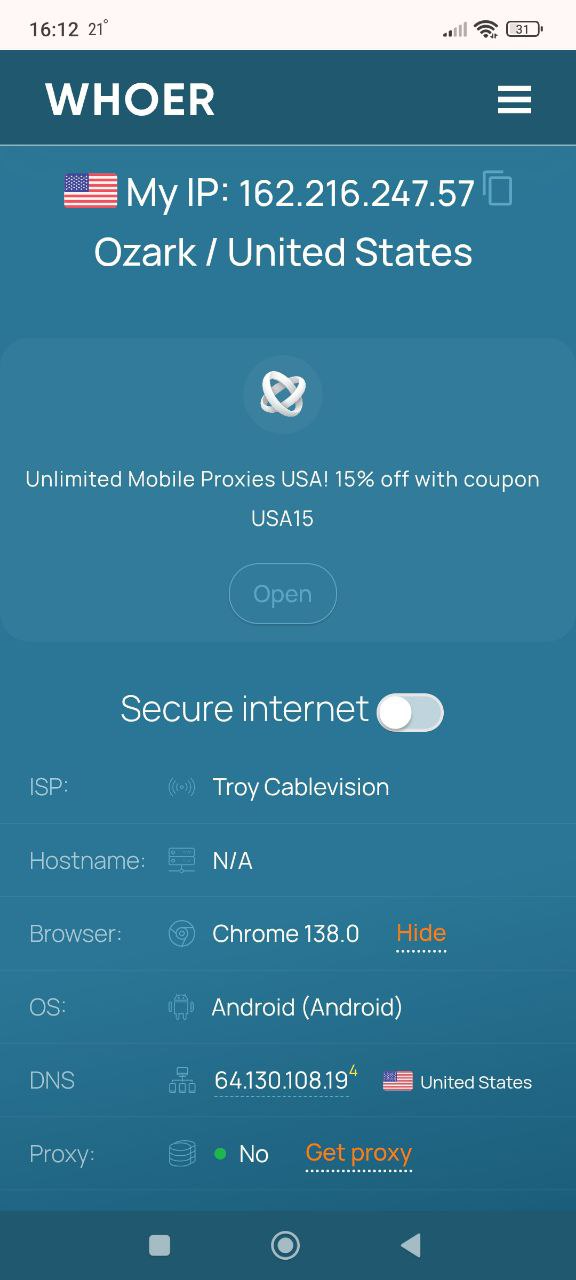
Discord will automatically pick up the proxy.
For detailed Android proxy configuration, see Android proxy setup guides.
iPhone:
-Open Settings, find Wi-Fi section.
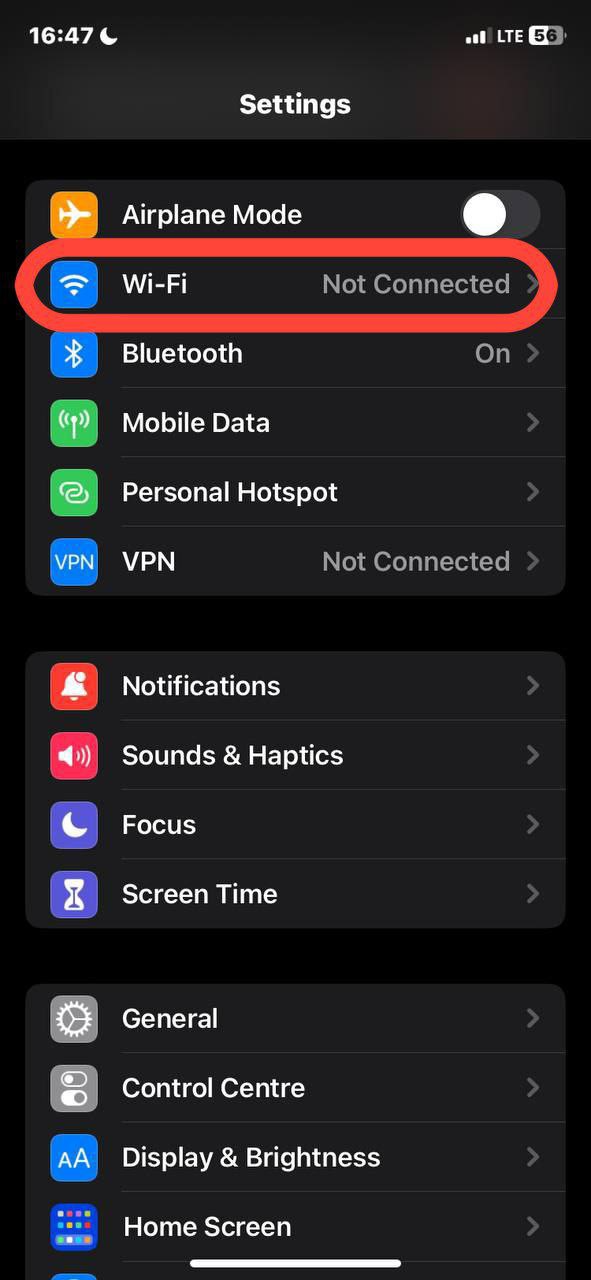
- See your network? Tap the info icon next to the name.

- Scroll down to "Configure Proxy." Change "Off" to "Manual."
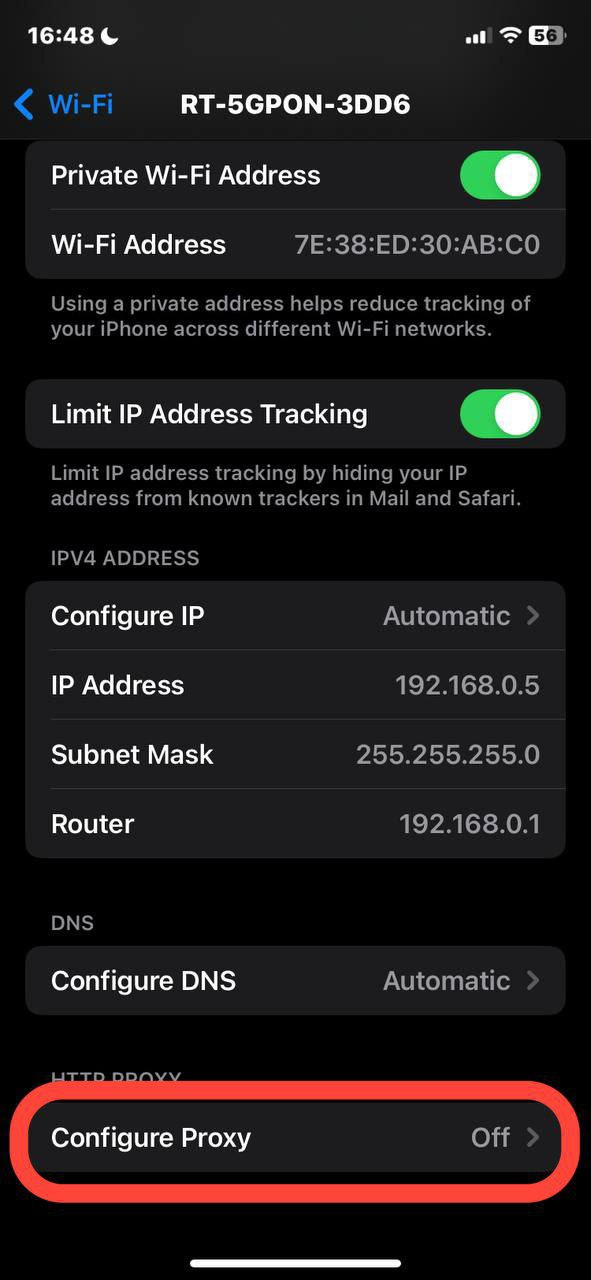
- Enter the data from your provider: server address (looks like numbers 192.168.1.1), port. For paid proxies add login and password.

- Save settings
Go back. Settings save automatically. Restart Discord.
Don't just configure and forget. Proxies fail, IPs get blocked, performance degrades. Regular monitoring catches problems before they cause account bans.
When to replace an IP:
🚨 Replace immediately if:
- Fraud score above 25%
- Discord shows repeated CAPTCHA challenges
- Connection fails intermittently
- Speed drops below 5 Mbps
Don't try to "make it work." Bad proxies waste time and risk account bans.
Community Managers Running Multiple Servers
Problem: Managing 20 Discord servers from one IP looks suspicious. Discord flags you as potential spam bot. Rate limits hit constantly.
Solution: One residential proxy per 3-5 servers. Discord sees normal users managing their communities.
Agencies Managing Discord Bots for Clients
Problem: Discord heavily restricts bot activity from datacenter IPs. Random datacenter proxy? Bot gets banned within days.
Solution: Static residential proxies from ISPs, one per bot. These look like bots running from home office internet.
NFT / Crypto Projects Moderating Global Communities
Problem: Moderators travel frequently. Same account logging in from different countries triggers Discord's fraud detection.
Solution: Each moderator gets assigned proxy in their home region. When traveling, they still connect through home region proxy. Account location stays consistent.
Case Study: Multi-Account Farming Success
Background: Marketing agency managing brand reputation on Discord. Client needed presence on 200+ gaming Discord servers.
Challenge:
- Needed 50 different Discord accounts
- Each account active in 4-8 servers
- Previous attempt with datacenter proxies: 35 accounts banned in 2 weeks
Solution implemented:
- 50 residential proxies from GonzoProxy, different cities/ISPs across US
- Each account assigned one dedicated proxy
- Proxies set to "sticky session" mode (maintain same IP for 7 dayss)
- Staggered account creation over 3 weeks
- Different time zones matched to proxy locations
Results after 6 months:
- Zero account bans
- 47 out of 50 accounts still active
- Successfully maintained presence on 180+ servers
Key factors:
✓ Real residential IPs with clean history
✓ City/ISP level targeting
✓ Sticky sessions prevented constant IP changes
✓ Traffic never expires with GonzoProxy
Match Timezone to Proxy Location
Discord tracks your timezone through browser/system settings. If your proxy shows London but your device reports Moscow time, flags go up immediately.
Fix: Set system timezone to match proxy location manually.
Warm Up New Proxies Gradually
Got fresh proxy? Don't immediately blast 100 messages across 20 servers.
Proper warmup:
- Day 1: Just login, read messages, don't post
- Day 2-3: Light activity, 5-10 messages per day
- Day 4-7: Normal activity, 20-30 messages per day
- Week 2+: Full activity
Never Share Proxies Between Critical Accounts
One proxy, one account. Period. Your friend gets banned using that proxy? Your account gets flagged too.
Use Only Private Residential Proxies
Free proxies or datacenter proxies from sketchy providers = account death sentence. These IPs already have spam history.
GonzoProxy automatically filters problematic IPs. Their system removes addresses with block history before they ever reach you.
Enable 2FA on All Discord Accounts
Even with perfect proxies, enable two-factor authentication. If password somehow leaks, attackers still can't login without your phone.
Monitor Account Health Indicators
⚠️ Warning signs:
- Increased CAPTCHA challenges (more than 1 per day)
- Delayed message sending
- "Suspicious activity" emails from Discord
- Rate limits kicking in faster than usual
See any of these? Check your proxy immediately. Might be time to switch IP.
Testing every proxy type over three years shows residential proxies consistently outperform for Discord specifically.
Real Device History = Real Trust
Residential IPs come from actual home internet users. That IP has been checking Gmail, browsing Reddit, watching YouTube for months. Discord's antifraud system sees natural human behavior patterns.
Low Fraud Scores
Major antifraud systems track every IP's reputation. Residential IPs typically score 0-5% fraud probability. Datacenter IPs? Often 50-90% fraud scores.
Traffic Never Expires with GonzoProxy
Most residential proxy providers use subscription models. Pay $100, get 30 days access, unused traffic disappears at month-end.
GonzoProxy's model: Buy traffic once, use whenever. Buy 10GB today, use 2GB this month, 3GB next month, 5GB three months from now. Zero waste.
For Discord specifically, this matters because traffic usage varies wildly (50MB light days, 5GB stream days).
24/7 Support in Telegram
Email support tickets = waiting hours or days. Discord proxy problems need instant fixes.
GonzoProxy's Telegram support (@gonzoproxy_bot): Real human responses averaging under 5 minutes, 24/7.
UK Company Registration = Accountability
GonzoProxy LTD is officially registered in United Kingdom. Not some anonymous operation that could disappear overnight. Real company means legal accountability and 3+ year track record.
Problem: Discord Shows "Connection Failed" Error
Step-by-step troubleshooting:
- Verify proxy works outside Discord — Open browser, visit ipinfo.io
- Check proxy protocol — Discord works best with SOCKS5 proxies
- Test proxy speed — Visit fast.com, should be 10+ Mbps
- Check authentication — Try credentials in browser first
- Force Discord through proxy — Use Proxifier on Windows
- Clear Discord cache — Delete %AppData%\Discord\Cache folder
- Check firewall — Windows Firewall might block Proxifier
Problem: Extremely Slow Connection Speed
Causes & Solutions:
- Proxy geographically far — Choose proxy close to Discord server location
- Residential proxy owner has slow connection — Request different proxy
- Proxy oversold — Switch to premium provider with guaranteed bandwidth
Problem: Discord Keeps Asking for CAPTCHA
Causes & Solutions:
- Proxy IP has bad reputation — Check scamalytics.com, get different IP
- Rapid account switching — Use antidetect browser with dedicated proxies
- Inconsistent timezone/location — Set system timezone to match proxy
- Datacenter IP detected — Switch to residential proxy
Problem: Account Locked for "Suspicious Activity"
Causes & Solutions:
- Location jumped countries too fast — Don't change proxy locations rapidly
- Multiple accounts using same proxy — One account per proxy, ALWAYS
- Proxy IP previously banned — Check abuseipdb.com before using
Recovery steps:
- Wait 12-24 hours
- Login from your actual home IP (not proxy) to verify
- After verification, can gradually resume using proxy
- Use different proxy IP than one that caused lock
FAQ


Discord proxy success comes down to three pillars: proper proxy selection, correct configuration, and consistent security practices.
The GonzoProxy advantage for Discord:
Testing every major proxy provider shows GonzoProxy consistently delivers what Discord users actually need:
✓ Real residential IPs from 20M+ real devices
✓ Traffic never expires (unique in the industry)
✓ City and ISP-level targeting without premium fees
✓ 99.6% uptime with ISO certification
✓ 24/7 Telegram support responding in minutes
✓ UK registered company (GonzoProxy LTD)
✓ 90% clean IP rate specifically for Discord
Special offer: Use promo code START15 for 15% off your first traffic purchase at GonzoProxy.
Whether you're managing one critical account or 100 client communities, proper proxy infrastructure protects your Discord presence from blocks, bans, and compromises.
Ready to secure your Discord setup?
Visit GonzoProxy → Sign up (30 seconds, no KYC) → Purchase traffic → Get credentials → Use code START15 for discount
Questions? Their Telegram support (@gonzoproxy_bot) responds in minutes.
Stay connected. Stay secure. Keep building your communities.